|
VOOZH | about |
|
VOOZH | about |
Deploying an AI model into production marks the beginning of its operational lifecycle, not the end of development. To ensure that a model continues to deliver accurate, efficient and reliable results under real-world conditions, it must be continuously monitored and appropriately scaled.
Monitoring plays a crucial role in maintaining model reliability and trustworthiness. Over time, models can experience data drift, concept drift or performance degradation due to changing inputs or usage conditions. Regular monitoring ensures these issues are detected early and addressed proactively.
Scaling ensures that deployed models can efficiently manage increasing workloads without compromising latency or accuracy. As usage demands fluctuate, scaling mechanisms optimize both performance and cost-efficiency by allocating resources dynamically.
Types of Scaling:
Let's see an example to understand how monitoring and scaling a model works using FastAPI, aiohttp and matplotlib. It simulates a real-world scenario of deploying, monitoring and scaling an AI model under variable workloads.
We start by training a RandomForestClassifier and serving it via FastAPI. The model is saved using joblib and exposed via a /predict endpoint.
Output:
FastAPI model server started at http://127.0.0.1:8000/predict
Note: This approach is only for demonstration/testing. In production, use proper deployment (e.g., Uvicorn/Gunicorn separately).
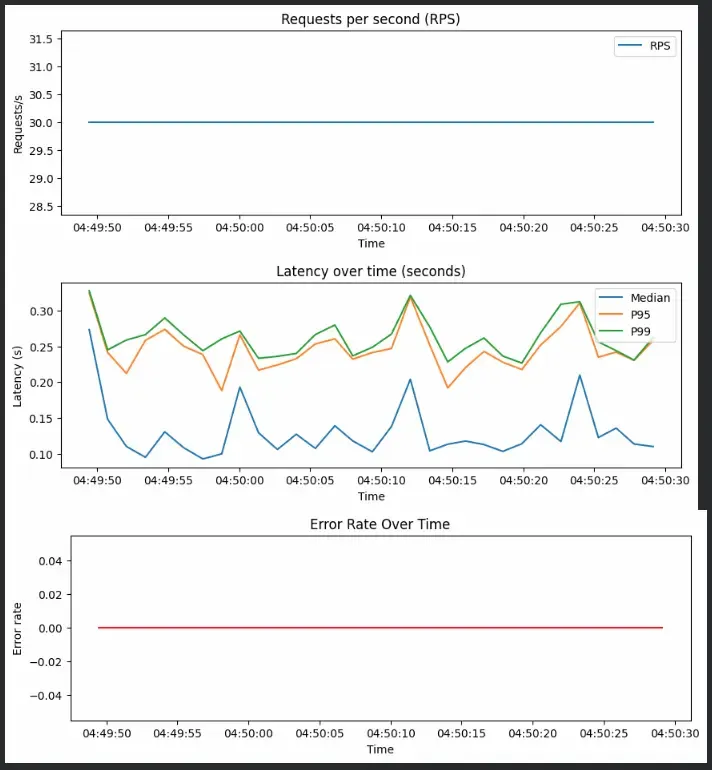
Next, we simulate a 40-second workload sending 30 requests per second. Each request randomly simulates light, medium or heavy computation to test model performance under different loads.
Output:
Once the load test is done, we visualize metrics for RPS, latency and error rate
Output:
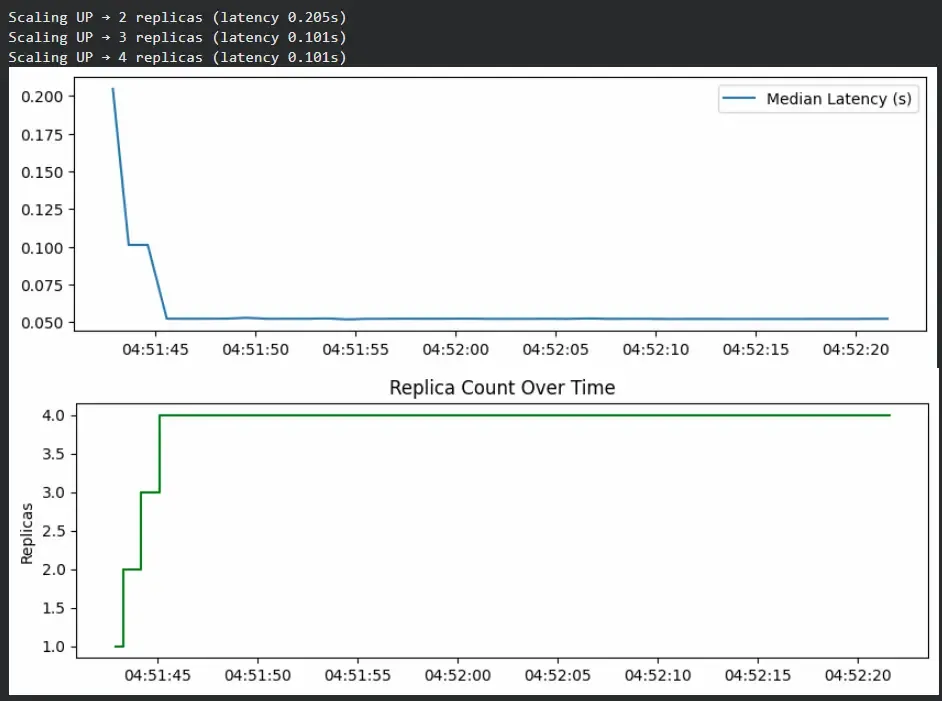
To demonstrate scaling behavior, we simulate a system that automatically increases or decreases replicas based on latency.
Output:
Let's see some tools that are often used to handle monitoring and scaling.
| Tool | Purpose | Description |
|---|---|---|
| Prometheus | Monitoring | Collects and stores real-time metrics such as latency, RPS and CPU usage. |
| Grafana | Visualization | Builds dashboards to visualize metrics and alert on anomalies. |
| Kubernetes HPA (Horizontal Pod Autoscaler) | Autoscaling | Dynamically adjusts the number of model pods based on CPU, GPU or custom metrics. |
| Ray Serve / BentoML | Model Serving | Manages scalable deployment and load balancing for ML models. |
| ELK Stack (Elasticsearch, Logstash, Kibana) | Logging | Aggregates and visualizes logs for troubleshooting and trend analysis. |