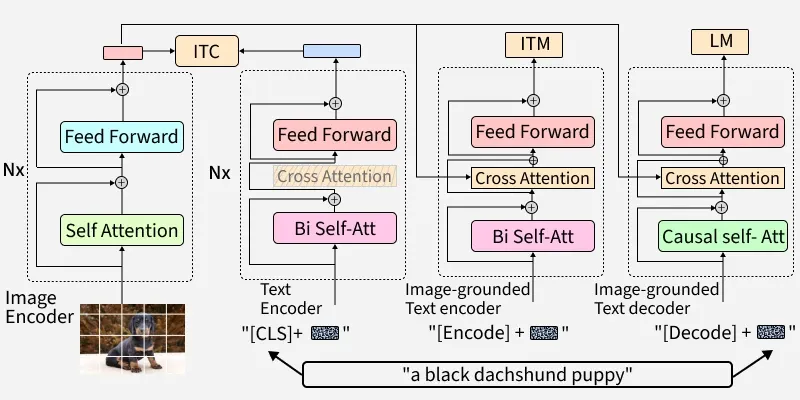
BLIP (Bootstrapping Language-Image Pre-training) is an advanced multimodal model from Hugging Face, designed to merge Natural Language Processing (NLP) and Computer Vision (CV). By pre-training on millions of image-text pairs, BLIP excels at image captioning, visual question answering (VQA), cross-modal retrieval and more. Its architecture uses transformer-based components that allow effective interactions between text and images, making it valuable for researchers and developers in the AI space.
Architecture of BLIP
BLIP’s core structure is a multimodal encoder-decoder setup made for both understanding and generation tasks:
Unimodal Encoder: Separately encodes images and text.
Image-grounded Text Encoder: Integrates visual context into text encoding using cross-attention layers.
Image-grounded Text Decoder: Generates text from images with causal self-attention mechanisms.
BLIP uses three main objectives during pre-training:
Image-Text Contrastive Loss (ITC): Aligns visual and textual feature spaces, promoting similarity between matching image-text pairs while distinguishing negatives.
Image-Text Matching Loss (ITM): Encourages detailed multimodal representation with a classification task, determining if a text matches an image.
Language Modeling Loss (LM): Trains the model to generate plausible text from images using an autoregressive approach.
Step-by-Step Implementation
Step 1: Install and Import Required Libraries
We will import all the necessary libraries,
torch: Deep learning framework backing most Hugging Face models.
transformers: Provides easy access to BLIP and other state-of-the-art models.
numpy: For efficient numerical operations (sometimes used for data formatting).
pillow: For image loading and manipulation in Python.
2. Download BLIP Model
We will load the pretrained BLIP model,
BlipProcessor: Handles preprocessing of images/text and postprocessing model output.
BlipForConditionalGeneration: The BLIP model itself for image captioning.
from_pretrained: Fetches a ready-to-use model and processor from the Hugging Face Hub.
Load and format the image and text data that we intend to use with the model,
Image.open: Loads an image into memory so it can be processed (required for the model).
requests.get(url, stream=True).raw: Downloads the image directly from a URL.
4. Run the Model and Fetch Result
Use the processor to prepare the inputs and run inference with the model,
processor(images=image, return_tensors="pt"): Converts the image into a format (PyTorch tensor) suitable for model input.
model.generate(**inputs): Runs the model to produce a caption for the image.
processor.decode(output, skip_special_tokens=True): Converts the model’s output tensor into a human-readable string, skipping any unused special tokens.
Output:
Generated Caption: a small dog running through the grass
Comparison of BLIP with other Models
Let's see the comparison of BLIP with various other models such as CLIP, DALL-E and ViT,
Aspect
BLIP
CLIP
DALL-E
ViT
Primary Role
Image captioning, VQA, matches image & text
Matches images with text, search & tagging
Creates images from text description
Image classification, AI model building block
Architecture
Image & language transformers (multimodal)
Separate image and text encoders, compared
Large text-to-image transformer decoder
Splits image into patches, processes as tokens
Training Approach
Contrastive + captioning on big datasets
Contrastive learning on huge image-text pairs
Learns to “draw” based on text prompts
Trained on large datasets, scales extremely well
Adaptability
Easy to fine-tune for many tasks
Handles zero-shot tasks well
Best for image generation
Widely used as model backbone
Strengths
Excels at both describing and understanding images
Robust for matching images and text
Makes creative, highly detailed images
High accuracy for image recognition tasks
Applications of BLIP
Visual Question Answering (VQA): BLIP can be used to answer questions about the content of images, which is useful in educational tools, customer support and interactive systems where users can inquire about visual elements.
Image Captioning: The model can generate descriptive captions for images, which is beneficial for accessibility, allowing visually impaired users to understand image content. It also aids in content creation for social media and marketing.
Automated Content Moderation: By understanding the context of images and accompanying text, BLIP can help identify and filter inappropriate content on platforms, ensuring compliance with content guidelines and enhancing user experience.
E-commerce and Retail: BLIP can enhance product discovery and recommendation systems by understanding product images in context with user reviews or descriptions, improving the accuracy of recommendations.
Healthcare: In medical imaging, BLIP can assist by providing preliminary diagnoses or descriptions of medical images, aiding doctors in interpreting X-rays, MRIs and other diagnostic images more efficiently.
Advantages
Multimodal Strength: Handles both images and text together, delivering rich, context-aware results.
Versatility: Adaptable for various tasks, captioning, answering questions, moderation and more.
Performance: Sets a high standard for accuracy in generating and understanding content across modalities.
Open Source: Easily accessible models and code for customization.
Limitations
Data Quality: Needs diverse and unbiased data to avoid mistakes and bias.
Training Demands: High computing power is required for best results.
Accuracy: Can miss details in very complex or unusual images.
Scalability: Large models may be slower and require work to use for new problems.