|
VOOZH | about |
|
VOOZH | about |
Bulma is an Open source CSS framework which is developed by Jeremy Thomas. This framework is basically based on the CSS Flexbox property. It is highly responsive and it helps in minimizing the use of media queries for responsive behaviour.
In this article, we’ll learn about Bulma Functions. The Bulma Functions provide custom Sass functions and a few utility functions that help users to find the related colors dynamically and to calculate the useful values.
1. The Bulma Functions to find the related colors dynamically:
2. The Bulma Functions to calculate the useful value:
Setup: After Bulma's initial setup, do the following:
Step 1: Create a package.json file for your project.
Command: npm init
The package.json will be created.
{
 "name": "test",
 "version": "1.0.0",
 "description": "",
 "main": "index.js",
 "scripts": {
 "test": "echo \"Error: no test specified\" && exit 1"
 },
 "author": "",
 "license": "ISC"
}
Step 2: Now install dev dependencies
Command1: npm install node-sass --save-dev
Command2: npm install bulma --save-dev
Step 3: Now create a customized sass file - gfgstyles.scss.
@charset "utf-8";
// path to bulma.sass can be find from
// node_modules/bulma install from Step 2
@import "/path/to/bulma/bulma.sass";
Now Update the package.json file with the following:
"main": "/path/to/gfgstyles.scss",
"scripts": {
"css-build": "node-sass --omit-source-map-url /path/to/gfgstyles.scss css/gfgstyles.css",
"css-watch": "npm run css-build -- --watch",
"start": "npm run css-watch"
}
Step 4: Run the below command to generate css/gfgstyles.css from sass/gfgstyles.scss which can be used in HTML CSS styling.
npm run css-build
Note: Each and every time when gfgstyles.scss is modified, you need to run Step 4.
Example 1: The following code demonstrates a function to find the related colors dynamically - findColorInvert() function.
Output: Using built-in findColorInvert() function usage
Now update the gfgstyles.scss with the following:
@charset "utf-8";

// Update Bulma's global invert variables
$info-invert: findColorInvert(light);
$success-invert: findColorInvert(light);
$warning-invert: findColorInvert(light);
$danger-invert: findColorInvert(light);
$light-invert: findColorInvert(light);
$dark-invert: findColorInvert(light);

@import "../node_modules/bulma/bulma.sass";
and run the below command:
npm run css-build
Then Re-run the HTML code. The text color in the button changes from #fff to rgba(#000, 0.7).
Output: After the changes
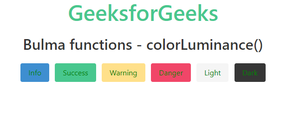
Example 2: The following code demonstrates a function to calculate the useful value - colorLuminance() function.
Output: Using built-in function usage
Now update the gfgstyles.scss with the following:
@charset "utf-8";
@import "../node_modules/bulma/sass/utilities/functions.sass";

// Update Bulma function
@function findColor($color) {
 @if (colorLuminance($color) < 0.55) {
 @return purple;
 }
 @else {
 @return green;
 }
}

$info-invert: findColor(info);
$success-invert: findColor(success);
$warning-invert: findColor(warning);
$danger-invert: findColor(danger);
$light-invert: findColor(light);
$dark-invert: findColor(dark);

@import "../node_modules/bulma/bulma.sass";
and run the below command:
npm run css-build
Then Re-run the HTML code. The text color in the button changes to green or purple depend on the luminance of the color.
Output: After the changes
Reference: https://bulma.io/documentation/utilities/functions/