|
VOOZH | about |
|
VOOZH | about |
Cascading in CSS refers to the process by which the browser determines which style rules to apply when multiple rules target the same element. The term "cascading" highlights how CSS applies a hierarchy of rules, where certain rules take precedence over others based on defined principles.
For Example,
Output:
In this example, the inline style color: red; will override the internal style color: blue; because inline styles take priority in the CSS cascade.
CSS rules can come from multiple sources: user-defined styles, browser default styles, and custom styles from a website. The cascading process determines which of these styles is applied when they conflict.
Here's how it works?
Here’s a simplified breakdown of the cascading order from highest priority to lowest priority:
!important > Inline CSS > Internal CSS > External CSS > Brower/User Styles
Output
In this example, we can see even afterinline CSS and internal CSS, the external CSS having !important overrides all the styles.
CSS specificity plays a huge role in the cascade. It is a measure of how specific a selector is, and it helps determine which rule applies when multiple rules match the same element.
CSS specificity is calculated using a point system based on the types of selectors used in a rule:
/* Less specific */
div {
 color: blue;
}

/* More specific */
#header {
 color: green;
}

/* Most specific */
#header .title {
 color: red;
}
In this case, if an element matches all three selectors, the style color: red; will be applied because it has the highest specificity.
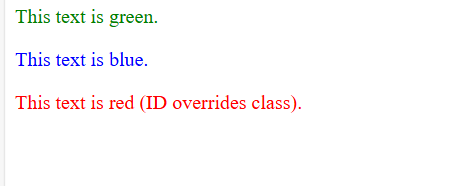
Rule overriding in CSS happens when more than one style is applied to the same element, and one style wins over the other. The most specific style or the one that comes last in the code usually gets applied.
Output:
<p> is styled by the tag selector, so it's green.<p> has a class special, which overrides the tag selector, making it blue.<p> has both a class special and an ID unique. The ID rule is more specific, so it’s red.