|
VOOZH | about |
|
VOOZH | about |
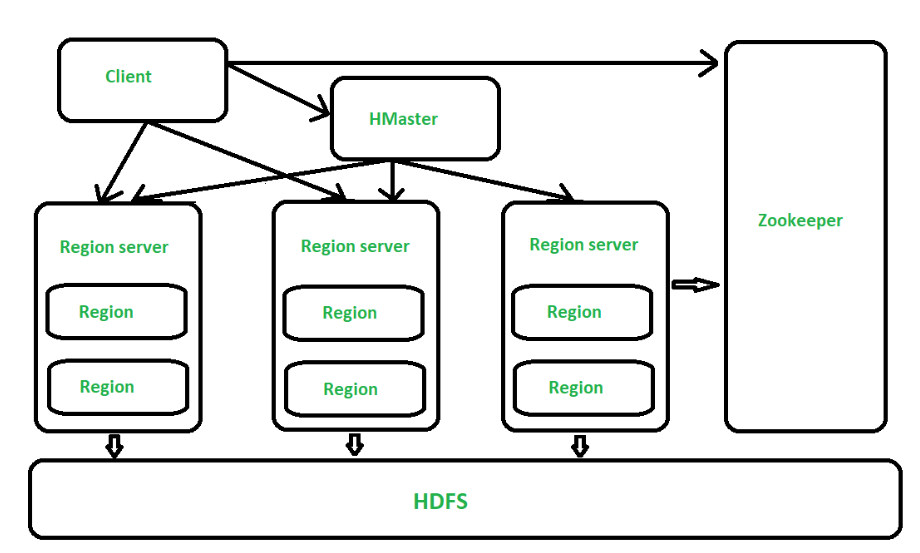
HBase is a distributed, scalable, NoSQL database built on top of Hadoop. It is designed to store huge amounts of structured or semi-structured data and provide fast, random read/write access. To achieve this, HBase relies on three main components in its architecture: HMaster, Region Server, and ZooKeeper.
The HMaster acts as the main coordinator of the HBase cluster.
Think of it as the manager that oversees how data is distributed and how the cluster functions.
In large clusters, multiple backup HMasters run to ensure high availability.
HBase tables are very large, so they are divided horizontally into smaller parts called Regions. A Region Server is responsible for managing these regions.
Each region is around 256 MB by default, and new regions are automatically created as the table grows.
ZooKeeper works like a traffic controller for the HBase cluster.
Without ZooKeeper, coordination between HMaster, Region Servers, and clients would not be possible.
Flow: Client → Region Server → WAL → MemStore → HFile
When you write data to HBase, here’s what actually happens:
Just like sending a message to a server saying, “Please save this data.”
WAL is like a safety notebook.
Before HBase stores data in memory, it writes a copy to WAL so that nothing gets lost if the server crashes.
Think of WAL as saving a draft before writing the final version.
This is a temporary holding area in RAM.
MemStore collects recent writes, making the system very fast because writing to memory is much quicker than writing to disk.
Once the MemStore reaches a certain size, HBase saves its content permanently to disk as an HFile in HDFS.
This is like moving items from your desk (fast access) into a file cabinet (permanent storage).
Over time, many small HFiles get created.
HBase merges these smaller files into larger ones, which:
This process is called compaction.
Flow: Client → Region Server → BlockCache → MemStore → HFile
When a client wants to read data, HBase tries to return the answer as fast as possible.
ZooKeeper tells the client which Region Server holds the data it needs.
This avoids confusion and saves time.
BlockCache is like the recently used memory (similar to how your phone keeps recently used apps active).
If the requested data is here → instant answer.
MemStore may still have some recent writes that were not flushed to HDFS yet.
If the data is not found in cache or MemStore, the Region Server reads it from the actual HFiles stored in HDFS.
This is the slowest option, but still efficient.
Because most of the time:
So HBase often returns results without touching the disk.
| Feature | HBase | HDFS |
|---|---|---|
| Access Pattern | Low-latency reads/writes | High-latency, batch processing |
| Data Access | Random read/write | Write once, read many |
| APIs | Shell, Java, REST, Thrift, Avro | Mostly MapReduce |
| Use Case | Real-time data | Large file storage & batch jobs |
HBase can grow across hundreds or thousands of machines, allowing it to store enormous datasets.
Data is stored in column families, making read/write operations faster for specific columns.
Built on HDFS and works seamlessly with MapReduce and other Hadoop tools.
Every read or write operation is consistent across the cluster.
Frequently accessed data is cached in memory for faster performance.
Reduces storage usage and speeds up data retrieval.
Columns can be added dynamically without redefining the entire table—ideal for evolving data.
HBase is popular for online analytical workloads. For example, banks use HBase for real-time ATM transaction updates, where fast and consistent data operations are crucial.