Converting an Entity-Relationship (ER) diagram to a Relational Model is an important step in database design. The ER model represents the conceptual structure of a database, and the Relational Model is a physical representation that can be directly implemented using a Relational Database Management System (RDBMS) like Oracle or MySQL.
Different Cases
Case 1: Binary Relationship with 1:1 cardinality with total participation of an entity
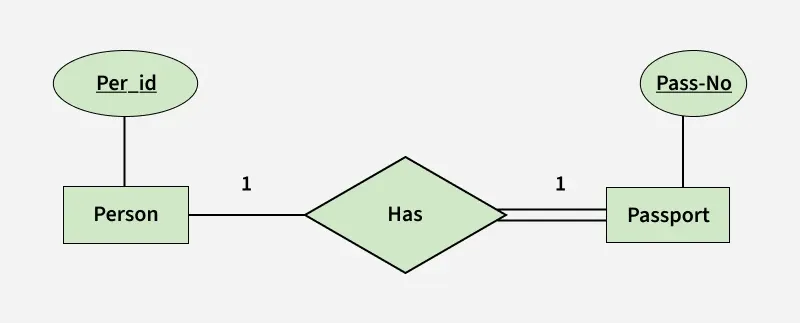
👁 has Binary Relationship with 1:1 cardinality with total participation of an entity
Note: A person has 0 or 1 passport number and Passport is always owned by 1 person. So it is 1:1 cardinality with full participation constraint from Passport.
First Convert each entity and relationship to tables.
Person table corresponds to Person Entity with key as Per-Id. Similarly Passport table corresponds to Passport Entity with key as Pass-No.
Has Table represents relationship between Person and Passport (Which person has which passport). So it will take attribute Per-Id from Person and Pass-No from Passport.
Table 1
Person
Has
Passport
Other Person Attribute
Pass-No
Other PassportAttribute
PR1
-
PR1
PS1
PS1
-
PR2
-
PR2
PS2
PS2
-
PR3
-
As we can see from Table 1, each Per-Id and Pass-No has only one entry in Has Table.
So we can merge all three tables into 1 with attributes shown in Table 2. Each Per-Id will be unique and not null.
Table 2
Other Person Attribute
Pass-No
Other PassportAttribute
Note: So it will be the key. Pass-No can’t be key because for some person, it can be NULL.
Case 2: Binary Relationship with 1:1 cardinality and partial participation of both entities
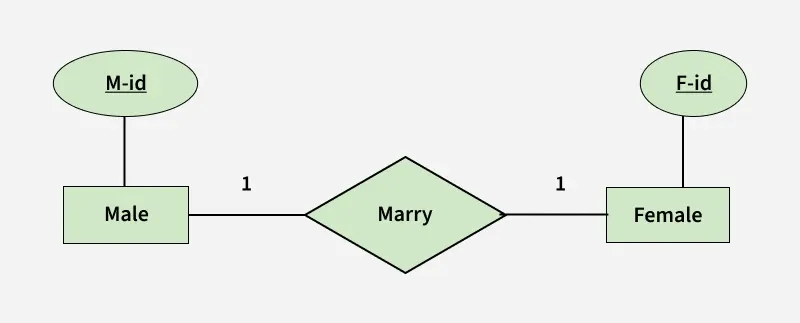
👁 file Binary Relationship with 1:1 cardinality and partial participation of both entities
A male marries 0 or 1 female and vice versa as well. So it is 1:1 cardinality with partial participation constraint from both.
First Convert each entity and relationship to tables.
Male table corresponds to Male Entity with key as M-Id. Similarly Female table corresponds to Female Entity with key as F-Id.
Marry Table represents relationship between Male and Female (Which Male marries which female). So it will take attribute M-Id from Male and F-Id from Female.
Table 3
Male
Marry
Female
Other Male Attribute
F-Id
Other FemaleAttribute
M1
-
M1
F2
F1
-
M2
-
M2
F1
F2
-
M3
-
F3
-
As we can see from Table 3, some males and some females do not marry.
If we merge 3 tables into 1, for some M-Id, F-Id will be NULL. So there is no attribute which is always not NULL.
So we can’t merge all three tables into 1. We can convert into 2 tables. In table 4, M-Id who are married will have F-Id associated. For others, it will be NULL.
Table 5 will have information of all females. Primary Keys have been underlined.
Table 4
Other Male Attribute
F-Id
Table 5
Other FemaleAttribute
Note: Binary relationship with 1:1 cardinality will have 2 table if partial participation of both entities in the relationship. If atleast 1 entity has total participation, number of tables required will be 1.
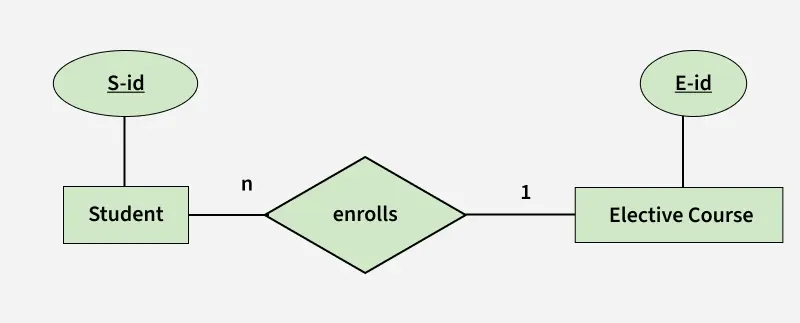
In this scenario, every student can enroll only in one elective course but for an elective course there can be more than one student.
First Convert each entity and relationship to tables. Student table corresponds to Student Entity with key as S-Id.
Similarly Elective_Course table corresponds to Elective_Course Entity with key as E-Id.
Enrolls Table represents relationship between Student and Elective_Course (Which student enrolls in which course). So it will take attribute S-Id from Student and E-Id from Elective_Course.
Table 6
Student
Enrolls
Elective_Course
Other Student Attribute
E-Id
Other Elective CourseAttribute
S1
-
S1
E1
E1
-
S2
-
S2
E2
E2
-
S3
-
S3
E1
E3
-
S4
-
S4
E1
As we can see from Table 6, S-Id is not repeating in Enrolls Table. So it can be considered as a key of Enrolls table.
Both Student and Enrolls Table’s key is same. We can merge it as a single table.
Table 7
Other Student Attribute
E-Id
Table 8
Other Elective CourseAttribute
Note: The resultant tables are shown in Table 7 and Table 8. Primary Keys have been underlined.
Case 4: Binary Relationship with m: n cardinality
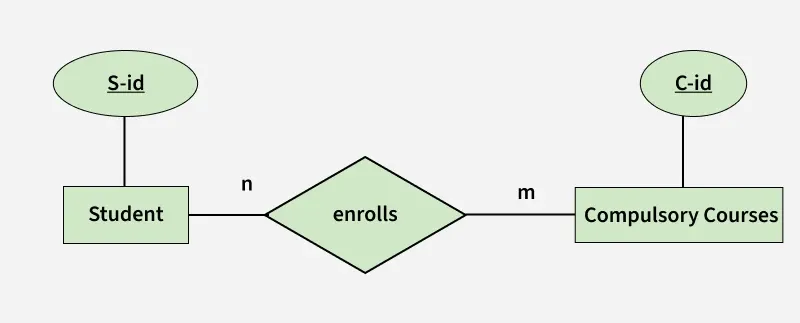
👁 enrolls Binary Relationship with m: n cardinality
In this scenario, every student can enroll in more than 1 compulsory course and for a compulsory course there can be more than 1 student.
First Convert each entity and relationship to tables. Student table corresponds to Student Entity with key as S-Id.
Similarly Compulsory_Courses table corresponds to Compulsory Courses Entity with key as C-Id.
Enrolls Table represents relationship between Student and Compulsory_Courses (Which student enrolls in which course). So it will take attribute S-Id from Student and C-Id from Compulsory_Courses.
Table 9
Student
Enrolls
Compulsory_Courses
Other Student Attribute
Other Compulsory CourseAttribute
S1
-
S1
C1
C1
-
S2
-
S1
C2
C2
-
S3
-
S3
C1
C3
-
S4
-
S4
C3
C4
-
S4
C2
S3
C3
As we can see from Table 9, S-Id and C-Id both are repeating in Enrolls Table.
But its combination is unique; so it can be considered as a key of Enrolls table.
Note: All tables’ keys are different, these can’t be merged. Primary Keys of all tables have been underlined.
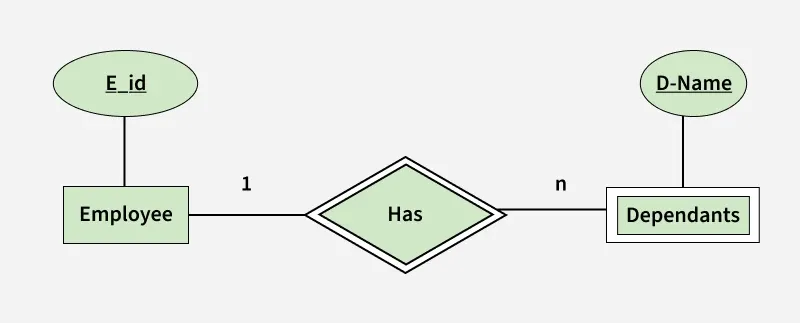
In this scenario, an employee can have many dependents and one dependent can depend on one employee.
A dependent does not have any existence without an employee (e.g; you as a child can be dependent of your father in his company).
So it will be a weak entity and its participation will always be total. Weak Entity does not have key of its own.
So its key will be combination of key of its identifying entity (E-Id of Employee in this case) and its partial key (D-Name).
Table 10
Employee
Has
Dependents
Other Employee Attribute
Other DependentsAttribute
E1
-
E1
RAM
RAM
E1
-
E2
-
E1
SRINI
SRINI
E1
-
E3
-
E2
RAM
RAM
E2
-
E3
ASHISH
ASHISH
E3
-
First Convert each entity and relationship to tables. Employee table corresponds to Employee Entity with key as E-Id.
Similarly Dependents table corresponds to Dependent Entity with key as D-Name and E-Id.
Has Table represents relationship between Employee and Dependents (Which employee has which dependents). So it will take attribute E-Id from Employee and D-Name from Dependents.
Table 11
Other Employee Attribute
As we can see from Table 10, E-Id, D-Name is key for Has as well as Dependents Table.
So we can merge these two into 1.
Table 12
Other DependentsAttribute
Note: So the resultant tables are shown in Tables 11 and 12. Primary Keys of all tables have been underlined.