|
VOOZH | about |
|
VOOZH | about |
A Database Management System (DBMS) is the backbone of modern data storage and management. Understanding DBMS concepts is critical for anyone looking to work with databases. Whether you're preparing for your first job in database management or advancing in your career, being well-prepared for a DBMS interview can make all the difference.
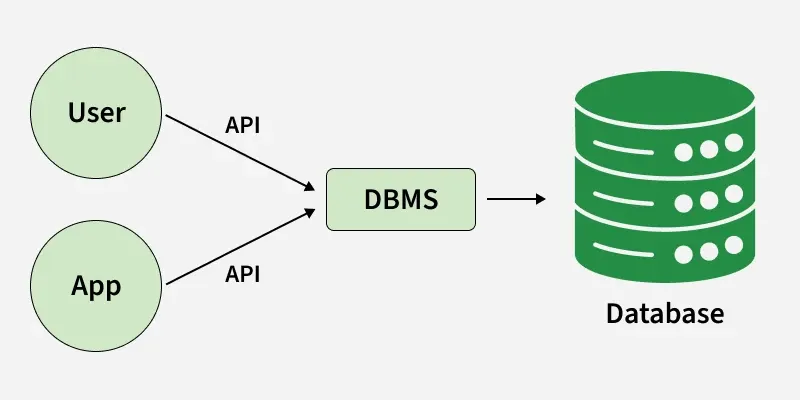
A Database Management System (DBMS) is software that is used to manage and organize databases. It provides an interface to interact with the data stored in a database. The DBMS is responsible for tasks such as storing, retrieving, and updating data, ensuring data integrity, security, and managing concurrency. Examples include MySQL, PostgreSQL, Oracle, and SQL Server.
The advantages of using a DBMS are:
Aspect | DBMS | RDBMS |
|---|---|---|
Data Storage | Stores data as files or in non-relational form | Stores data in tables (rows and columns) |
Relationships | Does not support relationships between data | Supports relationships using foreign keys |
Data Integrity | Does not enforce integrity constraints | Enforces integrity using primary and foreign keys |
Examples | Microsoft Access, XML Database | MySQL, Oracle, SQL Server |
The four types of DBMS are:
A relation in DBMS is a table that consists of rows and columns. Each row represents a record, and each column represents an attribute or property of the entity being described. Relations are defined by a schema, which specifies the attributes (columns) of the table.
A table in DBMS is a collection of data organized in rows and columns. It is the primary structure for storing data in a relational database. Each row represents an entity (record), and each column represents an attribute of that entity.
The primary components of a DBMS are:
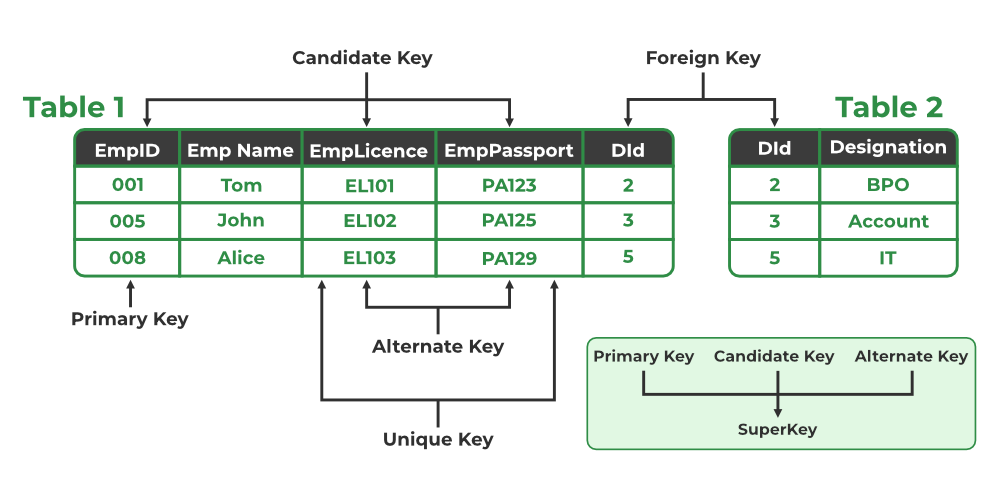
A Primary Key is a unique identifier for each record in a table. It ensures that no two records have the same value for the primary key field. It cannot contain NULL values. Example: In a STUDENT table, ROLL_NO could be the primary key because each student has a unique roll number.
| ROLL_NO | NAME | ADDRESS |
|---|---|---|
| 1 | Ram | Delhi |
| 2 | Suresh | Delhi |
A "Foreign Key" is an attribute in a table that links to the primary key in another table. It creates a relationship between two tables, ensuring referential integrity. Example: In a STUDENT table, the BRANCH_CODE could be a foreign key referencing the primary key BRANCH_CODE in the BRANCH table.
STUDENT Table:
| ROLL_NO | NAME | BRANCH_CODE |
|---|---|---|
| 1 | Ram | CS |
| 2 | Suresh | IT |
BRANCH Table:
| BRANCH_CODE | BRANCH_NAME |
|---|---|
| CS | Computer Science |
| IT | Information Technology |
Here, BRANCH_CODE in STUDENT is a foreign key referencing BRANCH_CODE in BRANCH.
Denormalization is the process of combining tables to improve query performance, often by introducing redundancy. While normalization minimizes redundancy, denormalization sacrifices some of it to improve speed for read-heavy operations.
Difference:
A Candidate Key is a set of one or more attributes that can uniquely identify a tuple in a relation. A relation can have multiple candidate keys, and one of them is chosen as the primary key.
The SELECT statement is used to query data from one or more tables. It allows you to retrieve specific columns or all columns, optionally applying filters (WHERE), sorting (ORDER BY), and joining multiple tables.
Example:
SELECT NAME, AGE FROM STUDENT WHERE AGE > 18;
A View is a virtual table created by querying one or more base tables. It does not store data physically but dynamically retrieves it when queried. Unlike a table, a view does not store its own data but presents data from other tables.
The three main types of relationships in DBMS are:
A schema in DBMS is the structure that defines the organization of data in a database. It includes tables, views, relationships, and other elements. A schema defines the tables and their columns, along with the constraints, keys, and relationships.
Constraints in DBMS are rules that limit the type of data that can be inserted into a table to ensure data integrity and consistency. Common types of constraints include: NOT NULL, PRIMARY KEY, FOREIGN KEY, UNIQUE, CHECK, DEFAULT.
Constraints in DBMS are rules applied to the data in a database to ensure its accuracy and integrity. The most common types of constraints are:
An index is a data structure that improves the speed of data retrieval operations on a database table. It works like a table of contents in a book, allowing the database to quickly find the location of a record based on a column value.
A Database Administrator (DBA) is responsible for managing and overseeing the entire database environment. Their key responsibilities include:
An Entity-Relationship Diagram (ERD) is a visual representation of the entities within a system and the relationships between those entities. It is used in database design to model the structure of data and how different pieces of data relate to each other.
Student, Course).Student Name, Course Duration).Student enrolls in Course).Example of ERD:
Student entity might have attributes like ID, Name, and Age.Course entity might have attributes like CourseID, CourseName.Enrolls connects Student and Course with attributes like EnrollmentDate.A JOIN in SQL is an operation that combines columns from two or more tables based on a related column between them. Joins are used to query data from multiple tables in a relational database.
Here are the different types of joins in SQL:
1. INNER JOIN: Returns only the rows where there is a match in both tables.
Example:
SELECT * FROM Student
INNER JOIN Course ON Student.ID = Course.StudentID;
2. LEFT JOIN (or LEFT OUTER JOIN): Returns all rows from the left table and the matching rows from the right table. If there is no match, NULL values will be returned for columns from the right table.
Example:
SELECT * FROM Student
LEFT JOIN Course ON Student.ID = Course.StudentID;
3. RIGHT JOIN (or RIGHT OUTER JOIN): Returns all rows from the right table and the matching rows from the left table. If there is no match, NULL values will be returned for columns from the left table.
Example:
SELECT * FROM Student
RIGHT JOIN Course ON Student.ID = Course.StudentID;
4. FULL JOIN (or FULL OUTER JOIN): Returns all rows when there is a match in either the left or the right table. If there is no match, NULL values will be returned for the columns of the table without a match.
Example:
SELECT * FROM Student
FULL JOIN Course ON Student.ID = Course.StudentID;
5. CROSS JOIN: Returns the Cartesian product of two tables, i.e., every combination of rows from both tables.
Example:
SELECT * FROM Student
CROSS JOIN Course;
6. SELF JOIN: A SELF JOIN is a join where a table is joined with itself. It is used when we need to compare rows within the same table. To differentiate the two instances of the same table, aliases are used.
Example:
SELECT E1.Employee_ID, E1.Employee_Name, E2.Employee_Name AS Manager_Name
FROM Employee E1
LEFT JOIN Employee E2 ON E1.Manager_ID = E2.Employee_ID;
A subquery in SQL is a query embedded within another query. It is used to retrieve data that will be used in the outer query. Subqueries can be used in SELECT, INSERT, UPDATE, or DELETE statements.
There are two types of subqueries:
Example of a subquery: To find the names of students who have a higher age than the average age:
SELECT Name FROM Student
WHERE Age > (SELECT AVG(Age) FROM Student);
Aggregate functions in SQL are functions that operate on a set of values (or a group of rows) and return a single result. They are often used in conjunction with the GROUP BY clause. Here are a few commonly used aggregate functions in SQL:
1. COUNT(): Returns the number of rows or non-NULL values in a column
Example:
SELECT COUNT(*) FROM Student;
2. SUM(): Returns the sum of values in a numeric column.
Example:
SELECT SUM(Amount) FROM Orders;
3. AVG(): Returns the average value of a numeric column.
Example:
SELECT AVG(Salary) FROM Employees;
4. MAX(): Returns the maximum value in a column
Example:
SELECT MAX(Age) FROM Student;
5. MIN(): Returns the minimum value in a column.
Example:
SELECT MIN(Salary) FROM Employees;
DBMS Intermediate Interview Questions dive deeper into more complex DBMS concepts and practical applications. These questions assess your ability to handle real-world database problems involving transactions, concurrency control, and schema design. Topics such as joins, indexing, normalization, and transaction management are often discussed at this level.
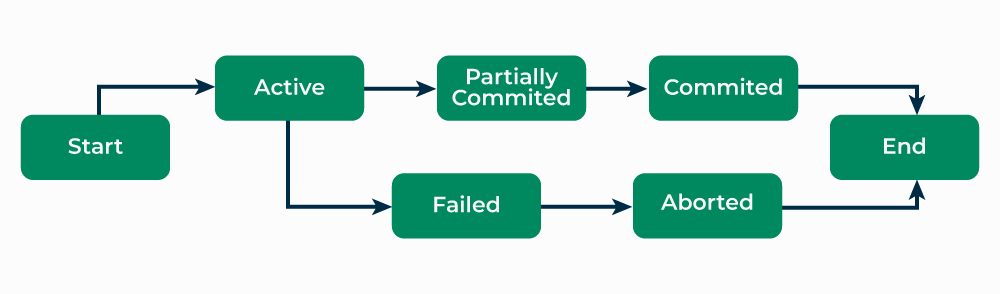
A transaction in DBMS is a sequence of one or more SQL operations executed as a single unit of work. A transaction ensures data integrity, consistency, and isolation, and it guarantees that the database reaches a valid state, regardless of errors or system failures.
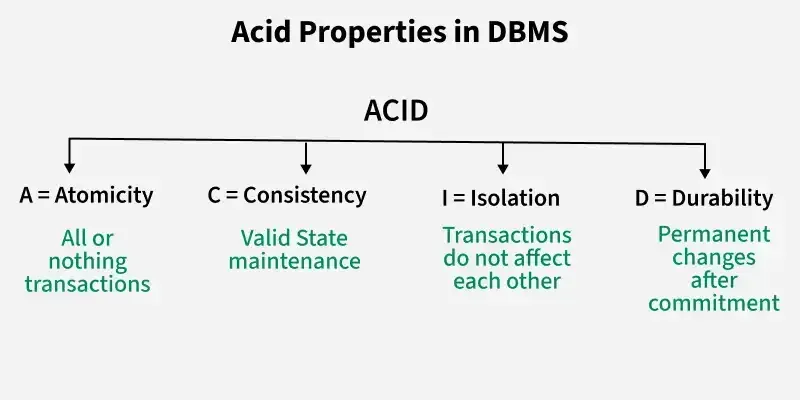
ACID stands for Atomicity, Consistency, Isolation, and Durability, which are the key properties that guarantee reliable transaction processing:
A stored procedure is a precompiled collection of one or more SQL statements stored in the database. Stored procedures allow users to execute a series of operations as a single unit, improving performance and reusability. They can accept input parameters, perform operations, and return results.
Example:
CREATE PROCEDURE GetStudentDetails(IN student_id INT)
BEGIN
SELECT * FROM Student WHERE ID = student_id;
END;
A trigger is a special kind of stored procedure that automatically executes (or "fires") in response to certain events on a table, such as insertions, updates, or deletions. Triggers are used to enforce business rules, maintain consistency, or log changes.
Example:
CREATE TRIGGER after_student_insert
AFTER INSERT ON Student
FOR EACH ROW
BEGIN
INSERT INTO AuditLog (Action, StudentID, ActionTime)
VALUES ('INSERT', NEW.ID, NOW());
END;
Trigger:
Stored Procedure:
UNION.Example:
SELECT Name FROM Students
UNION
SELECT Name FROM Teachers; -- Removes duplicates
SELECT Name FROM Students
UNION ALL
SELECT Name FROM Teachers; -- Does not remove duplicates
Indexing is a technique used to speed up the retrieval of records from a table by creating a data structure that allows for faster searching. An index provides a quick lookup of data based on the values of one or more columns.
Types of Indexes:
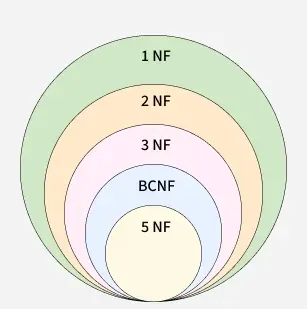
Normalization is the process of organizing data in a database to reduce redundancy and improve data integrity. It divides large tables into smaller related tables and establishes relationships between them. This helps avoid anomalies during insertion, update, and deletion operations and ensures consistency of data.
👁 normalization_venn_diagramExample:
Student (ID, Name, Subjects)
2. Second Normal Form (2NF): 2NF is achieved when the table is in 1NF and all non-key attributes are fully dependent on the primary key.
Example: Consider the following table
StudentCourse (StudentID, CourseID, InstructorName)
Here, InstructorName depends on CourseID, not on StudentID. To make it 2NF, we separate the data:
Student (StudentID, Name)
Course (CourseID, InstructorName)
Enrollment (StudentID, CourseID)
3. Third Normal Form (3NF): A table is in 3NF if it is in 2NF and there is no transitive dependency (non-key attributes depend on other non-key attributes).
Example:
Employee (EmpID, EmpName, DeptID, DeptName)
Here, DeptName depends on DeptID. To bring this into 3NF:
Employee (EmpID, EmpName, DeptID)
Department (DeptID, DeptName)
4. Boyce-Codd Normal Form (BCNF): A stricter version of 3NF where every determinant is a candidate key.
Example:
Student (StudentID, CourseID, InstructorID)
And the constraint is such that InstructorID determines CourseID, it would not be in BCNF because InstructorID is not a candidate key. To achieve BCNF:
Instructor (InstructorID, CourseID)
Enrollment (StudentID, CourseID)
| Aspect | INNER JOIN | OUTER JOIN |
|---|---|---|
| Result Set | Returns only matching rows from both tables. | Returns all rows from one or both tables, with NULL where no match is found. |
| Types | Single type. | Three types: LEFT, RIGHT, FULL. |
| Use Case | When you need only the intersecting data. | When you need to preserve all data, even with mismatches. |
| Performance | Generally faster as it deals with fewer rows. | Can be slower due to handling more rows and NULL values. |
| Reliability | Reliable for matching data across tables. | Reliable when you need to retain all data, but can introduce NULL-related issues. |
Data redundancy refers to the unnecessary repetition of data in a database. It can lead to inconsistencies, increased storage requirements, and maintenance challenges.
Reduction methods:
A deadlock occurs when two or more transactions are blocked because each transaction is waiting for the other to release resources. This results in a situation where none of the transactions can proceed.
Prevention Techniques:
A cursor in DBMS is a pointer to a result set of a query. It allows for row-by-row processing of query results, which is useful when dealing with large datasets.
Types of cursors:
Example:
DECLARE cursor_example CURSOR FOR
SELECT * FROM Employee;
There are several types of locks in DBMS to ensure data consistency when multiple transactions are involved:
Primary Key:
Unique Key:
Referential Integrity ensures that relationships between tables are maintained correctly. It requires that the foreign key in one table must match a primary key or a unique key in another table (or be NULL). This ensures that data consistency is maintained, and there are no orphan records in the database.
Example: In the Orders table, if the CustomerID is a foreign key, it should match a valid CustomerID in the Customers table or be NULL.
Concurrency control ensures that database transactions are executed in a way that prevents conflicts, such as data inconsistency, when multiple transactions are executed simultaneously. DBMS uses the following techniques:
A transaction log is a record that keeps track of all transactions executed on a database. It ensures that changes made by transactions are saved, and in case of a system failure, the log can be used to recover the database to its last consistent state. The transaction log contains:
A materialized view is a database object that contains the results of a query. Unlike a regular view, which is a virtual table (it doesn’t store data), a materialized view stores data physically, improving query performance by precomputing and storing results.
Use Case: Materialized views are commonly used for performance optimization in data warehousing and reporting systems, where the same data is frequently queried.
Example:
CREATE MATERIALIZED VIEW SalesSummary AS
SELECT Product, SUM(Quantity) FROM Sales GROUP BY Product;
Entity-Relationship Diagram (ERD):
Relational Schema:
The "GROUP BY" clause is used in SQL to group rows that have the same values in specified columns into summary rows, often with aggregate functions like COUNT, SUM, AVG, MIN, or MAX. It is typically used to organize data for reporting or analysis.
Example: This groups the employees by department and counts the number of employees in each department.
SELECT Department, COUNT(*) FROM Employees
GROUP BY Department;
A stored function is a set of SQL statements that can be executed in the database. It accepts input parameters, performs some logic, and returns a value. Stored functions are similar to stored procedures but differ in that they must return a value.
Example:
CREATE FUNCTION GetEmployeeSalary(EmployeeID INT)
RETURNS DECIMAL(10,2)
BEGIN
DECLARE salary DECIMAL(10,2);
SELECT Salary INTO salary FROM Employee WHERE ID = EmployeeID;
RETURN salary;
END;
DBMS Advanced Interview Questions focus on in-depth knowledge and problem-solving skills for complex database scenarios. This category evaluates your ability to handle large-scale data, optimize query performance, and understand advanced DBMS topics like distributed databases, indexing strategies, and concurrency control mechanisms. Being proficient in these areas is crucial for roles involving high-performance databases and large-scale systems.
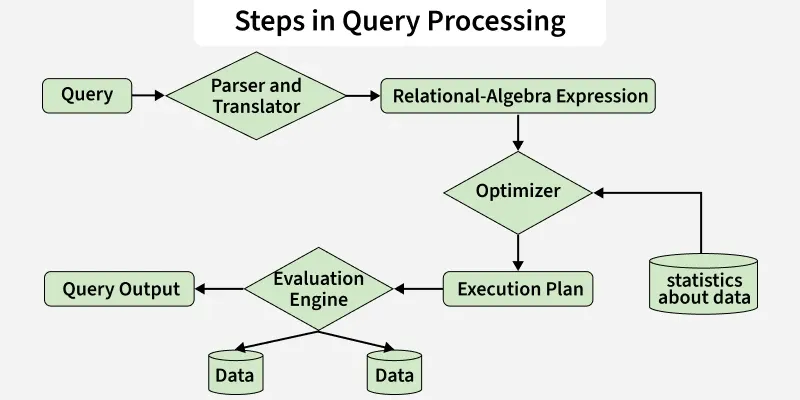
The DBMS query processing cycle consists of several phases that transform the high-level query (SQL) into executable actions:
There are several types of backups in DBMS:
The "WITH CHECK OPTION" is used when creating a view in SQL to ensure that any insert or update operation on the view must adhere to the conditions defined in the view’s WHERE clause. If the inserted or updated data violates these conditions, the operation will be rejected.
Example: Here, if a user tries to insert or update a Student record with a status other than 'Active', the operation will fail.
CREATE VIEW ActiveStudents AS
SELECT * FROM Students WHERE Status = 'Active'
WITH CHECK OPTION;
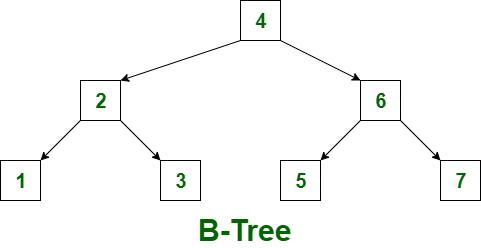
B-tree (Balanced Tree):
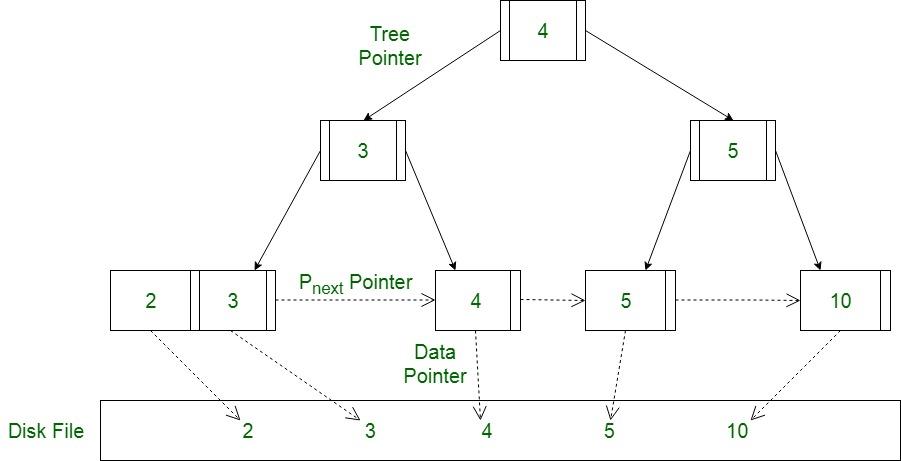
B+ tree:
A hashing technique in DBMS is used to map data (such as a key) to a fixed-size value or address, using a hash function. It is primarily used for quick data retrieval, particularly in hash indexes or hash tables.
Example: A hash function might map a StudentID of 123 to a bucket index of 3. The student’s record would be stored in the corresponding bucket.
How it works:
Data partitioning is the process of dividing large datasets into smaller, more manageable segments (partitions) to improve performance, scalability, and availability. Each partition can be stored and processed separately.
Types of partitioning:
The DBMS plays a critical role in ensuring:
| Aspect | DBMS | File-based System |
|---|---|---|
| Data Organization | Data stored in structured tables with relationships | Data stored in separate flat files |
| Data Redundancy | Low redundancy (uses normalization) | High redundancy |
| Data Integrity | Enforced using constraints | Hard to enforce |
| Security | Strong security and access control | Basic file-level security |
| Concurrency Control | Supports multi-user access safely | No proper concurrency control |
| Data Access | Supports complex queries (SQL) | Limited file operations |
| Backup & Recovery | Automatic and reliable | Manual and less reliable |
| Scalability | Highly scalable | Poor scalability |
| Maintenance | Centralized and easier | Manual and difficult |
| Transactions | Supports ACID properties | No transaction support |