|
VOOZH | about |
|
VOOZH | about |
Bitmap Indexing is a powerful data indexing technique used in Database Management Systems (DBMS) to speed up queries- especially those involving large datasets and columns with only a few unique values (called low-cardinality columns).
In a database table, some columns only contain a few different values. For example:
For such columns, Bitmap Indexing is a smart way to store data and quickly answer queries. Instead of storing full values repeatedly, Bitmap Indexing uses bitmaps (a series of 1s and 0s) to represent which rows contain which values.
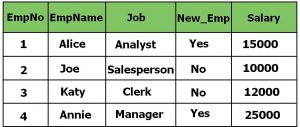
1. Let’s use a sample Employee table:
There are 4 rows in the table, so we will represent values using 4-bit binary numbers.
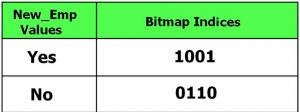
2. Bitmap Index for the New_Emp Column
This column has only two values: Yes and No, and the length of the bit-maps will four as we have four rows in our Employee Table:
Here,
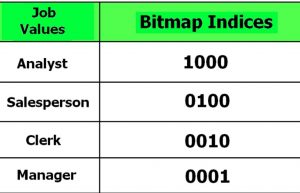
3. Bitmap Index for the Job Column
Each unique job title gets its own bitmap:
In the above table, each "1" marks the row where the job appears. For e.g:
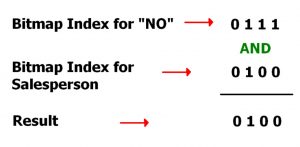
Let’s say you want to find: Employees who are NOT new (New_Emp = No) AND have the Job = Salesperson
Query for that will be:
SELECT *
FROM Employee
WHERE New_Emp = "No" and Job = "Salesperson";
For this query, the DBMS will search the bitmap index of both columns and perform logical AND operation on those bits and find out the actual result:
Here the result 0100 represents that the second row has to be retrieved as a result.
The syntax for creating a bitmap index in SQL is given below.
CREATE BITMAP INDEX Index_Name
ON Table_Name (Column_Name);
For the above example of the employee table, the bitmap index on column New_Emp will be created as follows:
CREATE BITMAP INDEX index_New_Emp
ON Employee (New_Emp);