A database object is any defined object in a database that is used to store or reference data. Any object created using the CREATE command is known as a database object. It can be used to hold and manipulate the data. Some of the examples of database objects are: views, sequence, indexes, etc.
Table: Basic unit of storage; composed of rows and columns
View: Logically represents subsets of data from one or more tables
Sequence: Generates primary key values
Index: Improves the performance of some queries
Synonym: Alternative name for an object
Different Database Objects
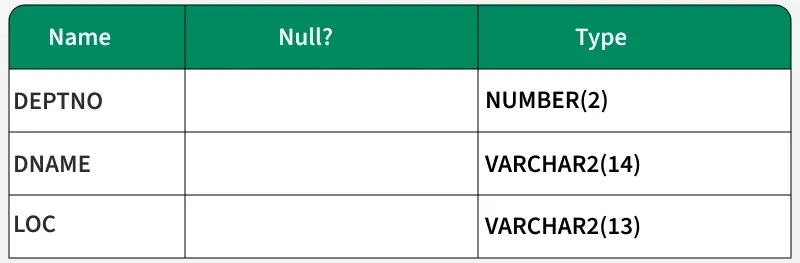
1. Table
This database object is used to create a table in the database.
This database object is used to create a sequence in database. A sequence is a user created database object that can be shared by multiple users to generate unique integers.
A typical usage for sequences is to create a primary key value, which must be unique for each row.
The sequence is generated and incremented (or decremented) by an internal Oracle routine.
Syntax:
CREATE SEQUENCE sequence [INCREMENT BY n] [START WITH n] [{MAXVALUE n | NOMAXVALUE}] [{MINVALUE n | NOMINVALUE}] [{CYCLE | NOCYCLE}] [{CACHE n | NOCACHE}];
Example:
CREATE SEQUENCE dept_deptid_seq INCREMENT BY 10 START WITH 120 MAXVALUE 9999 NOCACHE NOCYCLE;
Check if Sequence is created by:
SELECT sequence_name, min_value, max_value, increment_by, last_number FROM user_sequences;
4. Index
This database object is used to create a indexes in database. An Oracle server index is a schema object that can speed up the retrieval of rows by using a pointer.
Indexes can be created explicitly or automatically. If you do not have an index on the column, then a full table scan occurs.
An index provides direct and fast access to rows in a table. Its purpose is to reduce the necessity of disk I/O by using an indexed path to locate data quickly.
The index is used and maintained automatically by the Oracle server. Once an index is created, no direct activity is required by the user.Indexes are logically and physically independent of the table they index.
This means that they can be created or dropped at any time and have no effect on the base tables or other indexes.
Syntax:
CREATE INDEX index ON table (column[, column]...);
Example:
CREATE INDEX emp_last_name_idx ON employees(last_name);
5. Synonym
It simplify access to objects by creating a synonym(another name for an object).
With synonyms, you can Ease referring to a table owned by another user and shorten lengthy object names.
To refer to a table owned by another user, you need to prefix the table name with the name of the user who created it followed by a period.
Creating a synonym eliminates the need to qualify the object name with the schema and provides you with an alternative name for a table, view, sequence, procedure or other objects.
This method can be especially useful with lengthy object names, such as views.
In the syntax: PUBLIC : creates a synonym accessible to all users synonym : is the name of the synonym to be created object : identifies the object for which the synonym is created