Docker is one of the popular tools for building and running programs in containers. It includes various tools and started with a commercial version for managing containers while supporting an open-source version.
Blue-green deployment is a production application release approach in which user traffic is transferred gradually from an older version of an app or microservice to a new release of almost an identical one, with both in production. The blue-green deployment pattern sets up two environments: a blue environment and a green environment. At any given moment, traffic will be directed to one of these environments, and the process of implementing new modifications typically entails directing traffic to the inactive environment, which has been updated in some way.
How Does A Blue-Green Deployment Work?
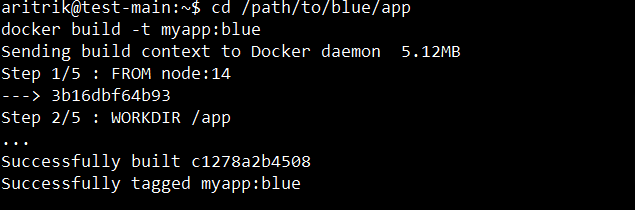
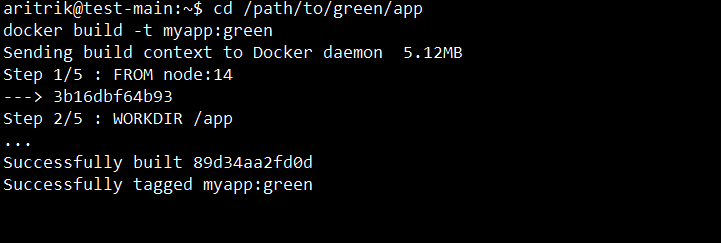
Deploy the new (green) version alongside the existing (blue) version. Test it to check it works properly, and make modifications as needed.
When the new version is prepared, route all traffic from blue to green. This should be done seamlessly so that there will be no disturbance to the end user.
Keep eyes and ears open regarding how users are interacting with the new version so that any weaknesses or issues can be easily disclosed.
Rollout or rollback in case of any errors, revert the traffic immediately to blue; otherwise, continue with green and keep the traffic on it.
Step-By-Step Guide To Implement Blue-Green Deployments With Docker
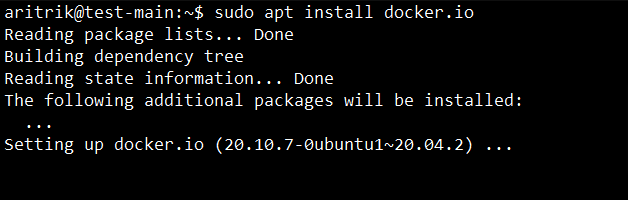
Step 1: Install Docker
To get started, you need to ensure that your system has Docker installed. You can use the below command to install it.
After that, you may use both environments using Docker Compose. This command will install the green_app and blue_app containers, each of which will be operating on a distinct port.
After confirming that the Green environment is operational, you need to make the following changes to the Nginx configuration to point to it.
upstream blue-green {
 # Comment the Blue server and enable the Green server
 # server 127.0.0.1:8081; # Blue server
 server 127.0.0.1:8082; # Green server
}
Step 7: Clean Up the Old Environment
Lastly, You can turn off the Blue environment if you're certain that the Green environment is stable.
Best Practices Of Blue-Green Deployments With Docker
Use A Load Balancer: Employ a load balancer to dispatch traffic across the Blue and Green environments. Such may include Nginx, HAProxy, or any load balancer of a cloud provider, switching versions is also easily done with no downtime because a load balancer can be put into action to make transitions seamless.
Monitor The Green Environment: Keep the Green environment running in order to measure the performance indicators of the latter, such as CPU, RAM, request times, etc., and its stability.
Zero-Downtime Optimization: Keeping both environments live until switching traffic will enable zero-downtime deployment. Ensuring seamlessness on the transition from Blue to Green.
Immutable Infrastructure: Continue doing Immutable Infrastructure where a new deployment gives completely new instances or containers. Never change the containers in place. This pattern does act very well with Blue-Green Deployments since it provides an environment that is completely new.
Conclusion
In conclusion, implementing Blue-Green Deployments with Docker offers a robust strategy for ensuring smooth application updates while minimizing downtime and risk. By maintaining two identical environments, teams can seamlessly transition user traffic from the old version to the new, facilitating immediate rollbacks if issues arise. This method not only enhances deployment efficiency but also fosters a more reliable user experience. Adopting best practices, such as leveraging load balancers and monitoring performance, further optimizes the deployment process, making Blue-Green deployments a valuable approach in modern software development.