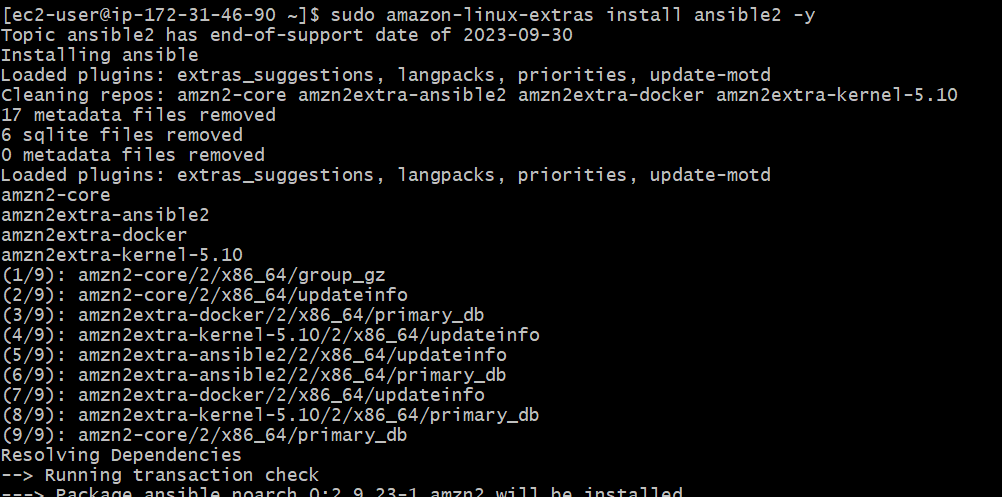
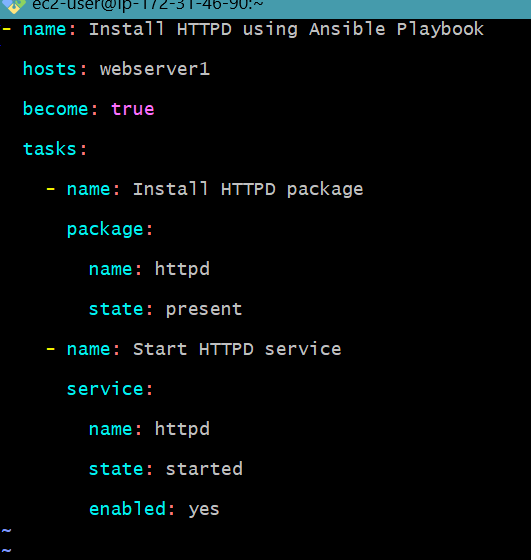
Another core aspect of IT automation is the ability to ensure that configurations and deployments are correct before they are applied to production. One of the most widely recognized automation tools, Ansible, has features associated with a "dry run" or "check mode" that display the changes it would make as a result of applying a playbook without actually executing them. This helps in ensuring and testing configurations, hence lessening the risk of errors and failures. A dry run in Ansible helps, especially to make sure that your playbooks are right and will do the right things, giving you a preview of possible effects of automation tasks to guarantee they are safe to be run in a live environment. This article is a primer to help you dry-run an Ansible playbook: terminologies that are explanatory, followed by a step-by-step guide including examples and frequently asked questions to support your understanding.
Primary Terminologies
Ansible: Ansible is an open-source automation tool. It allows users to perform configuration management, application deployment, and task automation by defining the tasks and configurations in its playbooks using simple YAML syntax.
Playbook: An Ansible file. It's a file that includes a set of steps to be executed against defined hosts, which are declared at the beginning of the playbook. Playbooks are written in YAML to describe the desired state of the system.
Dry Run (Check Mode): A mode in Ansible where one is able to see what changes will be made by a playbook prior to actually going ahead to implement these changes. It is meant for testing and validation.
Task: A single unit of work to be done on a managed node. This might be installing a package, copying over a file, or restarting a service. Tasks are the primary building block for playbooks in Ansible.
Module: An execution unit that Ansible uses to perform work. Modules are used by tasks to make things happen. Examples of modules are apt, yum, copy, and service.
Inventory: A list of hosts (servers) on which Ansible would run the tasks defined in the playbooks. The inventory can be either a static file or dynamically generated.
Host: A managed machine through Ansible, which can be physical or virtual. The hosts are the ones listed within the inventory file.
Role: A way of bundling together related playbooks and tasks into reusable components. They can be used to group related tasks, variables, files, templates, and handlers together.
Handler: A special task type that runs only when sent a trigger from other tasks. Handlers are typically used for actions like restarting services after configuration changes.
Variable: A value which shall be stored and then can be used again in the playbooks. This is one of the functionalities that makes playbooks flexible and dynamic.
YAML (YAML Ain't Markup Language): A human-friendly data serialization standard commonly used for the writing of Ansible playbooks and configuration files. It is purported to be very simple and readable.
Idempotency: A property of Ansible tasks in which the task could be applied more than once, but it shall leave system state untouched after its first successful application.
Step-by-Step Process to Perform a Dry Run of an Ansible Playbook
Step 1: Launch EC2 Instance
Go to the AWS console and log in with credentials.
Navigate to the EC2 dashboard and launch an EC2 instance.
Ensure your tasks are idempotent, meaning they can be run multiple times without changing the system state after the first successful run. You can validate idempotency by running the playbook again in check mode:
ansible-playbook site.yml --check
The second dry run should ideally show no changes if the tasks are truly idempotent.
The Ansible dry run, or check mode, is what allows you to make a simulation of playbook running without actually doing anything on the managed hosts. It is useful in various scenarios:
Playbook Testing: Before running a playbook on production systems, you can use a dry run to test that the playbook will execute as expected, making no changes that are unintended.
Validating Changes: With the need to update some existing playbooks, a dry run is instrumental in ensuring that the changes will take effect as expected and in understanding the difference these changes will cause.
Output Review: The dry run facility enables you to review the expected output and can be utilized in such a way that it helps verify if the tasks will work correctly, as well as whether the variables, conditions, and loops are functioning according to the desire.
Compliance and Auditing: In compliance, you might need to demonstrate what changes a playbook is going to make without actually applying them. Dry run allows you to generate such information in any aspect.
Ansible Dry Run – Executing Playbooks in Diff Option
The check mode of Ansible, together with the --diff option, will give an exact comparison of what changes would be done with it. That is most valuable in those kinds of configuration management work, wherein you'd really like to see what differences are set into files.
Example Command:
ansible-playbook playbook.yml --check --diff
Combining Check and Diff
When combined with the diff option, check mode presents the diff of all the potential changes.
Visualise changes: See a line-by-line comparison of what would change in files and configurations.
Identify problems: Identify potential problems even before they happen through a realization of the precise changes that would be implemented.
Improve Confidence: Increase confidence with the changes that will be introduced by your playbook in turn, bringing the possibility of unintended consequences to a minimum.
ansible-playbook site.yml --check --diff
When Not to Use Ansible Dry Run
While check mode is a powerful tool, there are situations where it may not apply:
Idempotency Violations: If your playbook contains tasks or modules that are not idempotent—that is, which deliver a different result on every next execution—then the dry run won't be able to foretell changes properly.
Dynamic: Operations that include dynamic data or that induce a change of state—such as fetching API data, or making use of the current date and time, for example—will not yield the final intended result in a dry run.
Custom Modules and Plugins: Custom modules or plugins which do not properly support check mode can yield wrong results or fail entirely during a dry run.
Critical Systems: For critical systems, where accuracy is necessary, depend on heavy testing in a staging area as opposed to relying solely on check mode.
Conclusion
One key practice in IT automation and configuration management is to run an Ansible playbook in a dry mode. This allows a preview of possible changes without actually making the described changes. The feature becomes a very strong safety net for validation and testing of configurations. Use Ansible's check mode to identify and troubleshoot any errors in the playbooks before running. This way, you can always check for errors in your playbooks and minimize the probability of disruptions in a production environment.
This article described the core ideas and key terms in Ansible dry runs, presenting the step-by-step process of real playbook execution in check mode. Following best practices and guidelines, one can safely test automation tasks and configurations to assure flawless deployments without any errors. Dry run is done to enforce reliability and efficiency in an Ansible workflow; thus, it remains one of the most important tools that any system administrator or DevOps professional can never do without. The more one can get used to using Ansible, the more dry runs they put into their routine of maintaining a robust and stable automation environment—a step that will, in turn, bring more reliable and efficient IT operations.


.png)