|
VOOZH | about |
|
VOOZH | about |
When you push the code into GitHub, you have to manually trigger builds and assessments every time. It's like building a sandcastle one grain at a time. This can be time-consuming and inefficient. Fortunately, Jenkins and GitHub are a dynamic pair that can take you to a world of computerized continuous integration (CI) and continuous delivery (CD).
Imagine seamlessly triggering builds, jogging checks, and deploying your code each time you commit, like magic! But this isn't always just smoke and mirrors; it's the strength of Jenkins and GitHub integration, working tirelessly behind the curtain. By following this steps you will get the clear idea about integrate the jenkins with the GitHub.
GitHub and Jenkins are commonly used together in software development workflows for continuous integration and continuous delivery (CI/CD) processes.
Jenkins is an open-source, self-contained automation server that can automate a wide range of software development, testing, and delivery or deployment operations. For a more detailed view of Jenkins, refer to this link.
GitHub is a web-based platform that hosts software development projects and uses Git for version management. Git is a distributed version control system that helps developers work together on the same software projects and keep track of changes made to their code by one another. GitHub offers a user-friendly interface, very collaborative tools, and more project management tools, which will enhance the potential of Git. By referring to this link you can learn about the git.
Jenkins and GitHub integration automates testing, guarantees code quality, and finds errors early. Jenkins runs tests automatically with every update, continuously scanning GitHub for changes. Without the need for manual involvement, successful improvements can be quickly distributed to a variety of situations. By giving team members real-time visibility into build and deployment statuses, this integration improves teamwork. All in all, it expedites the software development process and produces high-caliber software quickly. It is necessary to get the code into the jenkins server for the build process.
Jenkins is a powerful automation server cherished for its flexibility and customization alternatives. When it involves computerized construct triggering, Jenkins gives a whole lot of mechanisms to fit your particular desires. Let's discover a few famous alternatives:
We need to create a separate CI/CD pipeline to define your workflow. Jenkins supports if pipelines are defined as code using Jenkins files. Create a new pipeline task and select "Pipeline script" in the task list.
Write the Jenkinsfile in the repository, and explain the steps to create its deployment process. The Jenkinsfile can be written in Groovy syntax and can include checkout, build, test, deploy and other steps. Depending on your preferences and needs, use declarative or scripted syntax for Jenkins pipeline.
By following the below steps outlined for a Jenkins job, GitHub can be seamlessly integrated with Jenkins CI/CD pipeline
pipeline {
 agent any

 stages {
 stage('Checkout') {
 steps {
 // Checkout code from version control
 checkout scm
 }
 }
 stage('Build') {
 steps {
 // Build your project
 sh 'mvn clean install'
 }
 }
 stage('Test') {
 steps {
 // Run tests
 sh 'mvn test'
 }
 }
 stage('Deploy') {
 steps {
 // Deploy the application
 sh './deploy.sh'
 }
 }
 }
}
By following the below steps you can integrate the jenkins with the GitHub by using the GitHub credentials. After that we can automate the integration and deployment steps.
You can install jenkins by following this link. Then you can follow the step to integrate the jenkins with the GitHub.
After installation you can login into the Jenkins by entering the credentials. Login into the Jenkins server.
To begin, navigate to Jenkins and locate the "Create a job" button. Click on it to create a new job.
Enter name for your job and select Freestyle project, Click Ok. Then it will proceed to next step.
After selecting the freestyle job. Add Description and Select GitHub Project and GitHub repository URL.
To create the sample GitHub repository to integrate the Jenkins with Git. Create the repository by referring this link.
Scroll down to "Source Code Management Section". Select "Git" and add Repository URL.
By providing the GitHub credentials on credentials section you will authenticate the respective repository. For your reference refer the below image.
👁 Connect a GitHub RepositoryStep 7: Integrate with the GitHub Repository
Add GitHub repository branch. Select "githubweb" for Repository browser and Add URL.
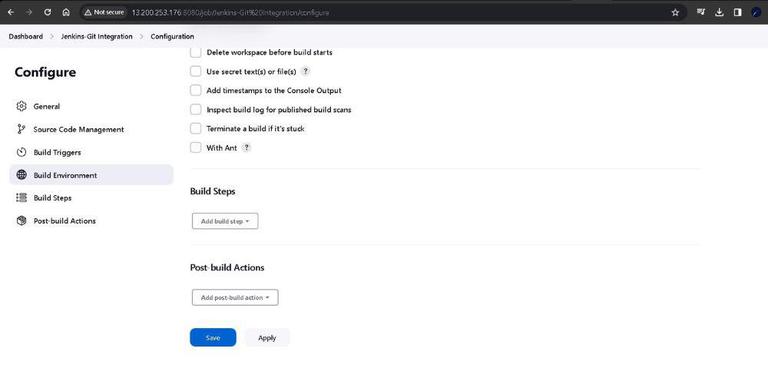
Click on Save and apply the the details which you have configured on the job will save and apply to the Jenkins job.
Click on "Build now". It starts a fresh build for the chosen Git repository. It's like giving your build process a jumpstart.
👁 Build-now
Once build is successfully completed. Click on "#1" in Build History section -> Console Output.
By configuring the webhook the build will start dynamically on the Jenkins when the commits is happen into the respective repository. By configuring the webhooks on Jenkins refer the link.
Integrating Jenkins with popular version control system like GitHub concludes. You now possess the knowledge to streamline your development workflow, triggering builds and testing changes automatically.


-768.jpg)

.jpg)