|
VOOZH | about |
|
VOOZH | about |
A Git repository (or repo) is a storage space where your project’s files and their complete history of changes are kept. It allows you to track, manage, and collaborate on code over time.
.git folder inside your project contains the local repository.push, pull, and fetch to synchronize changes with the local repository.| Bare Repository | Non-Bare Repository |
|---|---|
| Contains only the version history and Git data, no working files. | Contains working files along with the Git history. |
| Mainly used on servers for collaboration. | Used on local machines for development. |
Cannot directly edit files; only supports Git operations like push and fetch. | Files can be edited directly; supports all Git operations including commit and merge. |
Usually ends with .git extension. | Does not usually end with .git extension. |
| Acts as a central repository for multiple developers. | Acts as a local copy for development and testing. |
Before you can start tracking files, you need to initialize a repository in your project folder. This is done with the git init command.
$ git initSyntax And Usage Of `git add`
$ git add file_nameThe following are the different ways to use add command:
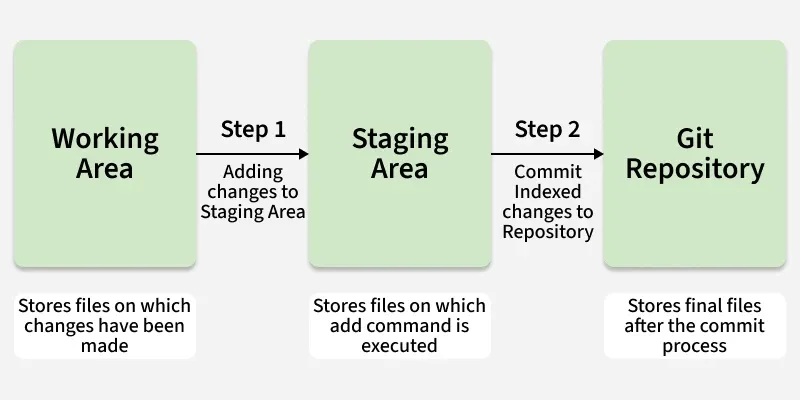
$ git add .$ git add --all$ git add *.txt$ git add docs/*.txt$ git add docs/git add "*.txt"Committing changes from the Index Committing process is done in the staging area on the files which are added to the Index after git add command is executed. This committing process is done by the use of git commit command.
Syntax And Usage Of `git commit`
$ git commit -m "Add existing file"This commit command is used to add any of the tracked files to staging area and commit them by providing a message to remember.
Git lets users clone repositories to their local machine, creating separate copies. To sync changes with others, Git provides commands to synchronize local repositories with remote one.
This git push command is used to push all the commits of the current repository to the tracked remote repository. This command can be used to push your repository to multiple repositories at once.
Syntax
$ git push -u origin masterTo push all the contents of our local repository that belong to the master branch to the server (Global repository).
The git pull command updates your local repository by fetching and merging changes from the remote repository. It ensures your copy stays synchronized when others have made updates.
Syntax
$ git pullHere are some more git commands that you might use when working on a project:
It is used for checking the status of git repository, i.e., if the files are committed or not, files in staging area or untracked file.
Syntax
$ git statusIt is used to track all the changes made in the repository, providing the information on contributors and their contributions.
Syntax
$ git logYou may use .gitignore if you want to hide any file when uploading online. Just simply create a .gitignore file, and write all the files names you want to ignore.
It is used to merge two branches within the same repository. It combines the changes from one branch into another (usually merging a feature branch into the main branch) without losing history.
Syntax
$ git merge <branch-name>Git checkout is a command used to switch between branches or view a previous version of your project by moving the HEAD pointer to a different commit. It does not permanently rollback your project-it simply allows you to explore or temporarily switch to an older commit using its hash from git log.
Syntax
$ git checkout <hash-code>