|
VOOZH | about |
|
VOOZH | about |
Git pull is a command which is used to fetch and integrate the changes which are present in the remote repository to the local repository.
git pull [remote-name] [branch-name]Git Pull is a command used to update the local version of a repository from a remote repository. It is a mixture of two other commands:
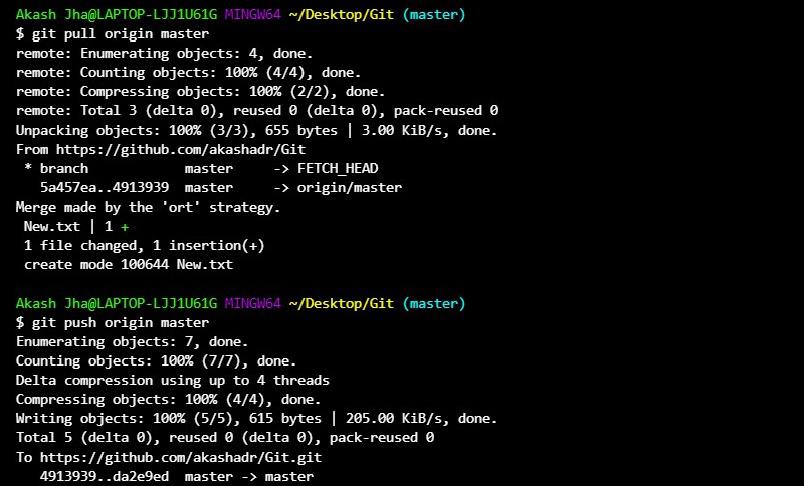
Example: If a teammate adds New.txt to the remote, git pull fetches and merges it into your local repository.
Synchronizes the local repository with the remote repository by updating changes.
If you want to maintain the your commits neat and linear order then you can use the Pulling via Rebase method follow the steps mentioned below.
Step 1: Lets consider your having the local commits with the names as
A---B---C
Step 2: Know fetch the changes that you want from the remote repository by using the following command. Fetch the changes form the remote origin.
git fetch origin mainStep 3: Pull changes via rebase by using the following command.
git pull --rebase origin mainStep 4: After completion of the git rebase.
Here the A--B--C are the commits which are available in the local repository and D---E---F are the changes form the remote repository. Know your local changes are on the top of the fetched changes.
A'--B'--C' (rebasing your changes)
\
D---E---F (remote branch)
Example 1: To pull from the default remote and current branch
git pullExample 2: Pulling From a Specific Remote and Branch
git pull <remote-name> <branch-name>Example 3: Pulling and Rebasing.
git pull --rebaseA shorthand command that fetches updates from a remote repository and integrates them into the local branch.
git pullGit Pull | Git Fetch |
|---|---|
Git pull is the combination of two commands git fetch and git merge. | Git fetch command will fetch the remote repository to the local machine. |
It will fetch the changes and merges with the repository. | It will only fetch the branch without any merge operation. |
A more efficient method for updating your local branch is to use git pull. | Git fetch is frequently used as a first step before using 'git merge' to combine updates. |