|
VOOZH | about |
|
VOOZH | about |
Git hooks are scripts stored in the .git/hooks directory that run on specific Git events. They can be client-side (run locally) or server-side (run on the Git server). Implementing Git Hooks can help streamline your development process by:
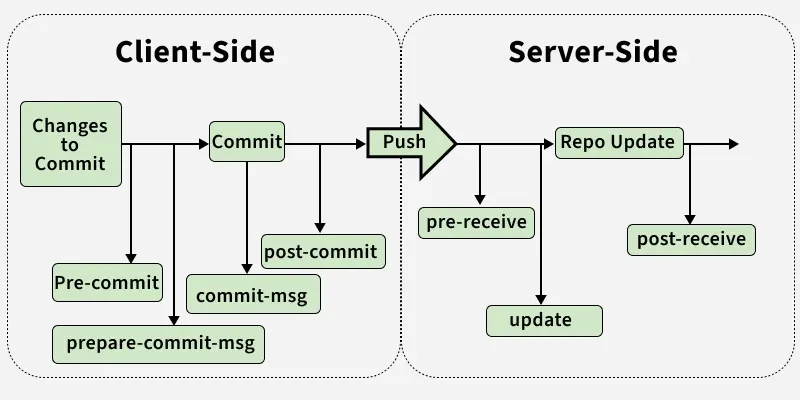
Git hooks are categorised into client-side and server-side hooks based on where and when they are executed during Git operations.
Client-side hooks run on a developer’s local machine and are triggered by actions such as committing, merging, or checking out code.
1. pre-commit: The pre-commit hook runs on the git commit event. This can be used for Static analysis, Linting, Spell-checks, and Code style checks. It takes zero arguments and exiting with a non-zero status aborts the commit operation.
Example: Given script prints “This is a git hook” and aborts the commit by returning a non-zero exit code (1).
Output:
2. prepare-commit-msg: The prepare-commit-msg hook runs after the default commit message is created but before the editor opens. It is used to modify commit messages automatically, such as adding a Ticket ID, branch name, or commit rules.
3. commit-msg: This hook validates commits by enforcing rules on the commit message or commit state, such as spell checks. It receives one parameter- the path to the temporary file containing the commit message.
Ouput:
👁 ImageHere during the commit operation, the commit message is appended with the issue id.
4. post-commit: This hook runs after the commit operation successfully completed. This hook can be useful to provide notifications and it doesn’t take any parameters.
5. post-checkout: The post-checkout hook runs after the git checkout operation. It can be used to set up a working directory, auto-generating documentation, etc. It works similar to the post-commit hook. This hook accepts three parameters as follows:
6. pre-rebase: The pre-rebase hook runs before the rebase operation. A script can be used to validate the rebase matches the workflow or not. If not then a non-zero exit code from the script will halt the rebase process.
Server-side hooks run on the Git server and are triggered by network operations such as pushes and receives, allowing enforcement of repository-wide rules.
1. pre-receive: This hook reacts to git push and updates the references in its repository. It takes no arguments but for each ref to be updated it receives standard input in this format.
<old-value> SP <new-value> SP <ref-name> LF>2. update: Before updating the ref on the remote repository, the update hook is invoked. Its exit status determines the success or failure of the ref update. It takes three arguments as follows:
3. post-receive: It executes on the remote repository once all the refs have been updated. It takes no arguments but gets the same information as the pre-receive hook does on its standard input.
In order to use git hooks, we must follow some steps first to enable them which are as follows:
Step 1: First we need to change our directory to the repository/.git/hooks directory as follows:
cd .git/hooksOutput:
Step 2: To enable a Git hook, remove the .sample extension from the hook file using the following command:
mv hookname.sample hookname Output:
Here we have removed the .sample extension of the pre-commit hook and enabled it.
Step 3: After that, we have to provide the execute permission for the hook. To do so we can use the following command as follows:
chmod +x hooknameNow we can write our scripts in different languages like Python, Bash, or Shell. In order to write a script first, you need to specify that in the first line of the script.
The first line of the script will be:
Python
#!/usr/bin/env pythonShell
#!/bin/shBash
#!/bin/bash Note: We will be using Python scripts for this article.
Here are some of the differences between them:
| Client-Side Hooks | Server-Side Hooks |
|---|---|
| Run in local repository | Run on remote repository |
| Enforce rules before commits, local automation | Enforce rules on incoming pushes, deploy code, CI/CD |
| Controlled by developer locally | Controlled by server or team policy |
| Examples: pre-commit, commit-msg, post-commit | Examples: pre-receive, update, post-receive |
| Can prevent bad commits before they happen | Can reject pushes or trigger workflows after push |