|
VOOZH | about |
|
VOOZH | about |
A Git repository is a storage space that contains project files along with the complete history of changes, enabling version control and collaboration.
A local repository is a Git repository stored on a developer’s local machine that contains project files and their complete version history.
A remote repository is a Git repository hosted on a server or platform that allows multiple developers to collaborate on a project.
To start working on a remote project, the repository must be cloned to the local system. Cloning creates a complete local copy of the repository, including files, commit history, and branches.
Cloning creates a local copy of a remote Git repository so developers can access all files, history, and branches and start working on the project locally. To clone a repository, use the following command:
git clone https://github.com/username/repository👁 cloning a repositoryA remote repository can be added to a local repository to simplify pushing and fetching changes. By default, cloning creates a remote named origin that links the local repository to the source repository.
👁 Default remote repositoryTo add a remote repository with the local repository, $ git remote add command is used. The file name and path are to be passed to this command as an argument.
git remote add <name> <repository_url>👁 Adding a remote repositoryThis will add the remote repository at the given path with the local repository.
👁 Showing all the existing remotesHere, it can be seen that a new repository named new_remote has been added with the existing remotes.
You can rename an existing remote repository in Git if its name needs to be updated by using the following command:
git remote rename <old-name> <new-name>👁 Renaming Existing RepositoryNote: The default remote repository 'origin' gets created only when a repository is cloned but not when a repository is created with the use of git init command.
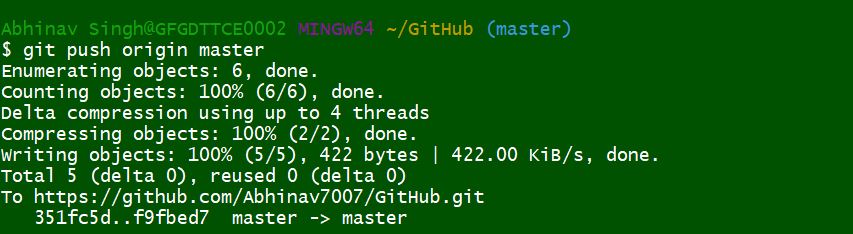
After making changes to your local repository, you'll want to push those changes to the remote repository so that others can access and collaborate on them. This can be done using the git push command.
By default, Git will push changes from the current branch to the same branch in the remote repository:
git push origin <branch-name>👁 Pushing to a Git RepositorySpecify the branch name in the push command to push changes to the correct branch in the remote repository.
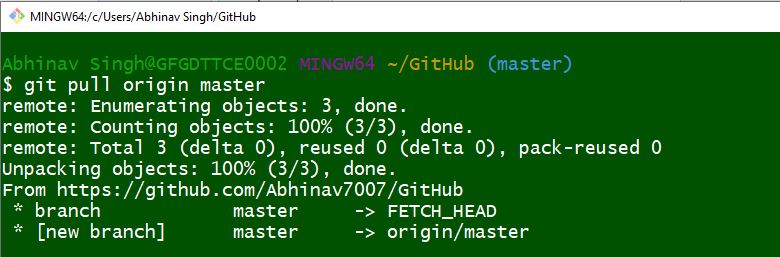
Pulling or fetching retrieves updates from the central repository to synchronize the local repository with the latest changes using git pull or git fetch.
👁 Pulling from a remote repositoryBest practices in Git helps maintain a clean workflow and improves collaboration in development projects.