|
VOOZH | about |
|
VOOZH | about |
Flutter is an amazing tool for developing cross-platform applications using a single code base. While Flutter is useful, it gets even better when you add Firebase. In this article, we'll discuss how to implement the Email/Password Authentication process in Flutter, using Firebase.
In this article, we'll cover the following Flutter development aspects:
Note: Configure Firebase in your Flutter application, before diving into Firebase Authentication. Check this link for the initial firebase setup with flutter.
Now, let's look into the implementation.
Before any Firebase services can be used, you must first install the firebase_core plugin, which is responsible for connecting your application to Firebase. Add the plugin to your pubspec.yaml file. Also, add a few supporting plugins which is used to deal with the authentication flow.
project/lib/pubspec.yaml
dependencies:
 flutter:
 sdk: flutter

firebase_core: "0.5.2"
firebase_auth: "^0.18.3"
provider: ^4.3.2+2
cloud_firestore: ^0.14.3
font_awesome_flutter: ^8.10.0
Install the plugin by running the following command from the project root:
$ flutter pub getTo initialize Firebase, call the .initializeApp() method on the Firebase class, as described in the below code. This method is asynchronous and returns a Future, so we need to ensure it has completed before displaying our main application. Updating the main( ) method of main.dart
project/lib/main.dart
Future<void> main() async {
 WidgetsFlutterBinding.ensureInitialized();
 await Firebase.initializeApp();
 runApp(MyApp());
}
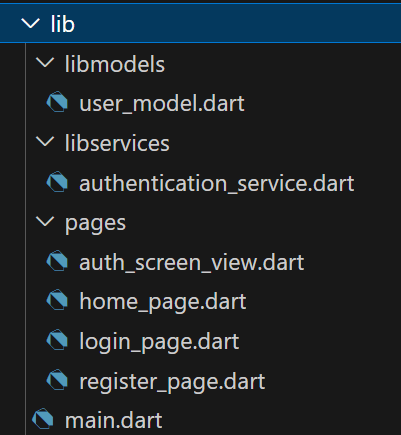
Following below folder structure to process forward.
/libservices/authentication_service.dartCreate a new folder as services, and inside it a new dart file as authentication_service.dart, it will contain all the authentication logic, which in case help us to separate the UI logic.
authentication_service.dart
/libmodels/user_model.dartThe user_model.dart is just a Plain Old Dart Object Strategy, which is used to convert the user model into a Map and also to retrieve it as a Map like it's a JSON object basically.
Below are the methods used in the authentication_service.dart file:
Registering the AuthenticationService methods as Provider, in our main.dart file.
Project/lib/main.dart
The AuthenticationWrapper class of main.dart, checks the state of the user. If the user is not Logged-In it will display the AuthScreenView( ), If the user is Logged-In it will display the HomePage( ).
/lib/pages/auth_screen_view.dartAuthScreenView is just a pageview, which deals with switching between the LoginPage() and RegisterPage() .
auth_screen_view.dart
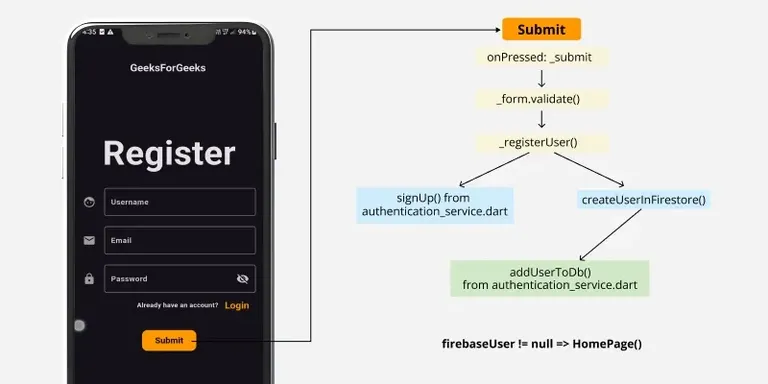
/lib/pages/register_page.dartregister_page.dart:
Output:
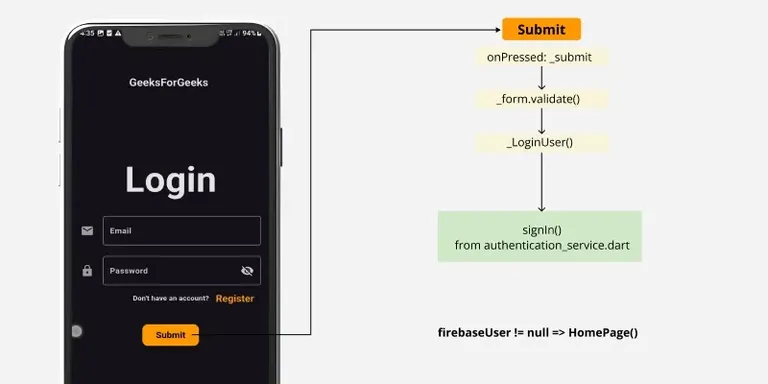
The LoginPage is exactly similar to the RegisterPage, the only difference is, the LoginPage is having only two TextFormField (For email and password) and while submitting it triggers signIn() method of authentication_service.dart
/lib /pages/login_page.dartlogin_page.dart:
Output:
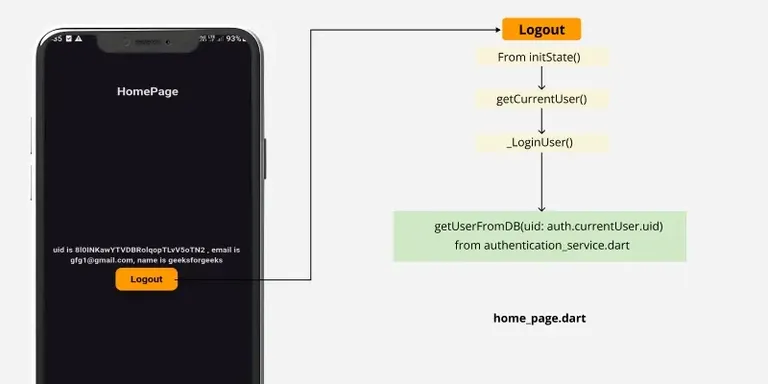
The HomePage will be displayed when the firebaseUser != null, checking from main.dart
lib/pages/home_page.dart
Output:
Final Output: