We will be building a Magic 8-Ball app that will give you the answers to all fun, tricky questions (basically, it is a fun game app that will change its state of image using Textbutton in Stateful widgets). For this, we will use Stateless and Stateful Flutter widgets and a Textbutton.
Steps to build the Magic 8-Ball App in Flutter Step 1 : Create a new flutter application Create a new Flutter application using the command Prompt. To create a new app, write the below command and run it.
flutter create app_name To know more about it refer this article: Creating a Simple Application in Flutter
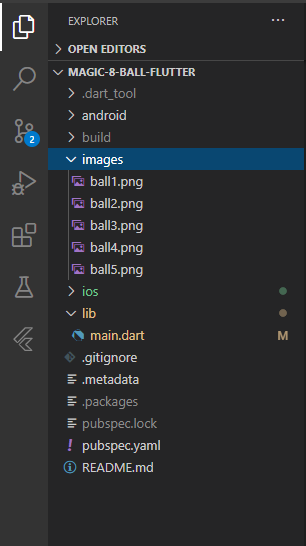
Step 2 : Store Images Download the images below, create an image folder, and add all images to that folder.
👁 Image
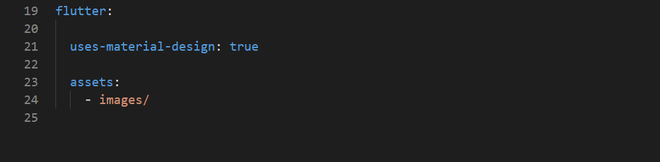
Step 3 : Update the pubspec.yaml Now, include the images in pubspec.yaml file to use them in the app.
Note: Use proper indentation, otherwise your images will not be included.
👁 Image
Step 4 : Working with the main.dart file Now, add the following code in the main.dart file:
main.dart:
Output: Explanation of main.dart
The code begins by importing the necessary packages: Flutter’s Material library is used to create the user interface. dart:math package is used for generating random numbers. Code Overview Main Function: The main() function initializes the Flutter app by creating an instance of MaterialApp and calling runApp() to start the app. The app's home page is set to BallPage. BallPage: BallPage is a stateless widget that defines the structure of the main screen. The build() method returns a Scaffold widget that provides the structure of the UI, including: backgroundColor: Set to a light green color. AppBar: A top navigation bar with the title "GeeksforGeeks." body: Contains a Ball widget, which handles the main functionality of the app. Ball Widget: Ball is a stateful widget, meaning it can change its state during the app's lifecycle. The state is managed by the _BallState class. Within _BallState, an integer variable ballNumber is initialized to 1. Building the UI: The build() method of _BallState returns a Center widget containing a TextButton. When the TextButton is pressed, the onPressed callback is triggered, which calls setState() to update ballNumber with a random value between 1 and 5. The Image.asset widget displays an image corresponding to the current ballNumber. Running the App: When the app is running, it displays a screen with a green background and an AppBar at the top. A ball imagFlutter