|
VOOZH | about |
|
VOOZH | about |
The provider package is an easy to use package which is basically a wrapper around the InheritedWidgets that makes it easier to use and manage. It provides a state management technique that is used for managing a piece of data around the app.
The basic classes available in the provider package are -
ChangeNotifierProvider(
 create: (context) => DataModel(),
 child: ...
)
@override
Widget build(BuildContext context) {
 return Consumer<DataModel>(
 builder:
 (context, data, child) => Column(children: [child!, Text(data.first)]),
 child: Text('Static widget'), // This stays constant
 );
}
Constructors
FutureProvider<T>(
 {Key key,
 @required Create<Future<T>> create,
 T initialData,
 ErrorBuilder<T> catchError,
 UpdateShouldNotify<T> updateShouldNotify,
 bool lazy,
 TransitionBuilder builder,
 Widget child}
)
This creates a Future from create and subscribes to it.

FutureProvider.value(
 {Key key,
 @required Future<T> value,
 T initialData,
 ErrorBuilder<T> catchError,
 UpdateShouldNotify<T> updateShouldNotify,
 TransitionBuilder builder,
 Widget child}
 )
This constructor notifies the changed values to the FutureProvider children.

Ex: FutureProvider<Model>(create: (context) =>
 Model(),)
MultiProvider(
 providers: [
 Provider<Model1>(create: (context) => Model1()),
 StreamProvider<Model2>(create: (context) => Model2()),
 FutureProvider<Model3>(create: (context) => Model3()),
 ],
 child: someWidget,
)
Constructor
ProxyProvider(
 {Key key,
 Create<R> create,
 @required ProxyProviderBuilder<T, R> update,
 UpdateShouldNotify<R> updateShouldNotify,
 Dispose<R> dispose, bool lazy,
 TransitionBuilder builder,
 Widget child}
)
This initializes key for subclasses.
Constructors
StreamProvider<T>(
 {Key key,
 @required Create<Stream<T>> create,
 T initialData,
 ErrorBuilder<T> catchError,
 UpdateShouldNotify<T> updateShouldNotify,
 bool lazy,
 TransitionBuilder builder,
 Widget child}
)
This creates a stream using create and subscribes to it.

StreamProvider.value(
 {Key key,
 @required Stream<T> value,
 T initialData,
 ErrorBuilder<T> catchError,
 UpdateShouldNotify<T> updateShouldNotify,
 bool lazy,
 TransitionBuilder builder,
 Widget child}
)
This constructor notifies the changed values to the StreamProvider children.

Ex: StreamProvider<Model>(create: (context) =>
 Model(),)
ValueListenableProvider<T>.value(
 {Key key,
 @required ValueListenable<T> value,
 UpdateShouldNotify<T> updateShouldNotify,
 TransitionBuilder builder,
 Widget child}
)
This constructor shows the changed values to its children.
Apart from these, there are a number of other classes that are available depending upon the need but these are the most used. Let's understand the concept with an example.
Create a new Flutter application using the command Prompt. To create a new app, write the following command and run it.
flutter create app_nameTo know more about it refer this article: Creating a Simple Application in Flutter
To add the dependency to the pubspec.yaml file, add provider as a dependency in the dependencies part of the pubspec.yaml file, as shown below:
Now, run the command below in the terminal.
flutter pub getOr
Run the command below in the terminal.
flutter pub add providerTo use libraries, import all of them in the respective .dart file,
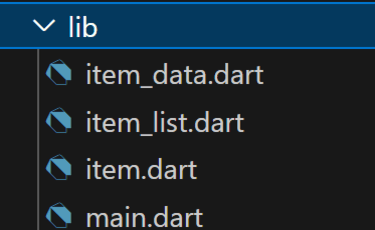
import 'package:provider/provider.dart';Follow the file structure below for better understanding.
First of all, we will be defining a model library inside of the lib folder which consists of item.dart and item_data.dart. Apart from these, the lib will have 3 more dart files namely the main.dart, home.dart, and item_list.dart.
The item.dart is a simple class that defines what are the attributes that the item class will hold and a toggle method.
- :
The item_data.dart contains a list that will hold the data of the Item class defined above. There are methods to perform tasks such as add, toggle, and remove an item from the list.
- :
The item_list.dart creates a ListView builder of the data coming from the list. It uses the Consumer to get the data.
- :
- : Used to show an AlertDialog for adding a list member.
-:
The main.dart has a ChangeNotifierProvider which acts as a parent to the material app. As our app is quite small we have defined the provider at the top only. In case your app is quite large you can place the provider at the top of the widget that needs the data and not at the top.
Output:
Apart from Provider, there are other State Management tools also available such as -