|
VOOZH | about |
|
VOOZH | about |
In this article, we are going to learn how state management is achieved in Flutter using providers. But before that, we need to know what a state is. As we know that everything in Flutter is a widget, and there are mainly two kinds of widgets: Stateless Widgets and Stateful Widgets. Stateless widgets are those widgets whose state cannot be changed once created. It can only be when it is reinitialized. On the other hand, Stateful widgets are dynamic, which means their state can change at any time throughout their lifecycle without reinitializing them.
State is the information that is read once the widget is built. It can be changed or modified throughout the lifecycle of the app. According to the official documentation of Flutter, Flutter is declarative, which means that the UI in Flutter is a function of the state. That means the UI of a Flutter app is built based on the state of the widgets.
In the case of a stateful widget, the setState() method is used to change the state and that forces the UI to rebuild. However, it is not an efficient method for state management and will learn state management using the provider package which is a better state management technique in the latter half of this article.
Now, before using the provider package, we need to understand the three basic concepts about it:
It is a class that provides notifications for changes to its listeners. It is a simpler way to use for a small number of listeners. It uses the notifyListeners() method to notify its listeners about changes in the model.
For example, let us create a class CounterModel which will extend ChangeNotifier, and it will have a function incrementCounter() which will increment the counter and notify its listeners about the changes using notifyListeners(), and UI will get updated.
In simple terms, ChangeNotifierProvider is just a widget that provides anContext instance of a ChangeNotifier. The code snippet below will give you a better idea of how it works.
It is a widget that contains a builder function and is used to build the UI based on changes in the model. The builder function will have three parameters context, counter, and child.
Use code below, To call IncrementCounter() that is in CounterModel class that used to update the state i.e, counter value.
Let's implement a provider in a simple counter Flutter app.
Create a new Flutter application using the command Prompt. To create a new app, write the following command and run it.
flutter create app_nameTo know more about it refer this article: Creating a Simple Application in Flutter
To add the dependency to the pubspec.yaml file, add provider as a dependency in the dependencies part of the pubspec.yaml file, as shown below:
Now, run the command below in the terminal.
flutter pub getOr
Run the below command in the terminal.
flutter pub add providerTo use libraries, import all of them in the respective .dart file.
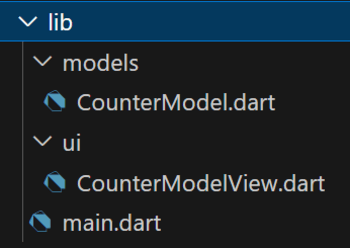
import 'package:provider/provider.dart';Follow the folder structure below for better understanding.
CounterModel.dart contains a class named CounterModel that extends ChangeNotifier, and that contains
CountModel.dart:
Add the boilerplate code below in main.dart to initialize the CounterModel using ChangeNotifierProvider in the main function and which contains below attributes.
main.dart:
CounterModelView.dart contains the UI part of the app, which gets the updated state using a Consumer that contains the following attributes:
CounterModelView.dart:
Output:
Explanation of the above Program:
The app flow goes like this, when we initialize the class with particular parameter, like CounterModel(0) then the constructor updates the value of private variable and next that updated value is again reinitialized to getter variable, so that we can directly call getter variable like this counterModel.counter for the updated state, if we call CounterModel(1) then the private variable will initialize to value '1', then we will see 1 in UI. When we call the incrementCounter() method, the state is updated, and it notifies to Consumer that the counter has been incremented, so the value is updated in the UI.