VOOZH about

URL: https://www.geeksforgeeks.org/flutter/persist-data-with-sqlite-in-flutter/

⇱ Persist Data with SQLite in Flutter - GeeksforGeeks


  • Courses
  • Tutorials
  • Interview Prep

Persist Data with SQLite in Flutter

Last Updated : 23 Jul, 2025

SQLite is an open-source computer database used to store pieces of information and perform various operations, such as adding, deleting, and updating. SQLite doesn't need a server or backend code; all the data is saved to a computer file within the device, or we can say it is stored locally. 

Demo Video

Step-by-Step Implementation

Step 1: Create a new Flutter Application

Create a new Flutter application using the command Prompt. To create a new app, write the following command and run it.

flutter create app_name

To know more about it refer this article: Creating a Simple Application in Flutter.

Step 2: Adding the Dependency

To add the dependency to the pubspec.yaml file, add path and sqflite in the dependencies part of the pubspec.yaml file, as shown below:

Now, run the command below in the terminal.

flutter pub get

Or

Run the command below in the terminal.

flutter pub add path sqflite

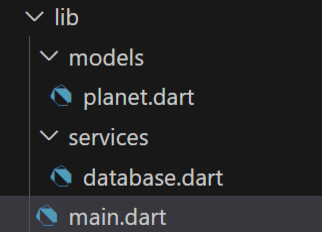
Step 3: File Structure

Follow the file structure below for better understanding.

👁 file_structure


Step 4: Defining the Planet Model

Define the model class for the data that needs to be stored. This model class has data members like id, name, age, distancefromsun, and a constructor that initializes the data members.

planet.dart:


Step 5: Defining the Database Class

The Database class contains all the following functions,

  • initializedDB, which gets the default data path using the getDatabasePath method of SQLite, opens the database in it using the openDatabase method of SQLite, and then creates the table planets.
  • insertPlanets method takes the list of planets and inserts them into the planets table one by one.
  • retrievePlanets returns the list of planets.
  • deletePlanets method deletes a planet from the database by using its primary key ID.

database.dart:


Step 6: Defining Main File

  • In the main file, we call the main() function and run the runApp().
  • The initState method adds the data and calls the insertPlanets method.
  • We then simply display the data on the user screen.

main.dart:


Complete Source Code

Output:

Comment

Explore