|
VOOZH | about |
|
VOOZH | about |
The inline and block elements of HTML are one of the important areas where web developers often get confused because they were unable to know which are inline and block elements which may cause clumsiness in a webpage in case he assumes some element to be a block but it is an inline element which causes next element comes next to it.
So let us see the differences between the inline and block elements in HTML and the different frequently used inline and block HTML elements.
Block elements: They consume the entire width available irrespective of their sufficiency. They always start in a new line and have top and bottom margins. It does not contain any other elements next to it.
Examples of Block elements:
HTML 5 Semantic block elements:
Example:
Output: From the above output, 3 different block elements with different background colour and a border are used to show how the block elements occupy the whole width and the margin they leave. Three-block elements <h1>,<p>,<div> are used in the above output.
Inline elements: Inline elements occupy only enough width that is sufficient to it and allows other elements next to it which are inline. Inline elements don't start from a new line and don't have top and bottom margins as block elements have.
Examples of Inline elements:
Example:
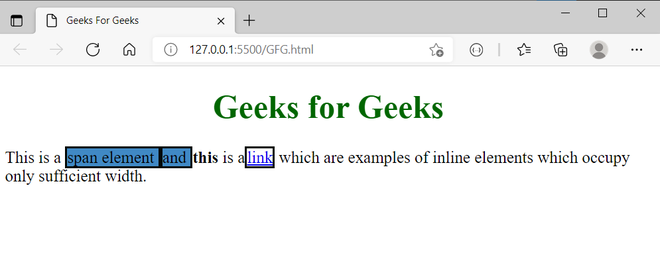
Output:
From the above output, three different inline elements are used is <span>, <b>,<a> that occupied only enough width and allowed other elements to settle at their next.
Difference between Inline and Block elements:
| Inline Elements | Block Elements |
|---|---|
| Inline elements occupy only sufficient width required. | Block Elements occupy the full width irrespective of their sufficiency. |
| Inline elements don't start in a new line. | Block elements always start in a line. |
| Inline elements allow other inline elements to sit behind. | Block elements doesn't allow other elements to sit behind |
| Inline elements don't have top and bottom margin | Block elements have top and bottom margin. |