|
VOOZH | about |
|
VOOZH | about |
Animated shared layout using framer-motion and React.js involves items that toggle open and close show some animation/transitions and switch the states when clicked.
To design an Animated shared layout using framer-motion and React.js we will be using the AnimatedSharedLayout along with motion and AnimatePresence components for showing transitions and useState hook to store and render the components after state changes.
Step 1: Create a React application using the following command:
npx create-react-application demoStep 2: After creating your project folder i.e. demo, move to it using the following command
cd animated-layoutStep 3: Add the npm packages you will need during the project :
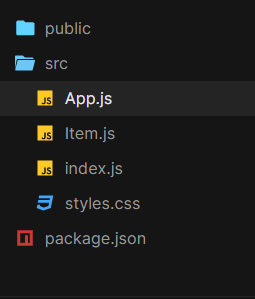
npm i framer-motionProject Structure:
The updated dependencies in packages.json file.
"dependencies": {
 "@testing-library/jest-dom": "^5.17.0",
 "@testing-library/react": "^13.4.0",
 "@testing-library/user-event": "^13.5.0",
 "framer-motion": "^10.16.4",
 "react": "^18.2.0",
 "react-dom": "^18.2.0",
 "react-scripts": "5.0.1",
 "web-vitals": "^2.1.4"
}
Example: This example uses AnimatedSharedLayout and AnimatePresence components to implement the Animated shared layout.
Step to Run Application: Run the application using the following command from the root directory of the project:
npm startOutput: Now open your browser and go to http://localhost:3000/, you will see the following output: