We will build a car rental system using Next.js , a popular React framework that provides server-side rendering and static site generation. This platform will allow users to browse and book vehicles for short-term usage.
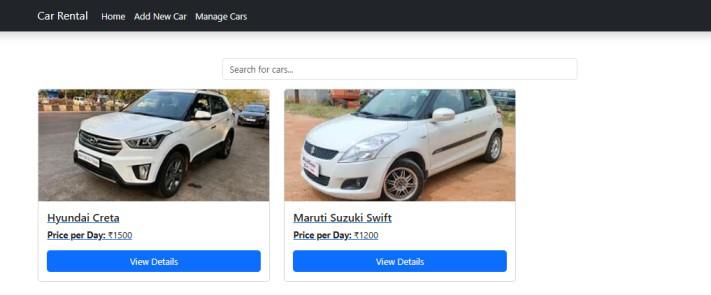
Output Preview: Let us have a look at how the final output will look like.
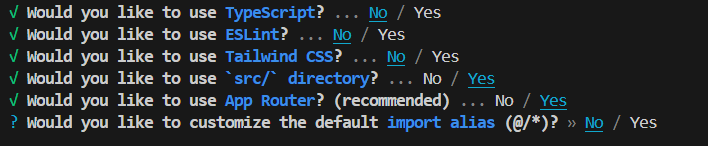
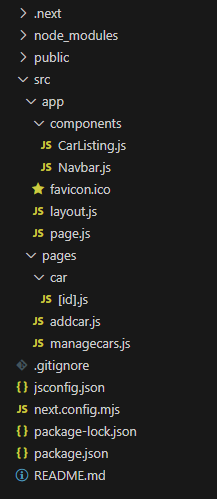
👁 ss Build a Car Rental System Using Next.js Prerequisites Approach to Build a Car Rental System Using Next.js Start by creating a new Next.js application. Design a navigation bar that provides links to different parts of the application, such as the car listing, booking, and user profile pages. Develop a CarListing component to display a grid of car cards. Each card should show basic information like the car model, price, and an image. Create a CarDetail component to display detailed information about a selected car, including features, availability, and contact details. Create managcars page to edit or delete the car details. Create addcar page which will have form to add new car details. Steps to Build a Car Rental System Using Next.js Step 1: Initialized the Nextjs app. npx create-next-app@latest car-rental-system Step 2: It will ask you some questions, so choose as the following 👁 Screenshot-2024-08-11-003348 Setup Step 3: Install the necessary package for your project using the following command. npm install bootstrap npm install @fortawesome/react-fontawesome @fortawesome/free-solid-svg-icons Project Structure 👁 file Folder Structure Dependencies "dependencies": { "@fortawesome/free-solid-svg-icons": "^6.6.0", "@fortawesome/react-fontawesome": "^0.2.2", "bootstrap": "^5.3.3", "next": "14.2.5", "react": "^18", "react-dom": "^18" } Example: Create the required files and write the following code.
Output