Explain the Benefits and Challenges of Using WebSockets in Redux Applications.
Last Updated : 23 Jul, 2025
WebSockets provide a full-duplex communication channel over a single TCP connection, allowing for real-time, bidirectional communication between the client and server. When integrated with a Redux application, WebSockets can enable continuous data updates and improve user experience by providing real-time functionalities.
Benefits of Using WebSocket in a Redux Application
Real-Time Data Updates: WebSockets allow for real-time data transfer, ensuring that the application state is always up-to-date. This is particularly beneficial for applications requiring live data, such as chat apps, stock tickers, or online gaming.
Reduced Latency: With WebSockets, data can be sent and received instantly, without the need for repeated HTTP requests. This reduces latency and improves the responsiveness of the application.
Efficient Resource Usage: WebSockets maintain a single connection open for the duration of the session, reducing the overhead associated with opening and closing multiple connections.
Bidirectional Communication: Both the client and server can send messages independently, enabling more interactive and dynamic applications.
Challenges of Using WebSockets in a Redux Application
Complexity in State Management: Managing real-time data updates and ensuring that the Redux state remains consistent can be challenging, particularly in larger applications.
Error Handling: Handling errors and connection issues gracefully requires additional effort and can complicate the application logic.
Scalability: While WebSockets are efficient, managing a large number of concurrent WebSocket connections can be challenging and may require additional infrastructure or optimizations.
Security Considerations: WebSockets are susceptible to certain security issues, such as man-in-the-middle attacks. Ensuring secure connections (using wss://) and implementing proper authentication and authorization mechanisms are crucial.
Features
Real-Time Communication: WebSockets enable instant data transmission between the server and client, providing real-time updates.
Full-Duplex Communication: Both client and server can send and receive messages simultaneously.
Efficient Resource Usage: WebSockets use a single connection, reducing the overhead associated with establishing multiple connections.
Scalability: Suitable for applications requiring frequent updates, such as chat applications, live sports scores, or financial tickers.
Steps to Create a Redux Application with WebSockets
Step 1: Create a new React project
npx create-react-app websocket-redux-app
 cd websocket-redux-app
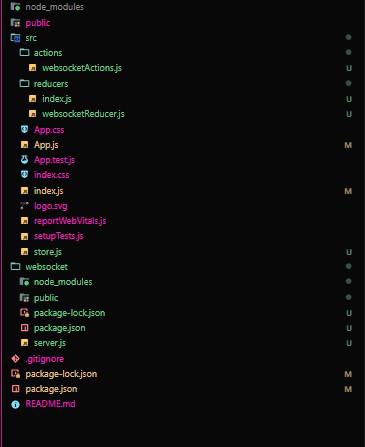
Step 5: Setting Up Redux and Connecting to WebSocket in a Component.
Example: This Illustrates creation of redux, reducers, actions, websocket reducers, connecting websockets in a component.
Running the Project
Step 1: Start the WebSocket server
cd websocket
node server.js
Step 2: Start the React application
cd websocket-redux-app
npm start
Output: After setting up the application, running the React app should display incoming WebSocket messages in real-time. Each message from the server will be appended to the list in the component.


-(1).gif)