|
VOOZH | about |
|
VOOZH | about |
GreenSock Animation Platform (GSAP) is a powerful JavaScript library that is used by front-end developers to create robust timeline-based animations. GSAP is used to animate anything that can be accessed with JavaScript.
Syntax:
gsap.fromTo(target_element, { from_parameter }, { To_parameter, scrollTrigger: {
 trigger: target_element
}})
Step 1: Create a React application using the following command:
npx create-react-app foldernameStep 2: After creating your project folder i.e. foldername, move to it using the following command:
cd foldernameStep 3: Installing Required module
npm install gsapStep 4: Import the GSAP library into your App.js file:
import gsap from 'gsap';
import { ScrollTrigger } from "gsap/ScrollTrigger";
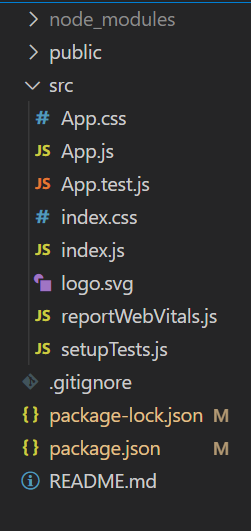
Project Structure:
👁 Screenshot-2023-06-06-223401
The updated dependencies in package.json file will look like:
"dependencies": {
 "gsap": "^3.12.3",
 "react": "^18.2.0",
 "react-dom": "^18.2.0",
 "react-scripts": "5.0.1",
 "web-vitals": "^2.1.4",
}
Example 1: we will try to animate the element's scale when it comes into view while scrolling. In the code, the scale is set to 0 in the "from parameter", and in the "to parameter", it is set to 1.4. That means when the element will come into view while scrolling, the size of the element will update from 0 to 1.4 in the duration of 1 second.
Steps to run: Start the server by typing the following command in your terminal:
npm start
Output: Now open your browser and go to http://localhost:3000/, you will see the following output:
Example 2: We will animate several components by using an array of refs. For that, there is the addtoRefs function which keeps adding the references of the box components one by one to the array when they come into view while scrolling
Steps to Run: Start the server by typing the following command in your terminal:
npm start
Output: Now open your browser and go to http://localhost:3000/