|
VOOZH | about |
|
VOOZH | about |
Managing asynchronous actions using Redux Thunk is a prevalent approach in Redux-based applications. Redux Thunk serves as middleware, enabling the creation of action creators that return functions rather than action objects. These functions can execute asynchronous tasks, like fetching data from an API, prior to dispatching actions to modify the Redux store.
We generally assume that Redux reducers must not contain "side effects". A "side effect" is any change to state or behaviour that can be seen outside of returning a value from a function.
Common examples of side effects are:
Despite these restrictions, practical applications inevitably require such functionalities at some point. In such case we can use middleware.
Step 1: Create a new React project using Create React App or any other method you prefer.
npx create-react-app userfetchproStep 2: Install Redux ,React-Redux and redux-thunk packages using npm or yarn.
npm install redux react-redux redux-thunk
or
yarn add redux react-redux redux-thunk
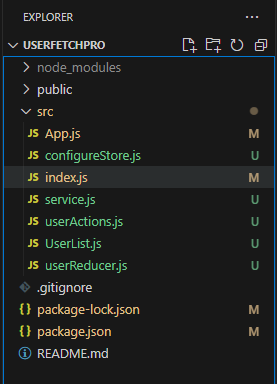
Below is a concise project structure for a counter application developed using Redux:
 "dependencies": {
 "@testing-library/jest-dom": "^5.17.0",
 "@testing-library/react": "^13.4.0",
 "@testing-library/user-event": "^13.5.0",
 "react": "^18.3.1",
 "react-dom": "^18.3.1",
 "react-redux": "^9.1.2",
 "react-scripts": "5.0.1",
 "redux": "^5.0.1",
 "redux-thunk": "^3.1.0",
 "web-vitals": "^2.1.4"
 },
import { createStore, applyMiddleware } from 'redux';
import thunk from 'redux-thunk';
// Assuming you have a rootReducer
import rootReducer from './reducers';

const store = createStore(
 rootReducer,
 applyMiddleware(thunk)
);
const fetchData = () => {
 return async (dispatch) => {
 dispatch({ type: 'FETCH_DATA_REQUEST' });

 try {
 const response = await fetch('https://api.example.com/data');
 const data = await response.json();
 dispatch({ type: 'FETCH_DATA_SUCCESS', payload: data });
 } catch (error) {
 dispatch({ type: 'FETCH_DATA_FAILURE', payload: error.message });
 }
 };
};
import { useDispatch } from 'react-redux';
import { fetchData } from './actions';

const MyComponent = () => {
 const dispatch = useDispatch();

 useEffect(() => {
 dispatch(fetchData());
 }, [dispatch]);

};
Example: Below is an example of How to mock the Redux store for testing purposes.
npm start
or
yarn start
Output: