|
VOOZH | about |
|
VOOZH | about |
Need of Validating Props in React JS Props are used to pass the read-only attributes to React components. For the proper functioning of components and to avoid future bugs and glitches it is necessary that props are passed correctly. Hence, it is required to use props validation to improve the react component's performance.
Syntax: The syntax to use propTypes is shown below.
class Component extends React.Component {
 render() {}
}
Component.propTypes = {/* definition goes here*/};
Validators: The propTypes object contains a list of validators for basic data types, some of them are:
Step 1: Create a React application by typing the following command in the terminal:
npx create-react-app PropValidationStep 2: After creating your project folder i.e. PropValidation, move to it using the following command:
cd PropValidationStep 3: After creating the ReactJS application, Install the required modules using the following command.
npm install prop-typesProject Structure:
The updated dependencies in package.json file will look like:
"dependencies": {
 "prop-types": "^15.8.1",
 "react": "^18.2.0",
 "react-dom": "^18.2.0",
 "react-scripts": "5.0.1",
 "web-vitals": "^2.1.4",
}
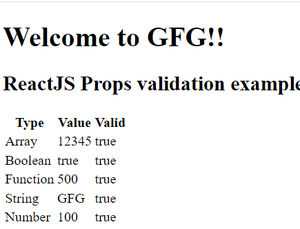
Example: Now write down the following code in the App.js file. Here, App is our default component where we have written our code. Here we have defined the props types for our component as well as the default props.
Step to Run Application: Run the application using the following command from the root directory of the project:
npm startOutput: Now open your browser and go to http://localhost:3000: