VOOZH about

URL: https://www.geeksforgeeks.org/reactjs/how-to-create-a-translucent-text-input-in-reactjs/

⇱ How to create a translucent text input in ReactJS ? - GeeksforGeeks


  • Courses
  • Tutorials
  • Interview Prep

How to create a translucent text input in ReactJS ?

Last Updated : 23 Jul, 2025

We are going to learn how to create a translucent text input in React JS. We are going to create a translucent animated text input using framer-motion and styled components.

Prerequisites:

Approach: 

  • We are going to create a translucent animated text input using framer-motion and styled components.
  • Wrapper, Input, Label, Underline are the styled components used to make the text input box collectively in Component.jsx file.
  • In Component.jsx file, we use framer-motion with custom animation variants from the Component.motion.js file to animate the text input box.
  • React useState hook is used to manage the state of value that is used as a placeholder attribute & also to set it as a label when active.
  • Framer-motion useCycle hook is similar to react useState hook. It cycles through a series of visual properties used for animation. It is used to toggle between or cycle through animation variants.

Steps to create React Application and Installing Modules:

Step 1: Now, you will start a new project using create-react-app so open your terminal and type:

npx create-react-app translucent-input-box

Step 2: After creating your project folder i.e. translucent-input-box , move to it using the following command.

cd translucent-input-box

Step 3: Add the npm packages you will need during the project:

npm install framer-motion styled-components

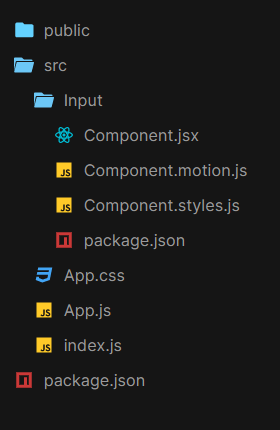
Project Structure:

👁 Image
Project structure

The updated dependencies in package.json file will look like:

"dependencies": {
"react": "^18.2.0",
"react-dom": "^18.2.0",
"react-scripts": "5.0.1",
"web-vitals": "^2.1.4",
}

Example: Below is the implementation of the above approach

Step to Run Application: Run the application using the following command from the root directory of the project :

npm start

Output: Now open your browser and go to http://localhost:3000

Comment
Article Tags: