|
VOOZH | about |
|
VOOZH | about |
ReactJS is one of the most popular JavaScript libraries for building user interfaces. It allows you to create dynamic, reusable UI components and efficiently manage state and events. In this article, we'll walk through the steps to create a basic website using ReactJS.
To create a website in React JS, we will first initialize a React Project using the CRA command. We will define the React Components in JSX which is a syntax extension of JavaScript. Return the Page in the App components using the return keyword with the JSX code. Define the styles for components in the CSS file and import them into the project.
Step 1: Create React Project
npm create-react-app myreactappStep 2: Change your directory and enter your main folder charting as
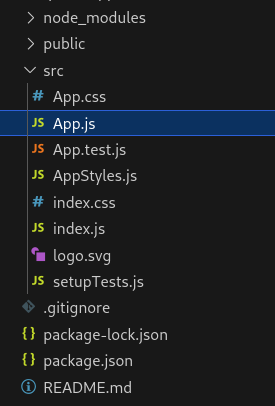
cd myreactappProject Structure
👁 Screenshot-from-2023-11-10-14-57-33
Now let's create a simple webpage in ReactJS
Step to Run Application: Run the application using the following command from the root directory of the project:
npm startOutput: This output will be visible on the http://localhost:3000/ on the browser window.
Ad that's it. We have successfully created a React Application.