|
VOOZH | about |
|
VOOZH | about |
In, this article, we will see how we can rotate a text while Scrolling to give a nice user experience by using an npm package react-scroll-rotate.
Syntax:
<ScrollRotate> </ScrollRotate>
We wrap the text within these tags which we want to show effects.
Step 1: Create the react project folder, for that open the terminal, and write the command
npm create-react-app projectStep 2: After creating your project folder(i.e. project), move to it by using the following command.
cd projectStep 3: now install the dependency react-scroll-rotate by using the following command:
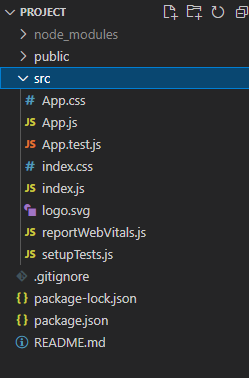
npm i react-scroll-rotateProject Structure:
👁 ImageThe updated dependencies in package.json file will look like:
"dependencies": {
 "react": "^18.2.0",
 "react-dom": "^18.2.0",
 "react-scripts": "5.0.1",
 "react-scroll-rotate": "^0.0.7",
 "web-vitals": "^2.1.4",
}
Example: In the App.js file, we are creating a simple welcome message where we will wrap the word geek within the ScrollRotate tags, to use it first we have imported it from react-scroll-rotate
Step to Run Application: Run the application using the following command from the root directory of the project.
npm start
Output: