|
VOOZH | about |
|
VOOZH | about |
In Next.js, the middleware.js file is one powerful tool to add custom functionality through the request/response cycle of the application. It is able to run some code before finalizing a request, which may involve actions such as authentication, logging, or even rewriting of URLs. Middleware can be applied globally, per route, or even to groups of routes.
Table of Content
middleware.js in Next.js allows you to execute code before a request is completed. It provides a way to control the flow of requests, modify incoming requests or responses, and even redirect users based on certain conditions. Middleware runs before the request reaches the final destination, such as a page component or API route.
Here's a basic syntax example of a middleware function:
import { NextResponse } from 'next/server';

export function middleware(request) {
 // Middleware logic here
 return NextResponse.next();
}
The middleware function is the core of middleware.js. It receives the request object as an argument and is expected to return a NextResponse object, which determines the outcome of the request.
export function middleware(request) {
 // Example: logging the request URL
 console.log('Request URL:', request.url);

 // Example: redirecting based on the path
 if (request.nextUrl.pathname === '/old-path') {
 return NextResponse.redirect('/new-path');
 }

 return NextResponse.next();
}
You can optionally export a config object to define specific behaviors for your middleware, such as applying it to specific routes.
export const config = {
 matcher: '/about/:path*', // Apply middleware to specific routes
};
The matcher property in the config object specifies which routes the middleware should apply to. It uses a pattern matching syntax to target specific paths.
export const config = {
 matcher: ['/about/:path*', '/dashboard/:path*'],
};
Params allows you to extract dynamic parameters from the URL in your middleware.
export function middleware(request) {
 const { params } = request.nextUrl;
 console.log('Dynamic segment:', params.path);

 return NextResponse.next();
}
The request object in middleware.js represents the incoming HTTP request and provides detailed information about it. This object is crucial for performing operations like logging, validation, and modification of requests.
export function middleware(request) {
 console.log('Request method:', request.method);

 return NextResponse.next();
}
The NextResponse class in Next.js makes it easy to create and manage HTTP responses when using middleware. With NextResponse, you can handle things like redirects, rewrites, or custom responses right in your middleware code. It simplifies how you manage responses, making the code cleaner and more straightforward to understand.
export function middleware(request) {
 return NextResponse.redirect('/new-path');
}
The middleware runtime is determined by the environment where your Next.js app is running. Middleware can be run in Edge Functions, which are optimized for low-latency, or in the Node.js runtime.
export const config = {
 runtime: 'edge', // 'nodejs' for Node.js runtime
};
Middleware was introduced in Next.js 12, offering new ways to control the flow of requests. Each subsequent version has introduced improvements and bug fixes related to middleware.
npx create-next-app@latest my-nextjs-app --typescript√ Would you like to use TypeScript? ... Yes
√ Would you like to use ESLint? ... Yes
√ Would you like to use Tailwind CSS? ... Yes
√ Would you like to use `src/` directory? ... Yes
√ Would you like to use App Router? (recommended) ... Yes
√ Would you like to customize the default import alias (@/*)? ... No
After the project is created, navigate to the project directory:
cd my-nextjs-appthe updated dependencies in package.json file are:
"dependencies": {
 "next": "14.2.5",
 "react": "^18",
 "react-dom": "^18"
},
"devDependencies": {
 "@types/react": "18.3.4",
 "eslint": "^8",
 "eslint-config-next": "14.2.5",
 "postcss": "^8",
 "tailwindcss": "^3.4.1"
}
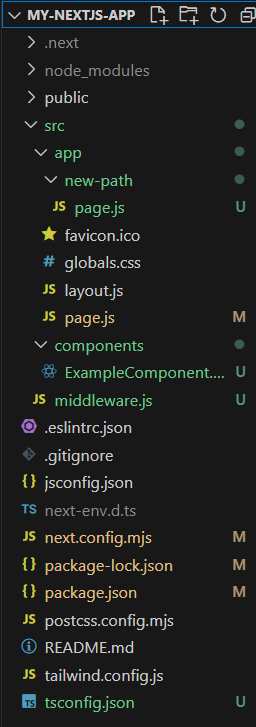
Create a middleware.js file inside the src/ directory
Explanation:
Output:
Middleware is very powerful in Next.js, and you will be able to handle a request before it even reaches your server-side logic. Regardless of whether you are redirecting the users, handling the authentication, or logging requests, middleware provides the flexibility for you to control the flow of an application at a low level. Through effective understanding and implementation of middleware, one can easily optimize their Next.js application towards improved performance and greater user experience.