 |
VOOZH | about |
|
VOOZH | about |
Next.js allows you to configure routing and rendering for multiple languages, supporting both translated content and internationalized routes. This setup ensures your site adapts to different locales, providing a seamless and localized experience for users across various languages.
Internationalization (i18n) in Next.js allows you to build multi-language websites by managing routes and content based on the user's language preference. With Next.js's built-in support for i18n, you can create a seamless experience for users across different locales.
In internationalization, users can design and develop applications to support multiple languages in a single platform. NextJS, a popular framework of ReactJS applications provides support for internationalization, making it easier for the developer to create multi-language applications.
Step 1: Create a NextJS application using the following command.
npx create-next-app my-i18n-appStep 2: It will ask you some questions, so choose the following.
√ Would you like to use TypeScript? ... No
√ Would you like to use ESLint? ... Yes
√ Would you like to use Tailwind CSS? ... No
√ Would you like to use `src/` directory? ... Yes
√ Would you like to use App Router? (recommended) ... Yes
√ Would you like to customize the default import alias (@/*)? ... Yes
Step 3: After creating your project folder i.e. gfg, move to it using the following command.
cd my-i18n-appStep 4: Intialize required dependencies:
npm install next-i18next
The updated dependencies in package.json file will look like:
"dependencies": {
 "next-i18next": "^15.2.0",
 "next": "14.1.0",
 "react": "^18",
 "react-dom": "^18"
}
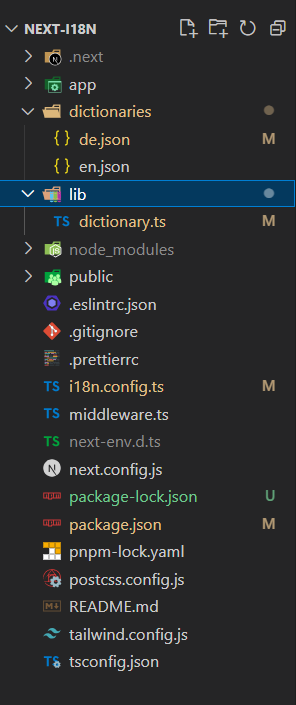
Example: We will start with the file code form respective defined dictionaries and will get into all different files and config files.
Output:
Using internationalization in nextjs you can implement multilingual application easily by just defining the respective library for your required languages.Create your file structure as per recommended by Nextjs and add your dictionaries for languages you want in your application and import it in config file.Follow the above steps to install packages for nextjs and project setup and implementation.Strucutre your project as per the example given and check for any dependencies update and update it as per requirement.

.gif)