|
VOOZH | about |
|
VOOZH | about |
One common feature in many applications is the ability to highlight specific portions of text based on user input. In this article, we will explore how to implement text highlighting functionality using React.js.
The following approach covers how to highlight text input given by users in ReactJS. It is a simple effect you can add to any ReactJS website.
Step 1: Initialize new react project using this command in the terminal
npx create-react-app react-highlight-text
Step 2: Move to the project directory.
cd react-highlight-text
Step 3: Install the dependencies required in this project by typing the given command in the terminal:
npm i --save styled-components
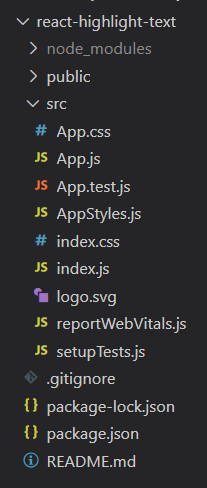
Project Structure:
The updated dependencies in package.json file will look like.
"dependencies": {
 "@testing-library/jest-dom": "^5.17.0",
 "@testing-library/react": "^13.4.0",
 "@testing-library/user-event": "^13.5.0",
 "react": "^18.2.0",
 "react-dom": "^18.2.0",
 "react-scripts": "5.0.1",
 "styled-components": "^6.1.1",
 "web-vitals": "^2.1.4
}
Example: This example implements highlighted text based on user input using the onchange event.
Step to Run Application: Run the application using the following command from the root directory of the project.
npm startOutput: Now open your browser and go to http://localhost:3000/, you will see the following output. See how borderline increases when we enter a text and starts decreasing when we remove the characters one by one.