|
VOOZH | about |
|
VOOZH | about |
In this example, we will see how we can implement the webpage using parallax in React. Parallax involves the movement of background elements at different speeds as the user scrolls, providing a 3D-like experience. This effect adds a visually appealing depth to the webpage as you scroll, making it more interactive and engaging for the user.
Preview of final output: Let us have a look at how the final application will look like.
Step 1: Create a React App
npm create vite@latest my-app --template react
cd my-app
Step 2: Install styled-components and react-parallax
npm install styled-components
npm install react-parallax
Note: A parallax effect is produced by the project using styled-components-styled React components. The sense of depth and immersion is created as the user scrolls down by multiple levels with differing depths moving at varied speeds.
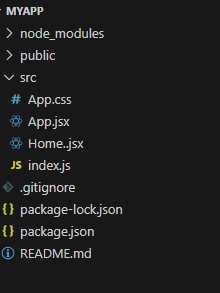
Project Structure:
The updated dependencies in package.json file will look like:
"dependencies": {
 "@vitejs/plugin-react": "^3.0.0",
 "react": "^18.2.0",
 "react-dom": "^18.2.0",
 "react-parallax": "^3.5.1",
 "styled-components": "^6.1.1",
 "vite": "^4.0.0"
}
Example: In this example we will see the implementation of above approach.
Steps to Run the Application:
Step 1: Start Development Server
npm run dev Step 2: Open the browser and navigate to http://localhost:5173.
Output: