|
VOOZH | about |
|
VOOZH | about |
An API key is a unique series of letters and numbers that's a special ID or secret password for an application or user when making a call to an API. API (Application Programming Interfaces) is how two computer programs communicate with one another. Consider an API key a personal secret code you present to a service as proof that you are someone. If the code is correct, the service lets you in; if not, you’re kept out.
An API key is typically a lengthy string, like 12345abcde67890XYZ. It's issued by the service (the provider of the API) to developers or consumers who wish to utilize that API. It's referred to as a "key" because it functions like one – it's like a virtual key that opens the door to some data or functionality of an API
API keys are commonly used in:
For example: Imagine a library card. The library (like an API) gives you a card with a number (like an API key). When you want to borrow a book, you show your card. The library computer checks the number on the card to make sure it's valid and that you’re allowed to borrow books. If everything checks out, you get to take the book home. If not, you can’t borrow books. Similarly, an API key is the “card” you show when an app wants to get data from another service.
API key may seem simple, but they are very crucial in the app and website. Below are some of the most important reasons why API keys are so crucial:
Note: In 2022, a leaked API key exposed 1M+ user records on a fitness app. Hackers used the key to access unsecured endpoints
API keys help in project identification, access control, and request verification. Below is a step-by-step breakdown of how API keys work:
First, a developer or user asks for a key. Usually, you go to the API provider’s website and sign up for an API key (often by creating an account). The provider then generates a unique API key just for you.
API keys are like concert tickets – no ticket, no entry
Now the developer writes their application to use the API. Every time the app sends a request to the API, it attaches the API key to the request. This can be done in different ways – commonly as a header or a parameter in the URL (like https://api.service.com/data?api_key=XYZ123ABC456).
It’s just like showing your ID card or ticket when you try to access something. The key says “Here’s my secret code, please let me in.” Without the key, the API request is like a door knock with no identification.
When the API server receives the request, it looks at the key and checks if it’s valid. The server basically asks: Is this a real key that I’ve issued? Does this key have permission to ask for this data? If the key is missing or doesn’t match any valid keys, the API will refuse the request. This is virtually to a guard checking your ticket, if the ticket is fake or not recognized, you’re nt allowed in. If the key is recognized, the process continues.
If the API key is valid and everything looks good, the server will allow the request and send back the data or perform the action you asked for. You've unlocked the door!. For example, the weather API will return the weather data you requested. If the key is not valid (or you don’t have permission for that data), the server will deny the request, often with an error message saying you’re not authorized
In summary: You get a key, you send the key with your requests, the API checks the key, and if all is well, you get access. This whole exchange happens very quickly behind the scenes every time your app talks to the API.
Example API Key Usage (Google Maps API)
curl -X GET "https://maps.googleapis.com/maps/api/geocode/json?address=New+York&key=YOUR_API_KEYAlso Read: API Keys and their security
API keys are essential for ensuring web application and cloud services API authentication and access control. These keys allow the generation of APIs on multiple platforms. Here, we will explain how to generate an API key using Google Cloud Console.
Sign in to Google Cloud API Console– At first user need to go on the Google Cloud Console which basically manages services on APIs.
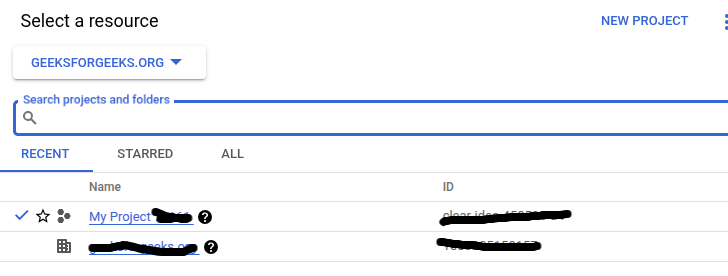
👁 imageSelect Your Project - After opening the console there is the list of projects, identify the one that requires API key for its authentication and authorization.
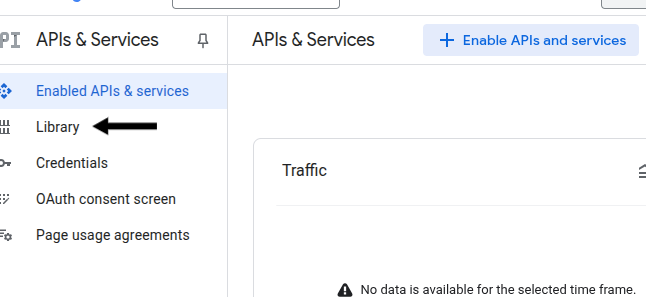
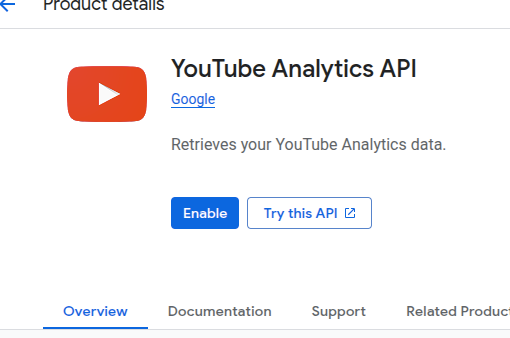
Enable an API - When the user select the project now go to the main menu and navigate to “APIs & Services” > “Library” and check the box next to the required API such as Google Maps API or YouTube Data API and also click on the enable button.
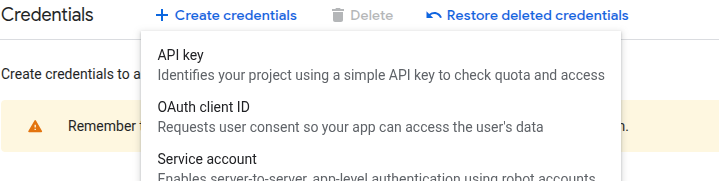
Create API Credentials - When the API key is enable click on the “Create Credentials” button and select “API Key” from the drop down list of authentication methods.
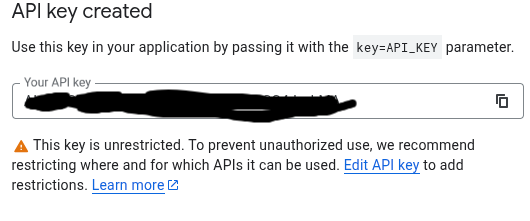
Copy and Secure the API Key - After that the API pop show on the screen and the user store the API Key in a safe place and apply restrictions using IP addresses, referrer URLs, or services to restrict the usage of the API Key to enhance the API security.
Manage API Key Permissions – After creating and copy the API key user manage the role-based access control (RBAC) or OAuth 2.0.
Also Read: How To Use an API? The Complete Guide
The primary use of API keys is for authenticating on APIs and granting access to specific projects. Unfortunately, they have security flaws. Because they are static, they can be leaked to potential attackers if not managed correctly. OAuth 2.0 and JWT (JSON Web Token) are more sophisticated methods for user authentication and API communication. Lets review the most popular authentication methods:
| Feature | API Key | OAuth 2.0 | JWT (JSON Web Token) | Basic Authentication | SAML (Security Assertion Markup Language) |
|---|---|---|---|---|---|
| Purpose | Authentication & project identification | Authentication + Authorization | Authentication + Secure Data Exchange | Authentication using username & password | Authentication using XML-based SSO |
| Security Level | Moderate | High | Very High | Low | High |
| Expiration | No expiration unless revoked | Short-lived tokens | Time-limited & cryptographically signed | No expiration (unless password changed) | Token-based, session-based expiration |
| Use Case | API project access | User authentication & app authorization | Secure API communication & data exchange | Internal network authentication | Enterprise SSO (Single Sign-On) |
| Token Type | API Key (Static String) | Access & Refresh Tokens (Bearer) | JSON Web Token (JWT) | Username & Password | XML-based Security Assertion Tokens |
| Vulnerability | Prone to leaks, MITM attacks | Secure, but OAuth token leakage possible | Secure if encrypted & signed | Highly vulnerable to phishing & replay attacks | Secure with proper encryption & SSO policies |
| Encryption Support | No built-in encryption | Encrypted access tokens available | Fully encrypted payload | No encryption | Supports encryption with XML encryption |
| Access Control | No granular control | Role-based access control (RBAC) | RBAC & claims-based authorization | No role-based control | Supports role-based & group-based policies |
| Example Use Case | API integrations (Google Maps, AWS, Stripe) | Social logins (Google, Facebook Login) | Secure API requests & mobile apps | Legacy systems, intranet logins | Corporate SSO for enterprise apps |
API Keys play a crucial role in API authentication and authorization, offering a lightweight and efficient way to control access to public, private, and third-party APIs. When implemented correctly, they provide speed, flexibility, and control, making them a preferred choice for many developers. Below are the key advantages of using API Keys:
API Keys are lightweight credentials that require minimal resources to setup. They are best suited for use by developers wishing to integrate APIs. Instead of OAuth 2.0, which has heavy authorization flows, token exchanges, and user permission structures, API Keys have a much simpler authentication structure, using HTTP header, query parameters, or the request body.
Example of Simple API Key Authentication
curl -H "x-api-key: YOUR_API_KEY" https://api.example.com/dataAPI Keys provide instant authentication without requiring a multi-step OAuth handshake.
Why API Key are Faster than OAuth?
| Factor | API Keys | OAuth 2.0 |
|---|---|---|
| Request Complexity | Simple request with key | Requires token exchange |
| Authentication Steps | 1-Step (Key in Header) | Multi-Step (Login, Token, Refresh) |
| Response Time | Fast | Slightly slower |
| Best Use Case | Non-sensitive, public APIs | Secure, user-specific APIs |
Example of API Key Authentication in REST APIs:
GET /weather?city=NewYork&key=API_KEY_HEREAPI Keys serve a very important function for public-facing APIs that do not require user identity authentication check. It is scalable and easy to administer.
Best Use Cases for Public API Keys:
Why API Keys are Good for Public APIs?
Example of Public API Key Usage in a Weather API:
curl "https://api.weather.com/data?location=NewYork&apikey=YOUR_PUBLIC_KEY"Usage restrictions is one of the most powerful options enabled by API Keys. Developers and firms may limit the use of API Keys to increase security by:
Example: Securing API Keys with IP Restrictions (Google Cloud)
{ "name": "API Key Restriction", "allowedIps": ["192.168.1.10", "203.0.113.25"] }API keys might sound technical, but you can now see they’re not so mysterious – they’re essentially like special passwords or keys that let apps talk to each other safely. We learned that an API key is a unique code that identifies an app or user to an API (just like a library card or club membership card) and that it’s crucial for security, tracking, and controlling access. We also saw how API keys work step-by-step: you get a key, use it in requests, and the API checks it before giving you data