|
VOOZH | about |
|
VOOZH | about |
15 min
read
Compare Webflow vs Elementor across 14 key factors to choose the best website builder for design, SEO, performance, pricing, and more
By
Jesus Vargas
Updated on
May 29, 2026
.
Reviewed by
Real-World Experience with No-Code Tools: With over 320 apps built, we know firsthand what works—and what doesn't—when using no-code platforms like Glide, Bubble, FlutterFlow and Webflow.
Expert Team with 40+ Years of Combined Experience: Our team has deep technical knowledge, with experts who use no-code tools to solve real-world problems for clients every day, ensuring our advice is actionable and reliable.
Detailed Guides Based on Actual Projects: We don’t just talk about no-code; we use it daily to solve real business problems for our clients, from MVPs to complex automations.
Take a deeper look at our editorial guidelines
In 2025, your website isn't just a digital presence; it's your brand's first impression, sales funnel, and growth engine. Webflow has become the go-to choice for over 70,000 designers and agencies, known for its clean code and precise control. Elementor powers more than 7% of all WordPress sites, offering creators the ease of drag-and-drop with the strength of open source.
So, should you choose Webflow’s all-in-one design freedom or Elementor’s plugin-rich WordPress workflow? In this guide, we’ll break down 12 essential factors like SEO, performance, CMS features, and pricing to help you pick the best tool for your goals and timeline.
| Feature | Webflow | Elementor |
|---|---|---|
| Platform Type | All-in-one no-code website builder with built-in hosting | WordPress plugin for visual page building |
| Ease of Use | Moderate learning curve; best for users familiar with design concepts | Very beginner-friendly; simple drag-and-drop editor |
| Design Flexibility | Full design freedom, custom layout, and animations | Highly flexible within WordPress; some limits based on themes/plugins |
| CMS Capabilities | Built-in CMS with dynamic content and visual control | Uses WordPress CMS; needs plugins for custom content types |
| E-commerce Features | Integrated e-commerce: great for custom stores with moderate product counts | Works with WooCommerce; powerful but plugin-heavy setup |
| SEO Capabilities | Built-in SEO tools (meta tags, URLs, sitemap, clean code) | Requires plugins like Yoast or Rank Math for full SEO setup |
| Performance & Speed | Fast by default with built-in CDN, clean code, and managed hosting | Depends on hosting, theme, and plugins; may need optimization |
| Mobile Responsiveness | Fully responsive with editable breakpoints for all screen sizes | Responsive controls for mobile/tablet; some limits based on theme structure |
| Integrations | Native support for tools like Zapier, Mailchimp, and Google Analytics | Supports thousands of WordPress plugins; very flexible |
| Hosting & Security | Hosting included; secure with SSL, backups, and global CDN | Hosting is separate; security depends on host and plugin management |
| Scalability | Great for growing businesses, teams, and dynamic content | Scales with good hosting and plugin management; more hands-on |
| Limitations | A steeper learning curve, no app store, and pricing can add up | Plugin overload can slow sites; ongoing updates and maintenance needed |
| Pricing Range | $14–$212/month (depending on site type and features) | $59–$399/year (plus separate hosting and domain costs) |
| Best For | Designers, agencies, startups, and businesses needing custom design | Bloggers, freelancers, small businesses, and WordPress users |
Webflow and Elementor are both tools for building websites without code, but they work in very different ways.
Webflow is a full website builder and hosting platform. You can design, build, and launch your website—all in one place. It gives you full control over layout, style, animations, and CMS content, making it perfect for custom, responsive websites.
Elementor, on the other hand, is a WordPress plugin. It works inside WordPress, which means you’ll need separate hosting, a domain, and the WordPress setup. It’s mainly a visual page builder—you can design beautiful pages with drag-and-drop tools, but many features depend on WordPress plugins and themes.
So, the core difference is: that Webflow is an all-in-one platform, while Elementor is a design tool built on top of WordPress. If you want full design freedom without extra setup, Webflow is the more complete solution.
Both platforms aim to simplify web design, but they offer different experiences based on your skill level.
Webflow has a learning curve, especially for those new to web design. While it’s a no-code tool, it follows the logic of HTML and CSS, so understanding layout, spacing, and responsiveness helps a lot. The interface may seem complex at first, but Webflow University offers excellent tutorials to guide you.
If you're willing to learn, you can build professional websites without touching code. For complete beginners, though, it may feel overwhelming in the beginning.
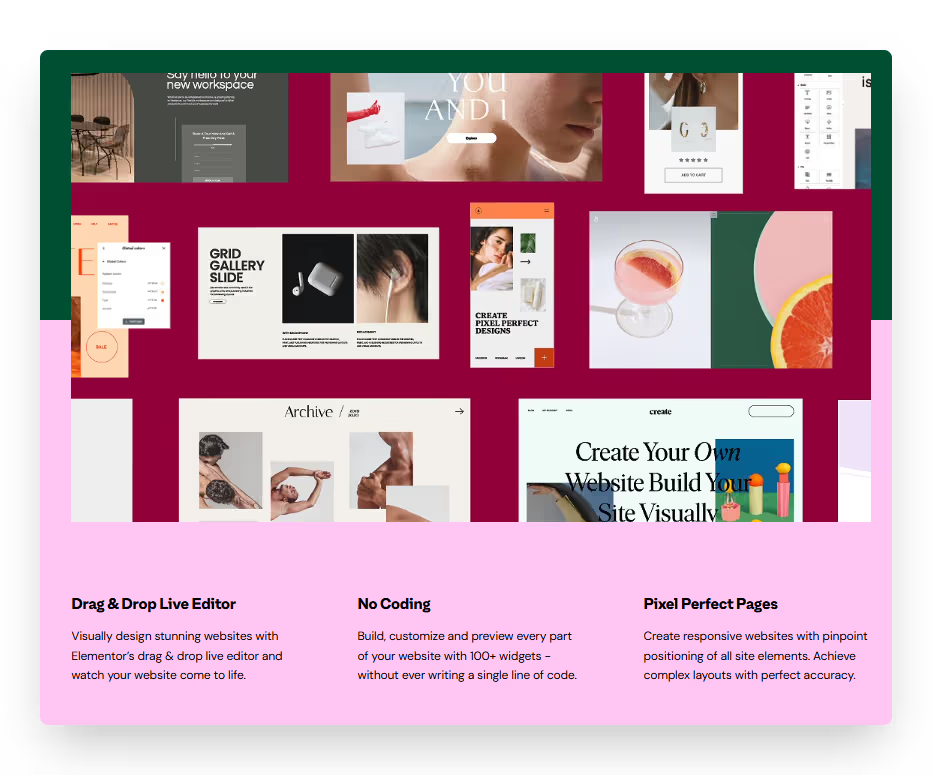
Yes, Elementor is very beginner-friendly. It works inside WordPress and uses a drag-and-drop editor, so you can build pages visually without knowing how to code. You can choose from many pre-built templates and widgets, making it easy to create beautiful pages quickly.
However, you still need to manage hosting, updates, and plugins through WordPress, which adds some extra steps for new users.
Read more about:
Both tools let you build visually, but Webflow gives deeper control, while Elementor focuses on ease and speed.
Yes, Webflow offers full design control. You can create completely custom layouts, animations, interactions, and responsive designs from scratch—just like working with code, but visually. It doesn’t limit you to templates or fixed blocks.
You can fine-tune everything from margins to hover effects. This makes Webflow ideal for designers who want pixel-perfect sites. However, this freedom comes with complexity, so it’s better suited for those comfortable with design principles or willing to learn.
Elementor is highly flexible within the WordPress environment. You can drag and drop sections, use pre-built templates, and customize fonts, colors, and spacing. It also supports responsive editing, so you can adjust layouts for desktop, tablet, and mobile.
However, it’s limited by your WordPress theme and sometimes requires extra plugins for advanced features. While it’s great for most websites, it doesn’t match Webflow’s level of custom design freedom.
Both platforms support content management, but Webflow gives built-in structure, while Elementor relies on WordPress’s CMS system.
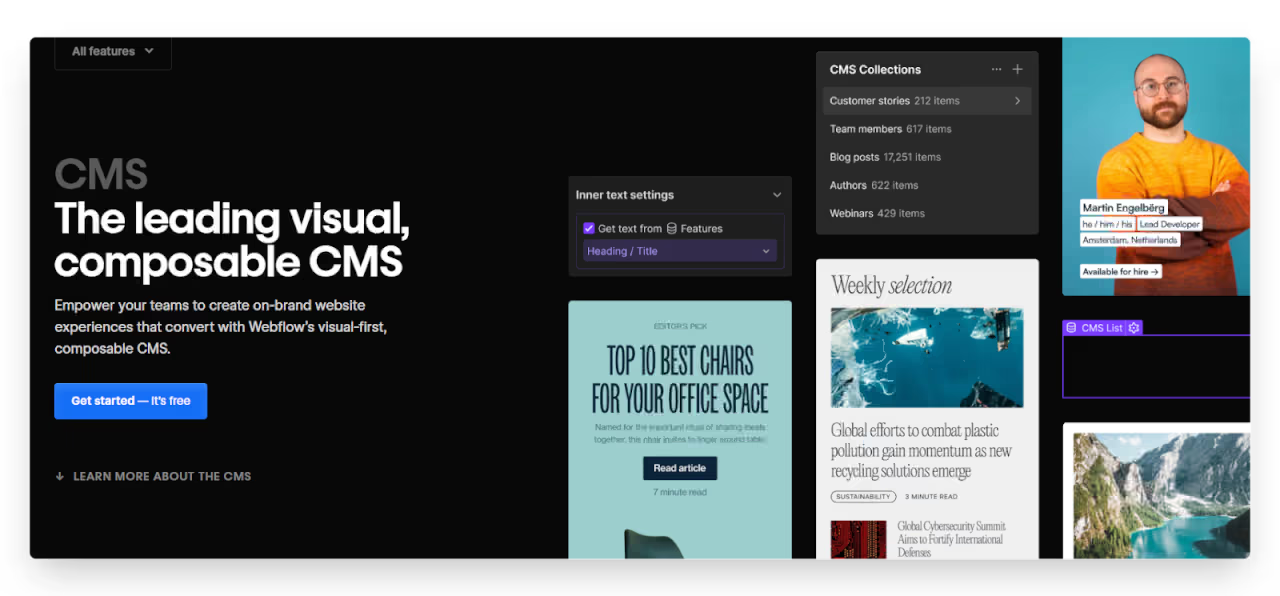
Yes, Webflow has a powerful built-in CMS that lets you create custom content types like blogs, job listings, or portfolios. You can design how each item looks using dynamic templates and organize everything visually. It’s great for structured, repeatable content.
You can even connect it with tools like Zapier or Airtable for automation. While it may require some planning, Webflow's CMS is flexible and scalable—perfect for content-heavy websites that need a custom layout and workflow.
Elementor is a visual page builder, but all the content is managed through WordPress CMS. You can build posts and pages using Elementor’s editor, while categories, tags, and content types are handled by WordPress itself. It works well for most content needs, and there are plugins to extend its CMS features.
However, for advanced custom fields or layouts, you may need additional tools like ACF (Advanced Custom Fields) or custom post types. It’s flexible but depends heavily on the WordPress ecosystem.
Both platforms can power online stores, but they use different systems to get there.
Yes, Webflow has built-in e-commerce features that let you design and run an online store without plugins. You can fully customize product pages, carts, and checkout flows to match your brand. It supports physical and digital products, custom fields, inventory tracking, and payment gateways like Stripe and PayPal.
While it's not as feature-rich as Shopify or WooCommerce for large stores, it's a solid option for small to medium-sized businesses that want design freedom with a smooth, integrated e-commerce experience.
Elementor integrates with WooCommerce, the most popular e-commerce plugin for WordPress. You can use Elementor’s drag-and-drop editor to design product pages, category layouts, and shopping cart experiences. It also offers WooCommerce widgets to customize product displays.
However, WooCommerce relies on multiple plugins for features like shipping, taxes, and payment gateways, which can make setup more complex. It’s a powerful combination, but managing everything smoothly may require some technical know-how or help from a developer.
Both tools support solid SEO, but Webflow has more built-in control, while Elementor depends on WordPress plugins.
Yes, Webflow is highly SEO-friendly right out of the box. It lets you control meta titles, descriptions, alt text, custom URLs, and even generates sitemaps and clean HTML/CSS. You can also edit robots.txt and use 301 redirects without extra tools.
Since Webflow doesn’t rely on third-party plugins, performance is fast and clean—helping your pages load quickly, which is important for SEO. It’s a great choice if you want control without relying on external plugins.
Elementor itself doesn’t handle SEO directly, but it works well with popular WordPress SEO plugins like Yoast SEO, Rank Math, or All in One SEO. These plugins give you full control over meta tags, sitemaps, breadcrumbs, and schema markup.
The key to good SEO with Elementor is managing plugin quality and site speed. With the right setup and clean hosting, Elementor + WordPress can be very SEO-friendly—but it needs more maintenance than Webflow.
Read more about:
Site speed matters for both SEO and user experience, and the platforms handle performance in different ways.
Webflow sites are generally faster out of the box. Since Webflow is an all-in-one platform with built-in hosting, global CDN, and clean code generation, sites load quickly without extra setup.
It avoids plugin bloat and minimizes unnecessary scripts, which helps boost page speed. If performance is a top priority and you want minimal maintenance, Webflow is a strong choice for fast, stable websites.
In Webflow, performance is optimized automatically—hosting, caching, and code are handled by Webflow itself. In Elementor, load time depends on your WordPress setup. Using too many plugins, poorly coded themes, or slow hosting can slow down your site.
While Elementor can perform well with optimization, it requires more manual work like caching, image compression, and choosing a reliable hosting provider.
Both platforms support mobile-friendly design, but Webflow offers deeper control over responsive layouts.
Yes, Webflow designs are automatically responsive. Every element you add is built to adapt to different screen sizes by default. You can switch between desktop, tablet, and mobile views to fine-tune layouts for each device.
Webflow also lets you hide or show specific elements depending on screen size, adjust spacing, and change styles for mobile without affecting the desktop version. This makes it easy to create fully responsive, professional-looking websites with full design control across all devices.
Elementor gives you solid control over mobile responsiveness. You can preview and adjust your designs for mobile, tablet, and desktop directly in the editor. You can modify font sizes, spacing, and alignment, and even hide or show widgets for specific devices.
However, since it’s built on top of WordPress and your theme, some layout limitations may apply. With careful editing, you can create mobile-friendly pages, but you’ll need to test across devices and possibly adjust global theme settings for the best results.
Both platforms support third-party tools, but Webflow focuses on clean external integrations, while Elementor thrives in the WordPress plugin ecosystem.
Webflow offers native integrations with tools like Google Analytics, Google Maps, Mailchimp, HubSpot, Zapier, and more. You can also add custom code or connect APIs directly for advanced workflows. While it doesn’t have a built-in app store, Webflow is highly flexible and supports most tools through embeds or third-party connections.
This makes it ideal for clean, focused integrations without bloating your site. For more automation, platforms like Make or Zapier can link Webflow with hundreds of other apps.
Yes, Elementor works smoothly with thousands of WordPress plugins and third-party tools. You can improve your site with SEO tools, e-commerce features, forms, analytics, CRMs, and more—usually by installing a plugin. Elementor also supports native integrations with services like Mailchimp, Stripe, and reCAPTCHA.
The only downside is that too many plugins can slow down your site or cause conflicts, so careful management is important. Still, for flexibility and variety, Elementor offers one of the largest integration ecosystems available.
Webflow includes hosting by default, while Elementor relies on your choice of WordPress hosting for performance and protection.
Yes, Webflow includes fully managed hosting. It uses Amazon Web Services (AWS) and Fastly CDN for fast global delivery, provides SSL certificates for secure browsing, and offers automatic backups for safety. You don't need to configure servers or install anything—everything is taken care of for you.
Hosting is seamlessly integrated with your Webflow project, ensuring reliable performance, uptime, and security from the start. It's perfect for users who want a hassle-free, secure hosting solution without additional setup.
Elementor itself is secure, but your site’s safety depends on your WordPress hosting, plugins, and maintenance. You’ll need to choose a good hosting provider with strong security features like SSL, firewalls, backups, and malware scanning.
Keeping WordPress, Elementor, and plugins updated is also important. With proper care and a trusted host, Elementor sites can be very secure—but it takes more hands-on work than Webflow’s all-in-one setup.
Read more about:
Both tools can grow with your website needs, but they scale in different ways depending on the platform’s structure.
Yes, Webflow is designed to grow with your business. You can begin with a simple site and then add dynamic CMS content, custom workflows, and team collaboration features. Webflow also handles high-traffic websites with dependable hosting, fast performance, and API access for advanced needs.
While it might not be the best fit for large e-commerce stores or complex backend logic, it's perfect for growing service businesses, agencies, and startups that want design freedom, speed, and professional results without complicated setup.
Elementor can manage high-traffic sites, but it relies on your hosting and how well your site is optimized. Since it runs on WordPress, scalability depends on the server's power, the quality of plugins, and the caching setup.
Many large businesses use Elementor successfully, but performance tuning becomes more important as traffic increases. By using efficient plugins, a strong theme, and managed hosting, Elementor can scale effectively. However, managing everything—from updates to security—requires ongoing attention, especially for enterprise-level websites.
Both Webflow and Elementor offer flexible pricing, but they follow very different models based on how each platform is structured.
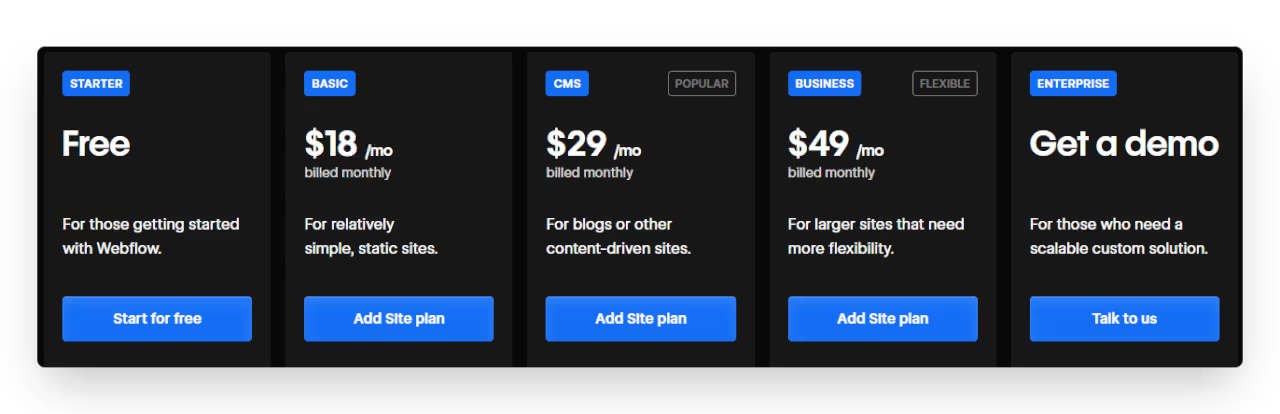
Webflow charges based on the type of site you're building—whether it’s a simple static site, a CMS-driven project, or an online store. Hosting is included in every plan, and you can start for free but you need a paid plan to connect a custom domain. Here's the general pricing range:
Webflow is ideal for professional or business websites where performance, design control, and hosting are all managed in one place.
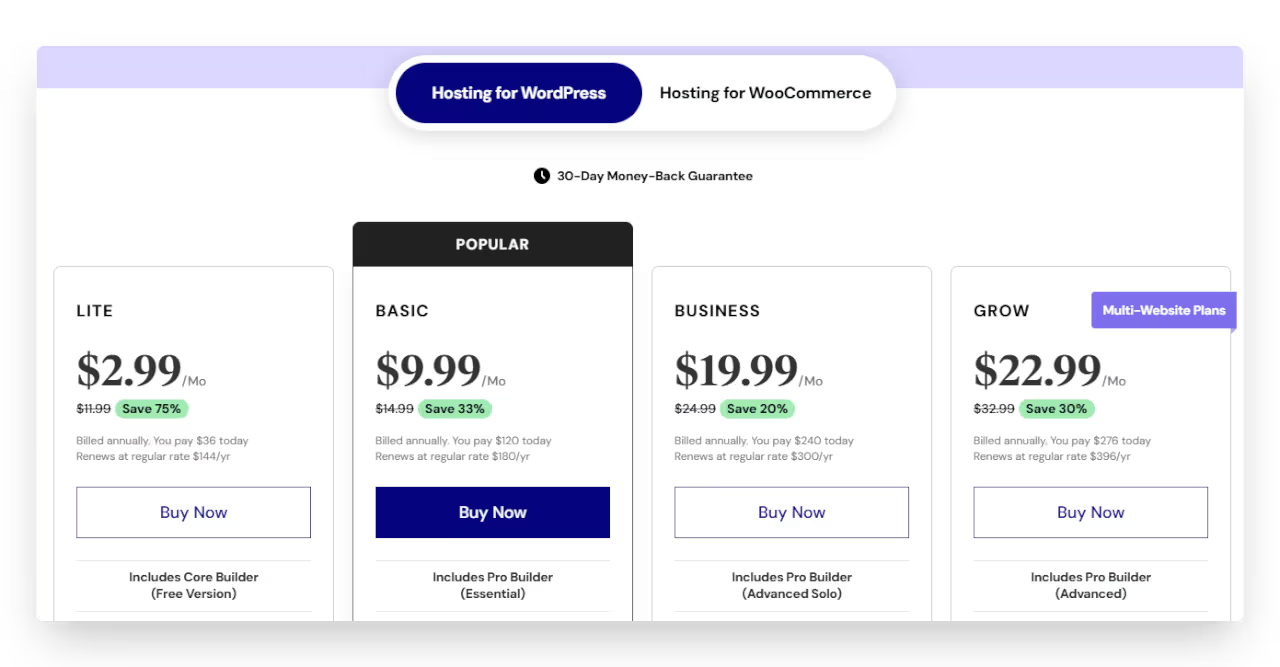
Elementor has a free version, but many advanced features come with the Elementor Pro subscription. Since Elementor runs on WordPress, you’ll also need to pay separately for hosting and domain. Here's a look at Elementor Pro pricing:
Don’t forget to factor in the cost of premium plugins or themes if needed. While Elementor is more budget-friendly, you manage hosting and security separately.
Both platforms have powerful features, but there are trade-offs you should consider before choosing one.
Webflow’s biggest downside is its learning curve. While it’s no-code, it uses web design concepts like flexbox, positioning, and breakpoints, which can be challenging for beginners. It also lacks a built-in app store, so some features require external tools or custom code. CMS item limits and pricing can be restrictive for larger projects.
Additionally, it’s not ideal for advanced backend features like user logins or memberships without third-party integrations. Webflow is best suited for those who want full control and are willing to learn or work with an expert.
Elementor relies heavily on WordPress and third-party plugins, which can slow down your site or cause compatibility issues. While it’s easy to use, overusing widgets or add-ons can lead to performance problems. You also need to manage your own hosting, backups, and security, which adds complexity.
Advanced features like dynamic content or global styles may require extra plugins or a pro license. For large or complex sites, keeping Elementor fast and stable takes more effort. It's great for flexibility, but maintenance becomes key as your site grows.
Read more about:
Both tools are excellent, but the right choice depends on your goals, skills, and how much control you want.
Choose Webflow if you want complete design freedom, clean code, and an all-in-one platform without needing plugins. It’s ideal for designers, agencies, and growing businesses that require custom layouts, animations, and dynamic CMS content.
Webflow takes care of hosting, security, and performance, so you don’t have to manage separate tools. Although there’s a learning curve, the end result is a fast, professional website tailored to your vision. If quality, control, and scalability are your priorities, Webflow is the right choice.
Elementor is a great option if you're already using WordPress or want to build a website quickly with minimal technical effort. It’s perfect for freelancers, bloggers, small business owners, or anyone who prefers drag-and-drop editing with many plugin options.
Elementor works well for most common website types, landing pages, portfolios, and basic e-commerce. If you’re comfortable managing plugins, hosting, and updates, Elementor offers flexibility at a lower cost and with less design complexity than Webflow.
Webflow gives you unmatched design control—but learning it takes time. If you're busy or just want it done right, let LowCode Agency handle it. We’ll build you a stunning, fully functional Webflow site in just 3–4 weeks. Explore our past projects and book your free consultation today.
Last updated on
May 29, 2026
.
Jesus Vargas
-
Founder
Jesus is a visionary entrepreneur and tech expert. After nearly a decade working in web development, he founded LowCode Agency to help businesses optimize their operations through custom software solutions.
Custom Automation Solutions
Save Hours Every Week
We automate your daily operations, save you 100+ hours a month, and position your business to scale effortlessly.
Our AI — trained on 300+ shipped products — tells you what to build, what to skip, and what it'll actually cost. No fluff.
Assess My Idea"Working with LowCode Agency was the best decision I made in 2025"
Franklin Frith
CEO at HRM
Elementor is better for beginners, especially those already using WordPress. Its drag-and-drop interface is simple, and you can build pages quickly without learning technical terms. Webflow offers more control but requires a learning curve. If you’re new to web design, Elementor is easier to pick up and get started with.
No, you can’t use Webflow and Elementor together. Webflow is a standalone platform with its own hosting and CMS. Elementor is a plugin that works inside WordPress. Since they run on different systems, they aren’t compatible or designed to be integrated into the same website project.
Yes, Webflow is ideal for design-heavy websites where custom layout, animations, and pixel-level control matter. It allows designers to build fully responsive, professional sites without being limited by templates or themes. If your focus is visual quality and branding, Webflow gives more creative freedom than Elementor.
Yes, Elementor can handle large websites, but performance depends on your WordPress setup, hosting quality, and plugin management. With the right optimization and caching tools, it can scale well. However, using too many plugins or poor-quality themes can slow down your site, so maintenance is key for long-term performance.
No coding is required for either tool. Webflow lets you build visually but uses terms like CSS, flexbox, and breakpoints, so some design knowledge helps. Elementor is easier for non-designers and doesn’t require any coding. However, both platforms allow custom code if you want to extend functionality later.
Business Automation
Comparison
Zapier vs Workato | 9 Factors to Decide the Best One
Compare Zapier vs Workato across ease of use, automation power, integrations, and security to find the best no-code platform for your automation needs
Comparison
FlutterFlow
FlutterFlow vs OutSystems | 10 Factors Compared (2026)
Compare FlutterFlow vs OutSystems across 10 key factors including enterprise scalability, customization, backend architecture, pricing, and long-term flexibility in 2026.
Webflow
Why Your WordPress Website Is Slow (Migrate to Webflow)
Is your WordPress website slow? Learn the real reasons and see how migrating to Webflow boosts speed, stability, and user experience.
Bubble
Comparison
Bubble.io vs WordPress | 17 Factors to Decide the Best One
Compare Bubble.io vs WordPress across 17 key factors to choose the best platform for building your website or web app in 2025
Comparison
Glide
FlutterFlow
FlutterFlow vs Glide | 10 Factors Compared (2026)
Compare FlutterFlow vs Glide across 10 key factors including flexibility, database control, scalability, pricing, and app performance to choose the right builder in 2026.
Airtable
Comparison
Airtable vs Asana | 10 Factors to Decide the Best One
Compare Airtable vs Asana on ease of use, workflows, views, automation, and collaboration to pick the best tool for your team’s project management needs