|
VOOZH | about |
|
VOOZH | about |
14 min
read
Compare Webflow vs Wix across 12 key factors to find the best website builder for your needs. Design, ease of use, pricing, SEO, and more—explained simply
By
Jesus Vargas
Updated on
May 29, 2026
.
Reviewed by
Real-World Experience with No-Code Tools: With over 320 apps built, we know firsthand what works—and what doesn't—when using no-code platforms like Glide, Bubble, FlutterFlow and Webflow.
Expert Team with 40+ Years of Combined Experience: Our team has deep technical knowledge, with experts who use no-code tools to solve real-world problems for clients every day, ensuring our advice is actionable and reliable.
Detailed Guides Based on Actual Projects: We don’t just talk about no-code; we use it daily to solve real business problems for our clients, from MVPs to complex automations.
Take a deeper look at our editorial guidelines
With over 200 million users worldwide, Wix is a go-to platform for beginners looking to build fast, professional-looking websites without touching a line of code.
On the other hand, Webflow is quickly gaining ground among designers and businesses who want more creative freedom, powering over 3.5 million websites and growing fast.
So, which one’s right for you?
If you're choosing between easy drag-and-drop or full design control, this guide covers everything you need to know—features, pricing, SEO, e-commerce, and more.
| Feature | Webflow | Wix |
|---|---|---|
| Platform Type | Advanced design tool with full control; best for custom sites | Beginner-friendly builder with templates; great for quick setups |
| Ease of Use | Steeper learning curve; best for users with some design knowledge | Very easy to use; ideal for non-tech users |
| Design Flexibility | Complete design freedom with visual HTML/CSS | Limited flexibility; mostly template-based |
| AI Features | Basic AI for layout and text generation (still improving) | Wix ADI builds a site for you automatically |
| CMS Capabilities | Strong CMS for dynamic content and structured data | Simple blog and content tools; less control over structure |
| E-commerce Features | Good for design-focused stores; not built for very large catalogs | Great for small shops; built-in tools for payments and product management |
| SEO Capabilities | Full SEO control—meta tags, URLs, sitemap, alt text | Built-in SEO tools with step-by-step guidance |
| Mobile Responsiveness | Responsive by default; full control over layout for every device | Mobile editor available; not fully responsive—requires manual tweaks |
| Integrations & Add-ons | No app store; uses custom code, Zapier, APIs for integrations | Large App Market with easy, plug-and-play features |
| Hosting & Security | Fast, secure hosting via AWS; SSL, CDN, backups included | Managed hosting with free SSL and automatic backups |
| Scalability | Great for growing businesses with dynamic content and integrations | Suitable for small to medium sites; limited for complex or large-scale needs |
| Limitations | Learning curve, no app store, higher cost for scaling | Less customization; can’t change templates after publishing |
| Pricing Range | $14–$212/month | $16–$159/month |
| Best For | Designers, freelancers, agencies, custom projects | Beginners, small business owners, personal websites |
Webflow and Wix are both no-code website builders, but they work in different ways.
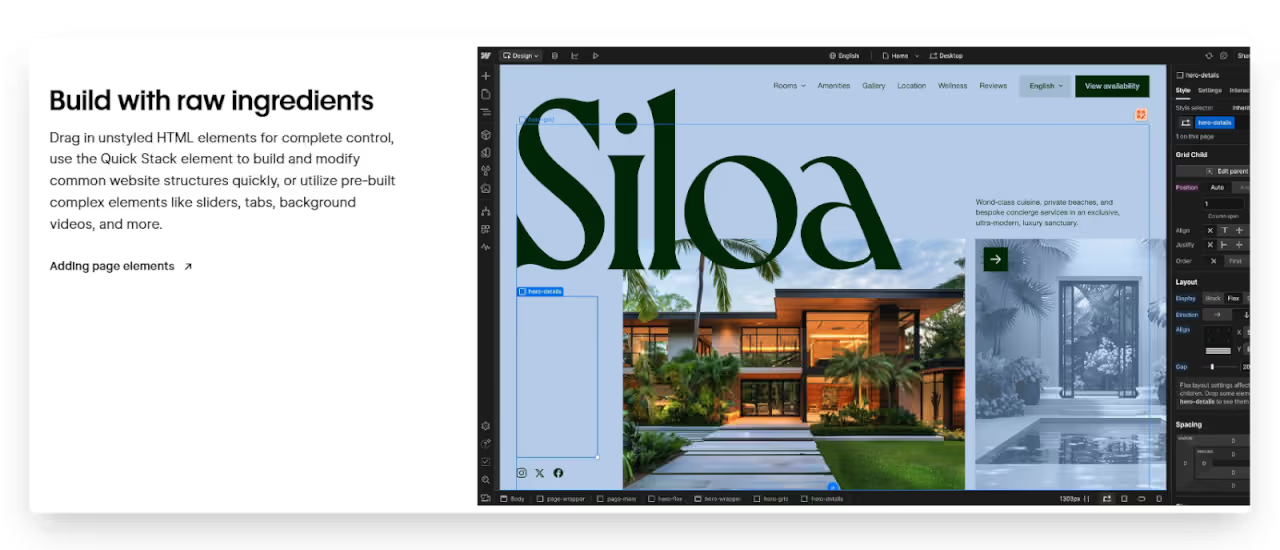
Webflow is a more advanced no-code website builder made for users who want full control over how their website looks and behaves. It works like a visual coding tool, where you design using a drag-and-drop interface, but the system builds clean HTML, CSS, and JavaScript behind the scenes. It's great for designers and developers who want to create custom websites without writing code.
Wix, on the other hand, is easier for beginners. It offers ready-made templates and a simple drag-and-drop editor that anyone can use. Wix focuses more on speed and ease, not deep customization. It’s perfect for personal websites that don’t need complex features.
So, the core difference is: Webflow gives you more design freedom and clean code, while Wix offers simplicity and quick setup.
Webflow is powerful but has a learning curve, while Wix is designed for ease from day one.
Webflow is not the easiest tool for beginners, especially if you’ve never built a website before. It works like a visual coding tool, so you need to understand basic web design terms like padding, margin, and flexbox.
While the interface is clean, it can feel overwhelming at first. However, Webflow offers great tutorials and a learning platform called Webflow University. If you're willing to invest time, you can build stunning websites with full control. But for a total beginner, it may feel more advanced.
Yes, Wix is one of the best website builders for non-tech users. It’s designed to be beginner-friendly with a simple drag-and-drop editor. You can choose a template, add elements like text, images, and buttons, and publish your site—all without any coding.
It also offers Wix ADI (Artificial Design Intelligence), which builds a website for you based on a few questions. This makes Wix perfect for students, or anyone who wants a website without learning technical skills.
Webflow offers full creative control, while Wix focuses on speed and simplicity with some limits.
Webflow gives you complete control over your website’s design. You can customize every part of a page—fonts, spacing, layout, animations, and more. It works like a visual version of HTML and CSS, so you’re not stuck with pre-made templates.
You can start from scratch or edit a template deeply. This makes it perfect for designers who want pixel-perfect results. However, the high level of control means you’ll need to understand how web layout works to use it effectively.
Wix lets you customize many parts of its templates, but not everything. You can change colors, text, images, and layouts using its drag-and-drop editor. It’s easy and quick, but there are some design limits.
For example, you can’t always fine-tune the spacing or control how a site looks on every screen size. Some features are locked into the template’s structure. So, while Wix is great for fast edits, it may not be the best choice if you want full creative freedom like you get with Webflow.
Read more about:
Wix leads with built-in AI tools, while Webflow is slowly adding AI to assist with design and content.
Webflow recently introduced some AI tools, but they are still in the early stages. You can use Webflow AI to generate text, suggest layouts, or help with HTML/CSS-like edits inside the visual editor. However, it acts more as a helper than a full website builder.
You still need to understand design basics and manually structure your site. Unlike Wix ADI, Webflow doesn't build the entire site for you. Its AI tools are designed to speed up your work, not replace the design process entirely.
Wix ADI (Artificial Design Intelligence) is a tool that creates a website for you in minutes. It asks a few simple questions, like your business type and the features you need, and then generates a ready-to-edit site.
You don't need to drag and drop anything unless you want to. The layout, color scheme, and content are all generated automatically. It's perfect for beginners or anyone who wants to get online quickly. You can still switch to the regular editor later if you want more control.
Webflow offers a powerful CMS for dynamic sites, while Wix keeps content management simple and beginner-friendly.
Yes, Webflow has a strong CMS built for dynamic content like blogs, portfolios, job listings, or product catalogs. You can create custom content types, design how each item looks, and manage everything through a clean interface. It’s great for designers who want full control without using code.
You can also connect Webflow CMS with tools like Airtable or Zapier for automation. However, it may feel advanced if you're new to content management systems. It’s ideal for complex websites that need structured, repeatable content.
Wix makes blog and content management easy for beginners. It has a built-in blog editor where you can add posts, images, tags, and schedule content. You don’t need to set up any CMS collections like in Webflow. The editor works like a regular writing tool, with basic formatting and layout options.
Wix also offers apps to manage bookings, products, and events. However, it’s not designed for complex dynamic content. If you need more control over how content is structured and displayed, Webflow is a better fit.
Read more about:
Both Webflow and Wix support e-commerce, but they serve different types of online store needs.
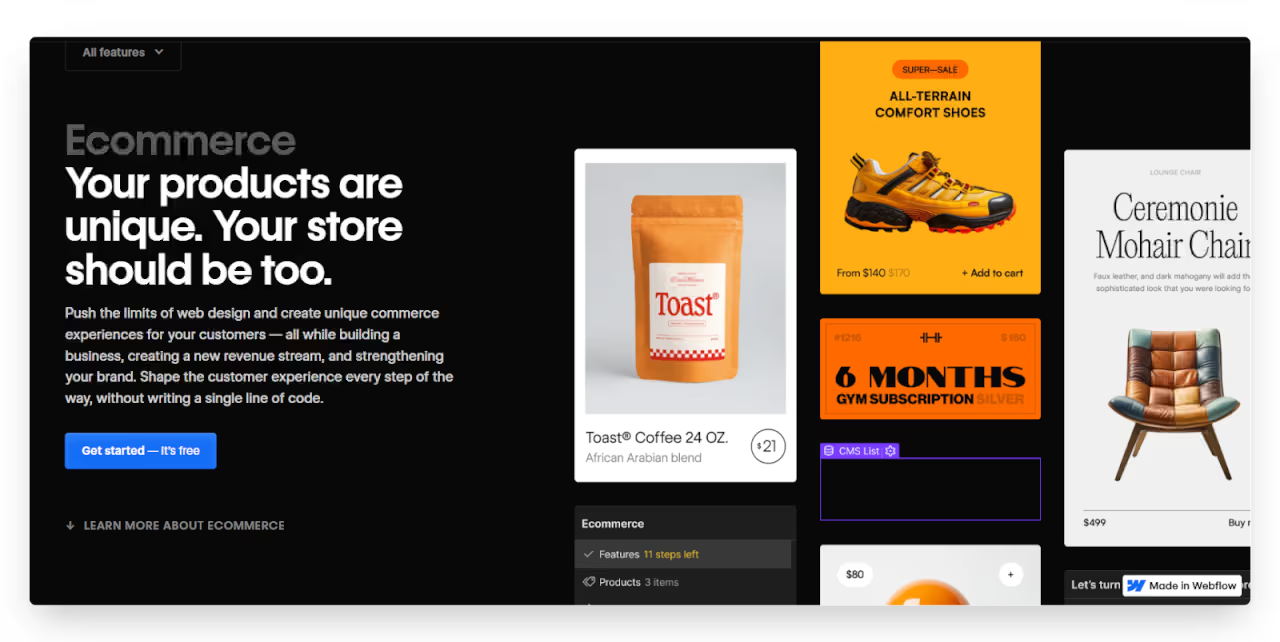
Yes, Webflow lets you build custom online stores with full design control. You can design every product page, cart, and checkout layout exactly how you want. It supports product variants, inventory tracking, and integrates with tools like Stripe and PayPal for payments.
You can also use Webflow CMS to manage product collections. However, it doesn’t have as many built-in e-commerce features as traditional platforms like Shopify. It’s best for design-heavy stores that need a unique look rather than large, complex product catalogs.
Wix is a great option for individuals who want to start selling online quickly. Its e-commerce tools are built-in and user-friendly. You get product pages, shopping carts, secure payments, inventory tracking, and even basic marketing tools like coupons and email campaigns.
Wix also supports digital products, subscriptions, and bookings. It’s perfect for small shops or service-based businesses. While it may not handle large inventories or advanced shipping rules, it covers the basics very well—making it a simple, cost-effective option for small online stores.
Webflow and Wix both offer SEO tools, but Webflow gives more control to advanced users, while Wix focuses on ease of use.
Webflow is excellent for SEO if you know how to use it. It gives full control over page titles, meta descriptions, URL structures, 301 redirects, and alt text for images. The clean HTML and fast-loading pages also help with performance.
You can create custom sitemap and robots.txt files, and Webflow automatically generates a responsive design, which is great for mobile SEO. However, beginners might need to learn a bit more to fully take advantage of these tools. It's ideal for users who want advanced SEO settings without code.
Wix has improved its SEO features a lot over the years. It now includes built-in tools for editing meta tags, alt text, and structured data. It also comes with an SEO Wiz—a step-by-step guide that helps beginners optimize their site.
Wix automatically creates a sitemap and mobile-friendly design, which are important for Google rankings. However, advanced users may find it a bit limiting when it comes to full control over technical SEO. For most small business owners and bloggers, though, Wix has everything you need to rank well.
Both platforms support mobile-friendly design, but Webflow gives more control, while Wix keeps it simple for beginners.
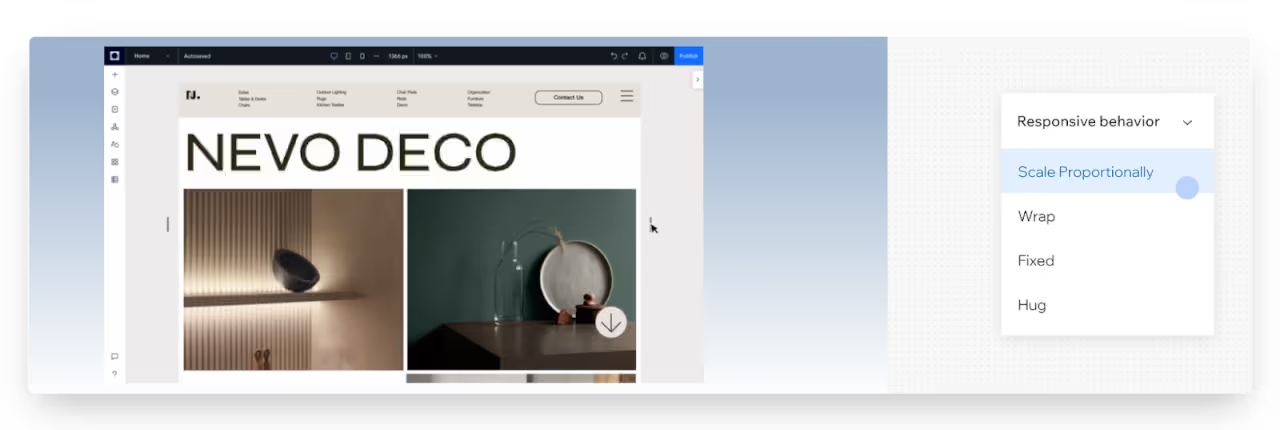
Yes, Webflow creates responsive websites by default, meaning your site adjusts to fit phones, tablets, and desktops. What’s even better is that you can customize the layout for each screen size. You can tweak font sizes, hide or show elements, and adjust spacing just for mobile views.
This gives you full control to make your site look perfect on every device. However, it does require some understanding of how responsive design works, so beginners might need time to learn these tools properly.
Yes, Wix lets you switch to mobile view and adjust how your site looks on phones. You can resize elements, rearrange sections, or hide content just for mobile without affecting the desktop version. It’s easy to use and doesn’t require technical knowledge.
However, Wix doesn’t use true responsive design—it creates a separate mobile layout. This means you may have to fix things manually for different devices. Still, for most small websites, Wix’s mobile editor does a good job of keeping things clean and functional.
Read more about:
Both Webflow and Wix offer secure, managed hosting, so you don’t need to worry about servers or technical setup.
Webflow provides fast, secure hosting powered by Amazon Web Services (AWS) and Fastly. It includes SSL certificates for all sites, DDoS protection, and automatic backups. Your site also benefits from a global CDN (Content Delivery Network), which helps it load quickly around the world.
Webflow handles all server maintenance and security updates, so you don’t need to manage anything yourself. It’s a reliable option for businesses that want peace of mind, especially for custom-designed sites that need both performance and protection.
Yes, Wix includes free SSL certificates for every website, keeping data encrypted and secure. It also offers automatic backups, so you can restore your site to a previous version if needed. Wix handles all hosting and security updates in the background, so you don’t have to worry about maintenance.
While you don’t get access to advanced server settings, everything is managed for you. For most small businesses, this level of security and backup is more than enough to stay protected and online without any extra work.
While both platforms are powerful, they each come with a few trade-offs you should know.
Webflow is powerful but has a steep learning curve, especially for beginners. If you’re not familiar with web design basics like layout, spacing, or responsive design, it can feel overwhelming. There’s also no built-in app store, so you’ll need to use custom code or third-party tools for extra features.
While Webflow is great for design freedom, it’s not ideal for building large e-commerce sites or apps with deep backend logic. Plus, pricing can get expensive if you need multiple CMS items or team access.
Wix is beginner-friendly, but it comes with some limits. You can’t switch templates once your site is live, and the design flexibility is lower compared to Webflow. The drag-and-drop editor is simple, but it can feel restrictive if you want full creative control. Advanced users may also find Wix less suitable for custom features or scaling.
While the App Market adds functionality, many apps require extra payment. Overall, Wix is great for small projects, but not the best choice for complex websites or growing businesses needing full customization.
Both Webflow and Wix offer free plans, but their pricing and value depend on what kind of site you’re building.
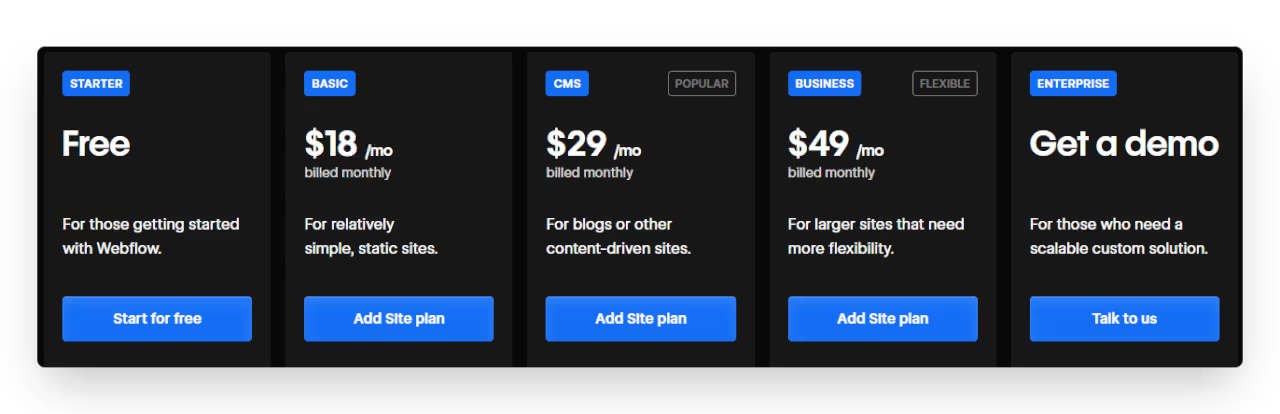
Webflow’s pricing varies based on the project type. It’s perfect for designers or businesses that want complete control over layout and CMS structure. While the free plan allows you to explore, you’ll need a paid plan to launch with a custom domain. Here’s what each plan offers:
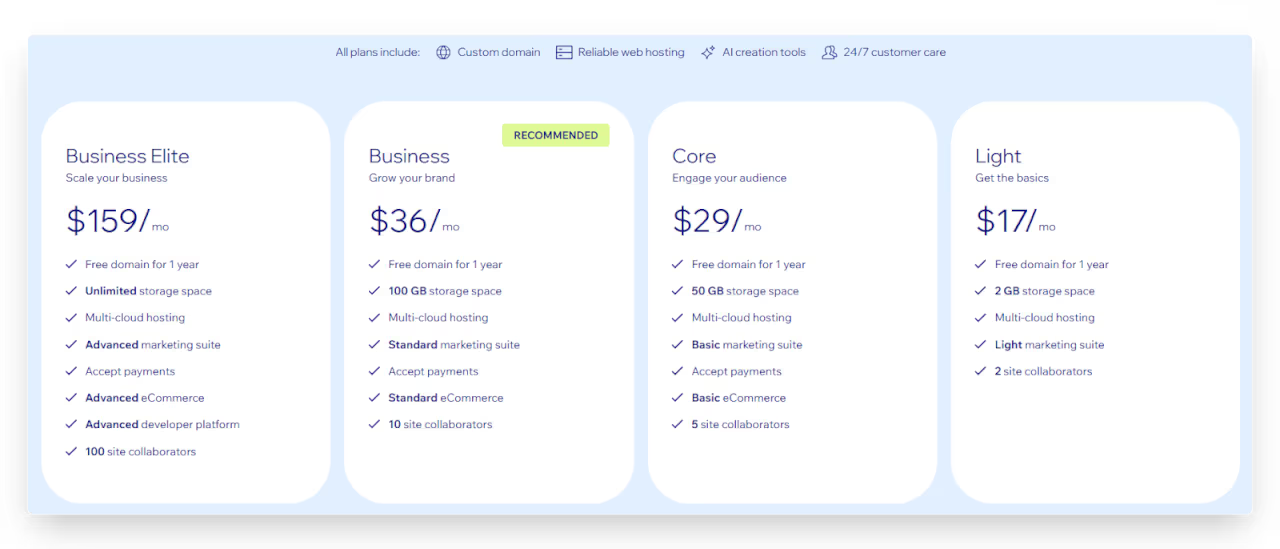
Yes, Wix is more affordable, especially for beginners and small business owners. It includes hosting, security, and many built-in tools in one simple package. The plans are easy to upgrade as your needs grow. Here’s what each plan includes:
Read more about:
Both Webflow and Wix are great, but they serve different needs depending on your skills and project goals.
Choose Webflow if you care about custom design, clean code, and full creative control. It’s a great tool for designers, developers, or business owners who want a unique website that stands out. If you plan to scale, need dynamic content, or want to integrate with advanced tools, Webflow gives you the flexibility to grow.
It’s also ideal if you're comfortable learning some web design basics. While it may take longer to learn, Webflow pays off for serious projects that need high-quality, professional websites.
Go with Wix if you want to build a website quickly and easily, without learning design or code. It’s perfect for beginners, small business owners, and anyone who needs a functional site up and running in a short time.
Wix offers ready-made templates, drag-and-drop tools, and a helpful App Market for extra features. It’s also great for simple blogs, portfolios, or small online stores. If you value speed, convenience, and low effort over full customization, Wix is a solid and affordable choice.
No doubt, Webflow is one of the best tools out there for building unique, high-quality websites. But mastering it can take time you may not have. Let LowCode Agency take care of it—we’ll deliver a professionally built Webflow site in just 3–4 weeks. Browse our work and schedule your free consultation.
Last updated on
May 29, 2026
.
Jesus Vargas
-
Founder
Jesus is a visionary entrepreneur and tech expert. After nearly a decade working in web development, he founded LowCode Agency to help businesses optimize their operations through custom software solutions.
Custom Automation Solutions
Save Hours Every Week
We automate your daily operations, save you 100+ hours a month, and position your business to scale effortlessly.
Our AI — trained on 300+ shipped products — tells you what to build, what to skip, and what it'll actually cost. No fluff.
Assess My Idea"Working with LowCode Agency was the best decision I made in 2025"
Franklin Frith
CEO at HRM
Wix is better for beginners. It’s easy to use, requires no coding or design knowledge, and has ready-made templates. Webflow offers more control but has a steeper learning curve. If you want to launch a website fast without learning technical terms, Wix is the more beginner-friendly option.
You can move from Wix to Webflow, but it’s not automatic. You’ll need to rebuild your site manually on Webflow since Wix doesn’t offer full export options. This can take time, especially if your site has many pages or blog posts, but it’s doable with some planning.
No, Webflow doesn’t require coding, but it helps to understand basic design and web layout concepts. It works like a visual coding tool, letting you design with HTML/CSS logic in a drag-and-drop interface. You can also add custom code for more advanced features, but it’s not required.
Yes, Wix has solid SEO tools built in. You can edit meta titles, descriptions, alt text, and URLs. It also has an SEO Wiz to guide beginners. While it may lack some advanced controls, it’s good enough to rank well on Google for small to medium websites.
Wix is better for small online stores and beginners. It includes all basic e-commerce tools in one place. Webflow is more flexible for custom-designed stores but requires more setup and may lack advanced e-commerce features out of the box. Choose Webflow for design, Wix for simplicity.
FlutterFlow
Comparison
FlutterFlow vs Mendix | 9 Factors to Decide the Best One
Compare FlutterFlow vs Mendix on design, backend, scalability, and enterprise features to choose the best low-code or no-code platform for your next app
Webflow
Comparison
Webflow vs Drupal | 13 Factors to Decide the Best One
Compare Webflow vs Drupal across 13 key factors like ease of use, design, CMS, SEO, and more to find the best platform for your next website
AI
Comparison
Lovable vs Replit | 8 Factors to Choose the Best AI Builder
Compare Lovable vs Replit across 8 key factors to choose the best AI app builder in 2026, including speed, control, use cases, and limits.
Bubble
Comparison
Bubble vs Thunkable | 9 Factors to Decide the Best One
Compare Zapier vs Workato across ease of use, automation power, integrations, and security to find the best no-code platform for your automation needs
Comparison
Webflow
Webflow vs Divi | 10 Factors to Decide the Best One
Compare Webflow vs Divi across 10 key factors—design, SEO, pricing, ease of use, and more to find the best website builder for you
Comparison
Bubble
Best backends for Bubble: Firebase vs Supabase vs Xano
Explore the best backend options for Bubble: Firebase, Supabase, and Xano. Choose the right one for your no-code project's scalability and performance needs.