|
VOOZH | about |
|
VOOZH | about |
Batch processing is a common requirement while dealing with large volumes of data. Batch processing plays an important role in handling large datasets efficiently using chunks or batches. Spring framework provides a flexible framework for building batch-processing applications in Java.
Below are the steps to read from MongoDB and generate CSV files or export to CSV files.
Step 1: Create Spring Boot Project
Create a Spring boot starter project and add the necessary dependencies. Here is the attachment on how to create and add the dependencies.
👁 Spring Boot Project Creation
Create the project and click on next in the next step add the required dependencies as shown below.
For Batch Processing, the required dependencies are Spring Batch, Spring Data MongoDB.
Step 2: Creating the Entity
Let us consider Employee as an entity class for better understanding.
Define the Employee Entity class with the fields representing the employee attributes and after annotating the class with @Document annotation to specify the MongoDB collection name.
In the above Java class, we have added some required attributes.
Step 3: Configuring the Spring batch
Create the configuration class for batch processing and annotate the class with the annotations @Configuration and @EnableBatchProcessing, define a job in the corresponding class to read the data from MongoDb and Write it to a CSV file using Spring Batch.
Here is the MongoDBReader class.
In the above class we have done the following things:
Step 4: Scheduling the Batch Job
Create the configuration class with the annotations @Configuration and @EnableScheduling and implement a scheduled task to trigger the spring batch job at regular intervals using @Scheduled annotation, there operation can be performed based on the requirement.
Step 5: Running the Application
After completing all the setup, then run the spring boot application and then the csv file will be generated in the specific project location as shown below:
👁 CSV file GeneratedAs we can see in the above attachment, after running the spring boot application the one CSV file is generated named employee.csv in the location src/main/resource and in the csv file the data is shown below.
So, this is the generated CSV data. And below are the logs during the execution of the job.
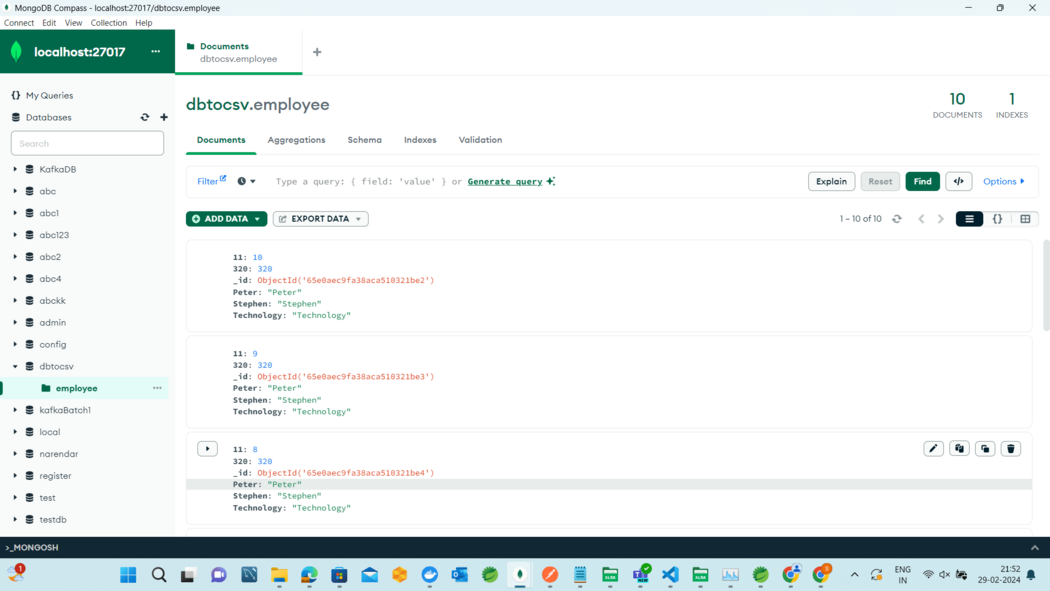
And, here is the data base collection image:


.png)