|
VOOZH | about |
|
VOOZH | about |
JPA (Java Persistence API) is a specification in Java that simplifies database interactions by mapping Java classes to relational database tables. An @Entity annotation marks a class as an entity, where each instance of the class represents a row in the table. JPA uses annotations such as @Entity, @Id and @Table to define this mapping.
We will cover three main annotations used in JPA:
The @Table annotation in JPA is used to define the database table mapping for an entity. It allows customization of:
The @Table annotation provides the following attributes:
The @Entity annotation of the Java class can indicate that it is the entity and it can represent the tables in the relational database. When a class is annotated with @Entity, JPA treats it as a persistent Java object whose state can be stored in and retrieved from a database.
Key points:
The @Id annotation in JPA marks a field as the primary key of an entity. It uniquely identifies each row in the corresponding database table and is mandatory for every entity
The @GeneratedValue annotation defines how primary key values are automatically generated.
Example: GenerationType.IDENTITY (auto-increment), GenerationType.SEQUENCE or GenerationType.AUTO
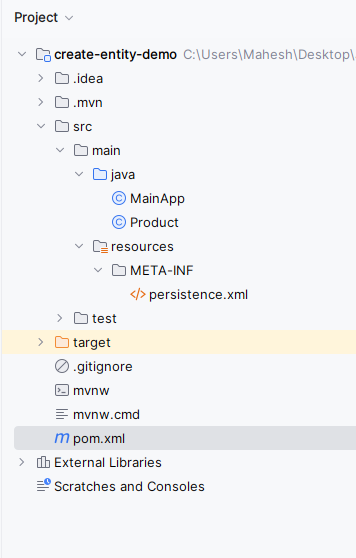
Once the project then the file structure looks like the image below.
Use Hibernate 6, MySQL 8 and JAXB (for XML handling). Also set the compiler to Java 11
pom.xml:
Open the persistence.xml and put the below code into the project and it can configure the database of the project.
Product.java
MainApp.java:
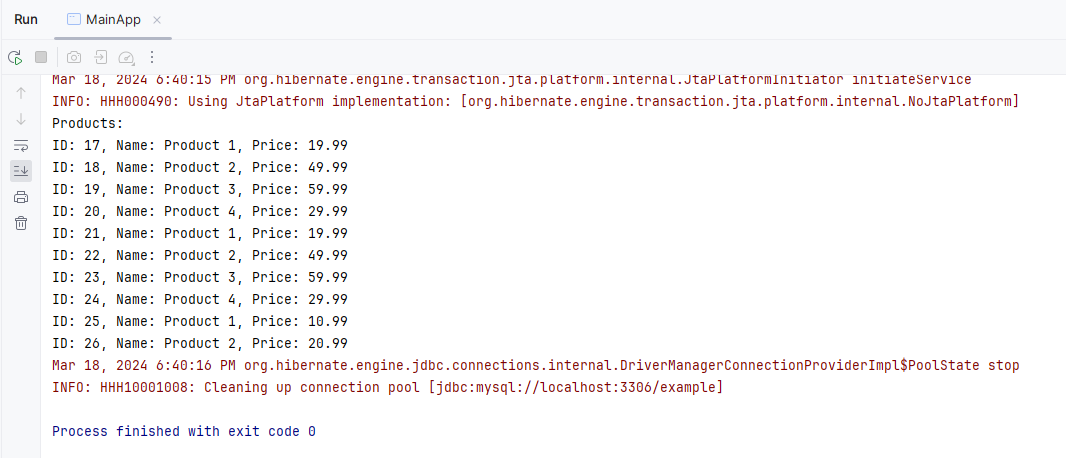
In IntelliJ: Right-click MainApp-> Run.
The application starts by creating an EntityManager, persists two Product entries into the database and then retrieves and displays them. It uses JPA's transaction management and JPQL to handle database operations.
Annotation | Purpose | mandatory | Common attribute |
|---|---|---|---|
@Entity | it can represent the tables in the relational database | yes | name (optional for JPQL alias) |
@Table | Specifies the table name and other table-level properties | No | name, schema, catalog, uniqueConstraints |
@Id | Marks a field as the primary key of the entity | yes | (No attributes directly; usually combined with @GeneratedValue) |