|
VOOZH | about |
|
VOOZH | about |
In Spring Boot, developers often define beans (components, services, etc.) to be managed automatically by the Spring IoC (Inversion of Control) container. Sometimes, it's helpful to identify beans marked with a specific custom annotation for special handling—whether for applying certain behavior or managing the execution flow.
In this article, we will explore how to create a Spring Boot application that scans and retrieves all beans annotated with a custom annotation. We will cover:
Annotations in Spring are powerful tools for marking classes or methods with metadata. While Spring provides many built-in annotations like @Serviceor @Component, you can also define custom annotations. These annotations can be applied to specific beans, which can then be identified at runtime for special processing.
To achieve this, the steps are:
Let’s walk through the steps to find all beans annotated with a custom annotation in a Spring Boot application.
Create a new Spring Boot project using IntelliJ IDEA or your preferred IDE. Choose the following options:
find-annotated-beansClick on the Next button.
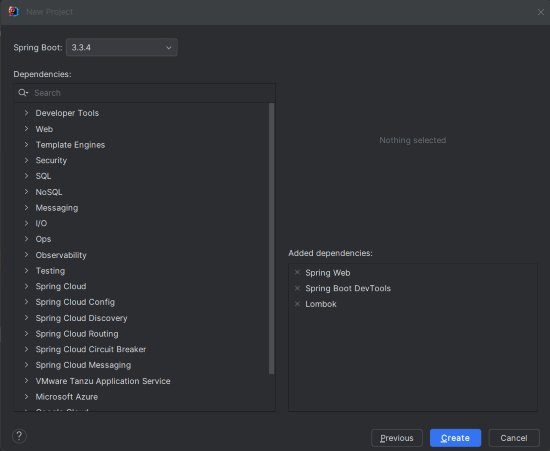
Add the following dependencies into the Spring Boot Project.
Click on the Create button.
After the project creation done successfully, the folder structure will look like the below image:P
In the application.properties file, set up the project name and port.
spring.application.name=find-annotated-beans
server.port=8080
CustomAnnotation InterfaceThis is our custom annotation, which will be used to mark certain beans.
CustomAnnotation.java
Now, let’s create two service classes that will be annotated with @CustomAnnotation.
AnnotatedService1.java:
AnnotatedService2.java:
These beans are annotated with @CustomAnnotation. They represent services that will be discovered by our scanner.
We will configure the Spring Boot application to scan for the beans annotated with @CustomAnnotation during the startup.
BeanScannerConfig.java
By using CommandLineRunner, this configuration ensures that the bean scanner runs when the application starts up, searching for beans annotated with @CustomAnnotation.
CustomAnnotationBeanScanner UtilityWe need a utility class to scan the application context for beans annotated with @CustomAnnotation.
CustomAnnotationBeanScanner.java
No changes are required in the main class.
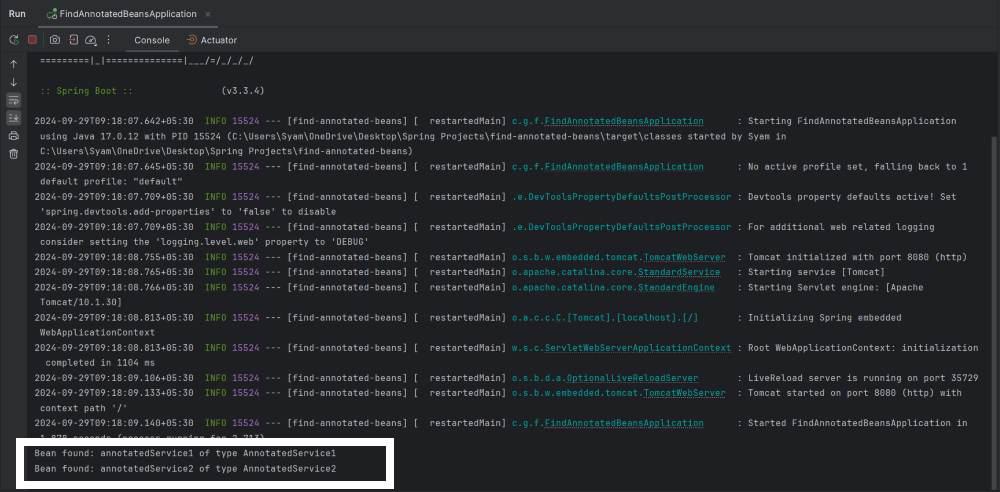
Once you've set everything up, run the application. It will scan the application context and print out all the beans annotated with @CustomAnnotation to the console:
This example project demonstrates how to create the Spring Boot application that scans for the beans with the custom annotation. It can be extended to support the more complex scenarios by modifying the annotation scanner or adding the more annotated beans.
In this article, we explored how to create a custom annotation and use it to mark beans in a Spring Boot application. We then implemented a scanner utility that searches the application context for beans annotated with the custom annotation. This method provides flexibility for applying special behavior to specific beans at runtime.