|
VOOZH | about |
|
VOOZH | about |
We will create two Spring Boot 3.x applications (Producer and Consumer) requiring Java 17 to get started. We need a queuing service to pass messages from the producer Spring service to the consumer Spring service. Here, we will use Kafka. Confluent provides Docker images that are easy to use for setting up the Kafka environment. Since we will use a Docker Compose file to start all three services (the two Spring applications and the Kafka environment with one broker and one Zookeeper), we will initially set up our Kafka environment using a docker-compose.yaml file.
Run the following command to check if Docker is installed and running properly:
docker infoGood to go to next step if you didn't get any errors or warning.
Create file docker-compose.yaml
vi docker-compose.yamlPaste the following configuration into the file and save it (press ESC, type :wq!, and press Enter if using vi/vim):
services:
 zookeeper:
 image: confluentinc/cp-zookeeper:latest
 container_name: zookeeper
 environment:
 ZOOKEEPER_SERVER_ID: 1
 ZOOKEEPER_CLIENT_PORT: 2181
 ZOOKEEPER_TICK_TIME: 2000
 ports:
 - "22181:2181"
 broker:
 image: confluentinc/cp-kafka:latest
 container_name: broker
 ports:
 - "9090:9090"
 depends_on:
 - zookeeper
 environment:
 KAFKA_BROKER_ID: 1
 KAFKA_AUTO_CREATE_TOPICS_ENABLE: "true"
 KAFKA_ZOOKEEPER_CONNECT: zookeeper:2181
 KAFKA_LISTENER_SECURITY_PROTOCOL_MAP: PLAINTEXT:PLAINTEXT
 KAFKA_ADVERTISED_LISTENERS: PLAINTEXT://broker:9090
 KAFKA_OFFSETS_TOPIC_REPLICATION_FACTOR: 1
 KAFKA_TRANSACTION_STATE_LOG_MIN_ISR: 1
KAFKA_TRANSACTION_STATE_LOG_REPLICATION_FACTOR: 1Now time to start our Kafka environment. Start the Kafka environment using Docker Compose:
docker compose up -dTo view running containers, use following command:
docker container listNote: We will be modifying this(docker-compose.yaml) file again once our spring applications are all setup.
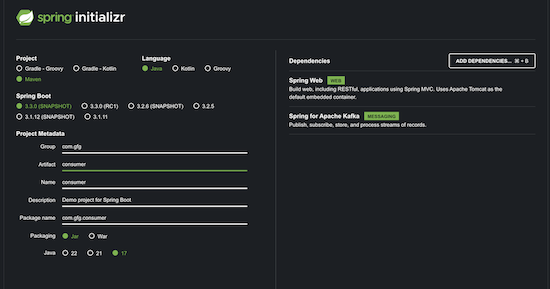
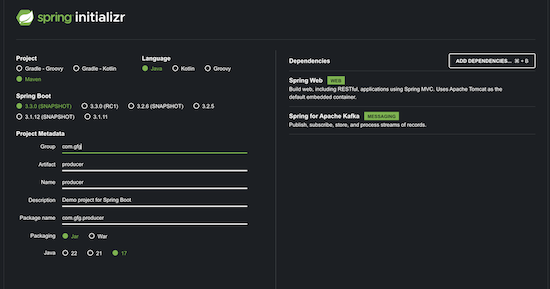
Step 1: Open Spring initializer and create 2 spring boot applications named consumer and producer with sync web and Kafka dependency.
Consumer Application Creation:
Producer Application Creation:
Download the zip file and open same with your IDE. There are several configuration and code we will be adding.
We are using topic name as topic-name and multiple partition can used.
This is DTO that will be transferred serialized and transferred to Kafka broker.
Kafka Producer Service that uses KafkaTemplate to send the MyMsg object and returns Future object.
A simple controller with one endpoint to test application that will trigger the message trigger object that we send.
application.properties:
server.port=9091
spring.kafka.bootstrap-servers=PLAINTEXT://broker:9090application.properties:
# IMPORTANT: Since we are adding PLAINTEXT://broker:9090 as broker-server URL,
# if you start the consumer service outside the kafka_network, it will not be able to connect to the broker.
# Hence, the service will not start outside the Docker container network.

server.port=9092
spring.kafka.bootstrap-servers=PLAINTEXT://broker:9090Create a Dockerfile in the root path of both Spring Boot applications (adjacent to pom.xml). You can refer this link on how to create Dockerfile.
Producer Dockerfile:
FROM openjdk:17-slim
MAINTAINER shvm.cloud
COPY target/producer-0.0.1-SNAPSHOT.jar producer-0.0.1-SNAPSHOT.jar
ENTRYPOINT ["java","-jar","/producer-0.0.1-SNAPSHOT.jar"]
Consumer Dockerfile:
FROM openjdk:17-slim
MAINTAINER shvm.cloud
COPY target/consumer-0.0.1-SNAPSHOT.jar consumer-0.0.1-SNAPSHOT.jar
ENTRYPOINT ["java","-jar","/consumer-0.0.1-SNAPSHOT.jar"]
Build the images using the Docker files using the following commands:
docker build -t gfg/producer .docker build -t gfg/consumer .Update the docker-compose.yaml file to include the two new services:
 producer:
 image: gfg/producer:latest
 container_name: producer-svc-container
 ports:
 - "9091:9091"
 depends_on:
 - broker
 consumer:
 image: gfg/consumer:latest
 container_name: consumer-svc-container
 ports:
 - "9092:9092"
 depends_on:
 - broker
docker compose up -dNow we have 4 services under same network gfg_default
Now on executing following cURL from postman/cmd:
curl --location 'http://localhost:9091/api/produce' \
--header 'Content-Type: application/json' \
--data '{
 "msg": "test messsage from postman",
 "id": 1
}'
You will see following Console log from producer service:
And following Console log from consumer service: