VOOZH about

URL: https://www.geeksforgeeks.org/advance-java/how-to-create-your-first-model-in-spring-mvc/

⇱ How to Create Your First Model in Spring MVC? - GeeksforGeeks


  • Courses
  • Tutorials
  • Interview Prep

How to Create Your First Model in Spring MVC?

Last Updated : 20 Apr, 2026

Spring MVC is a powerful Web MVC framework for building web applications. It is designed around the Model-View-Controller (MVC) pattern, which separates the application into three main components Model, View and Controller.

  • Model is used to transfer data from controller to view.
  • Uses Model interface to store key-value pairs.
  • Data can be accessed in JSP using Expression Language (EL)

Prerequisites

Step-by-Step Implementation

Followings are the steps to implement the first model in Spring MVC:

Step 1: Create Dynamic Web Project

  • Open STS/Eclipse
  • Create a Dynamic Web Project
  • Ensure proper project structure is generated

Step 2: Add Spring JAR Files

  • Download required Spring JARs
  • Go to: src > main > webapp > WEB-INF > lib
  • Paste all JAR files in this folder

Step 3: Configure Apache Tomcat Server

  • Add Tomcat server in IDE
  • Configure it with your project
  • Ensure server starts successfully

Step 4: Configure Dispatcher Servlet (web.xml)

  • Go to: src > main > webapp > WEB-INF > web.xml file.
  • Add servlet configuration

File: web.xml:

Note: One should be well aware of what is Dispatcher Servlet in Spring as it is a crucial concept to understand prior adhering ahead. 

Step 5: Create Spring Configuration File

  • Go to: src > main > webapp > WEB-INF and create an XML file
  • Create file: viewresolver-dispatcher-servlet.xml

And the name of the file must be in this format:

YourServletName-servlet.xml

For example: For this project, the name of the file must be

viewresolver-dispatcher-servlet.xml

So either you can create a Spring Configuration File or you can just create a simple XML file and add the below lines of code inside that file.

File: viewresolver-dispatcher-servlet.xml:

Step 6: Create Controller Class

  • Go to: src/main/java
  • Create package (e.g., com.demo.controllers)
  • Create class DemoController
  • Annotate with @Controller

@Controller
public class DemoController {}

Note: Spring will automatically initialize the class having a @Controller annotation and register that class with the spring container.

  • Use @RequestMapping("/hello")
  • Return view name "demo"

// Annotation
@RequestMapping("/hello")
// Method
public String helloWorld()
{
return "";
}

Now in the return statement, we have to return some views (web pages), so whenever the endpoint '/hello' is invoked we can see our result on the web page. So let's create our first View.

Step 7: Create View (JSP Page)

  • Go to: WEB-INF
  • Create folder: views
  • Create file: demo.jsp

File: demo.jsp:

Now go to the DemoController class and inside the helloWorld() method we have to return a value something like this.

return "demo";

File: DemoController.java:

Step 8: Create Model and Send Data

Modify controller method:

  • Add Model parameter
  • Add data: model.addAttribute("myNameValue", myName)
  • Create data: String myName = "Amiya Rout"

File: DemoController.java:

Step 9: Display Data in JSP

  • Use Expression Language (EL)
  • And to display the data inside our jsp page we have to modify the demo.jsp page.
  • And we can do it by the following line of code

${myNameValue}

Now the complete code for Demo.jsp is given below and you are done.

Step 10: Run Application

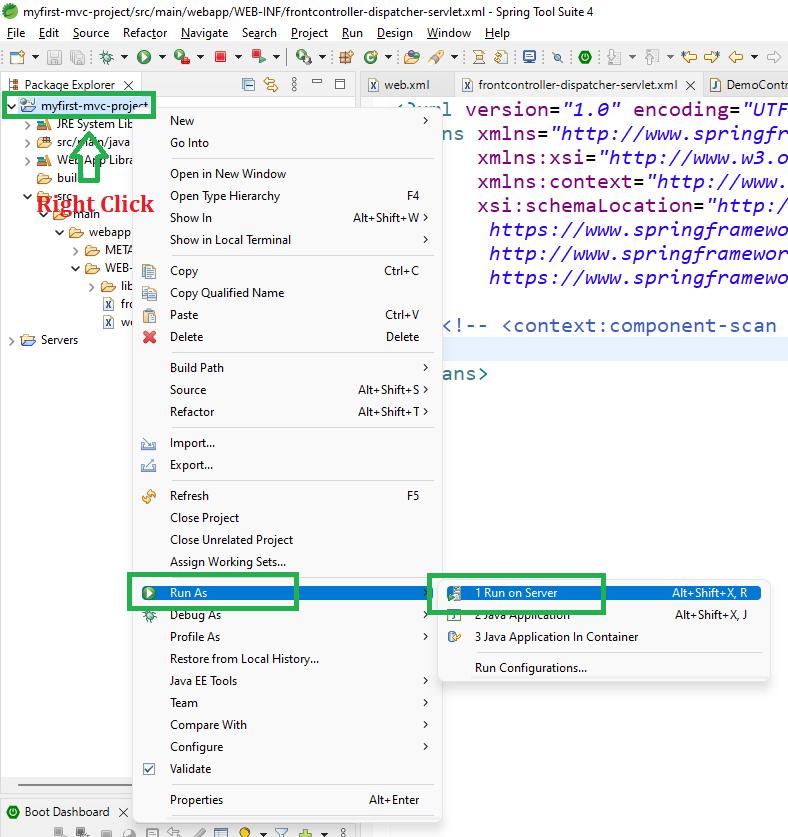
  • Right-click project ->Run on Server

👁 Image

After that use the following URL to run your controller

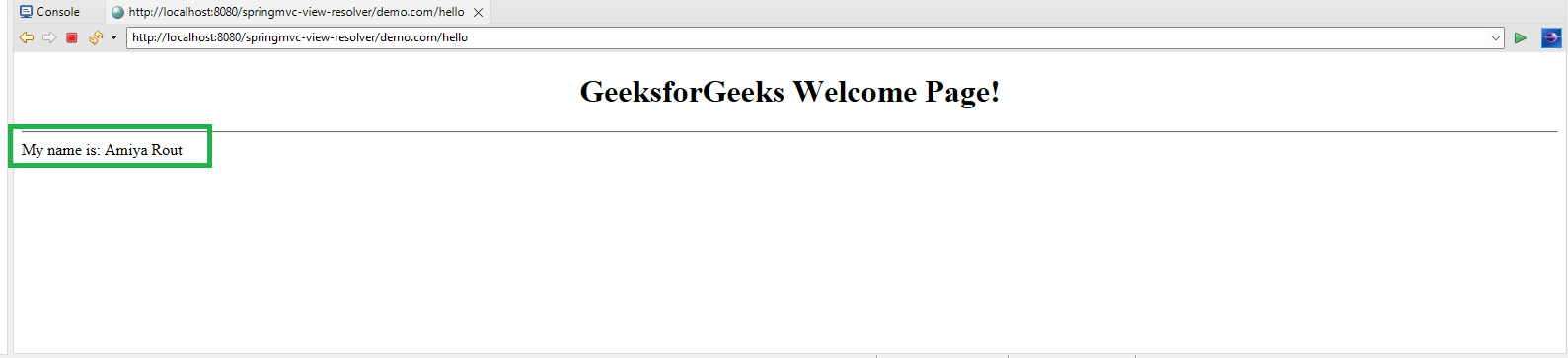
http://localhost:8080/springmvc-view-resolver/demo.com/hello

Output:

👁 Output
Comment
Article Tags:

Explore