|
VOOZH | about |
|
VOOZH | about |
JPA in Java is referred to as Java Persistence API(JPA). List mapping in JPA is a key feature for managing relationships between entities in an application. In this article, we will discuss the concept of List Mapping in JPA and its application. List mappings in JPA allow us to represent one-to-many relationships between entities using a Java collection, especially in the list of applications.
Define the entities with the appropriate relationships of the JPA application. For example, consider the entities Student and Course, the student can be enrolled in multiple courses and it can form one-to-many relationships.
Student Entity:
@Entity
public class Student {
 @Id
 @GeneratedValue(strategy = GenerationType.IDENTITY)
 private Long id;
 private String name;

 @OneToMany(mappedBy = "student", cascade = CascadeType.ALL, fetch = FetchType.LAZY)
 private List<Course> courses = new ArrayList<>();

 // Getters and setters
}
Course Entity:
@Entity
public class Course {
 @Id
 private Long id;
 private String name;

 // Getters and setters
}
In the above example, the Student class represents the table in the database and the @OneToMany annotation establishes the one-to-many relationship between the Student and Course entities of the application.
In the JPA application, we need to the configure the persistence settings either through the persistence.xml of the project.
<persistence-unit name="PersistenceUnit" transaction-type="RESOURCE_LOCAL">
 <!-- Entity classes -->
 <class>com.example.model.Student</class>
 <class>com.example.model.Course</class>

 <!-- Database connection properties -->
 <properties>
 <!-- Database connection details -->
 </properties>
</persistence-unit>
The XML file can configure the persistence unit named as the PersistenceUnit and it lists the entities classes to manage by the JPA application.
In JPA application, we can automatically the generate the database schema based on the entity definitions and it can manually create the database schema using DDL scripts of the application.
EntityManager is the primary interface for interacting with persistence context and it provides the methods for the persisting, retrieving, deleting and updating the entities of the JPA application.
EntityManager em = JPAUtil.getEntityManager();
EntityTransaction tx = em.getTransaction();

try {
 tx.begin();

 // Create and persist entities
 // Perform operations like persist, merge, remove, etc.

 tx.commit();
} catch (Exception e) {
 if (tx != null && tx.isActive()) {
 tx.rollback();
 }
 e.printStackTrace();
} finally {
 em.close();
 JPAUtil.close();
}
We can retrieve the data using the JPQL queries or the EntityManager methods of the application.
Example:
List<Student> students = em.createQuery("SELECT s FROM Student s", Student.class).getResultList();
for (Student student : students) {
 System.out.println("Student: " + student.getName());
 System.out.println("Courses Enrolled:");
 for (Course course : student.getCourses()) {
 System.out.println("- " + course.getName());
 }
}
The above code can retrieves the all students from the database along with their enrolled courses and it can demonstrate the use of the JPQL queries of the application.
Step 1: First, we will create a JPA project using Intellij Idea IDE. The project named as jpa-list-mapping-demo.
Step 2: Now, we will add the following dependencies into the created JPA project.
Dependencies:
<dependency>
 <groupId>org.hibernate.orm</groupId>
 <artifactId>hibernate-core</artifactId>
 <version>6.0.2.Final</version>
 </dependency>
 <dependency>
 <groupId>org.glassfish.jaxb</groupId>
 <artifactId>jaxb-runtime</artifactId>
 <version>3.0.2</version>
 </dependency>
 <dependency>
 <groupId>org.junit.jupiter</groupId>
 <artifactId>junit-jupiter-api</artifactId>
 <version>${junit.version}</version>
 <scope>test</scope>
 </dependency>
 <dependency>
 <groupId>org.junit.jupiter</groupId>
 <artifactId>junit-jupiter-engine</artifactId>
 <version>${junit.version}</version>
 <scope>test</scope>
 </dependency>
 <dependency>
 <groupId>mysql</groupId>
 <artifactId>mysql-connector-java</artifactId>
 <version>8.0.28</version>
 </dependency>
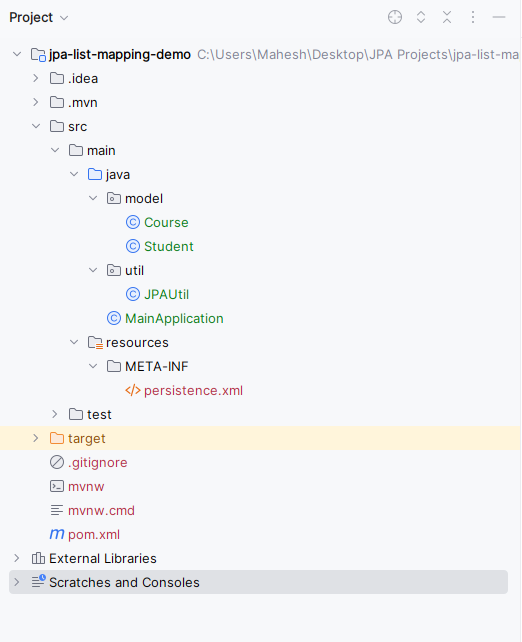
Now the project structure will look like below image:
👁 Project StructureStep 3: Now, open the persistance.xml file and write the below code for MYSQL database configuration of the database.
Step 4: After all the above steps, now create a package named model and create an entity class inside that package named as Student. Go to src > main > java > model > Student and write the below code file..
Step 5: Create the new Java package named as model. In that package, create a new entity class named Course. Go to src > main > java > model > Course and put the below code.
Step 6: Create a new Java package named util in that package, create the new Entity Java class for the creation of the entity and it named as JPAUtil. Go to src > main > java > util > JPAUtil and put the below code.
Step 7: Create a new Java class and named as the MainApplication. Go to src > main > java > MainApplication and put the below code.
pom.xml:
Step 8: Once the project is done, run the application and we will get the output like the below image.
The above example demonstrates a simple Java application using JPA for the List mapping and it includes the entity classes for the Student and Course along with the JPA utility class for the managing the EntityManager instances.