|
VOOZH | about |
|
VOOZH | about |
JSP can be defined as JavaServer Pages. It is a technology that can be used for developing dynamic web pages. The JSP registration form allows to the users to input their information and it is typically for registration purposes and submit it to the server for processing. It consists of the HTML for the layout and structure, and it is combined with the Java code to handle the server-side processing such as the data validation storage and response generation.
We can develop the simple registration JSP form with basic details of the user after then processing from the server then response back display the data to the client as the result.
Step 1: Create the dynamic web project using Eclipse and it is named as the RegistrationJSP Open the project into the eclipse.
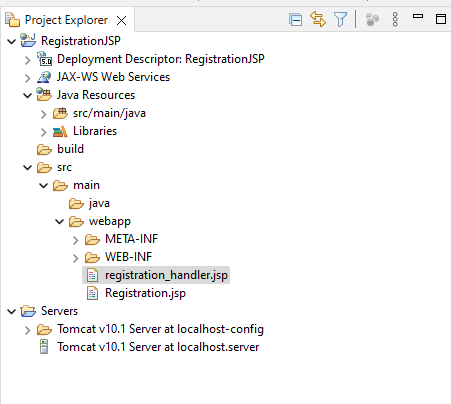
Once the project then the file structure looks like the below image.
Step 2: Create the new JSP file and it named as the Registration.jsp and this file can be used to create the registration form to gather data from the user.
Go to src > webapp > Registration.jsp and put the below code.
Step 3: Create the new JSP file and it named as the registration_handler.jsp and this file can be used to processing the user data from the server and response back to the client.
Go to src > webapp > registration_handler.jsp and put the below code.
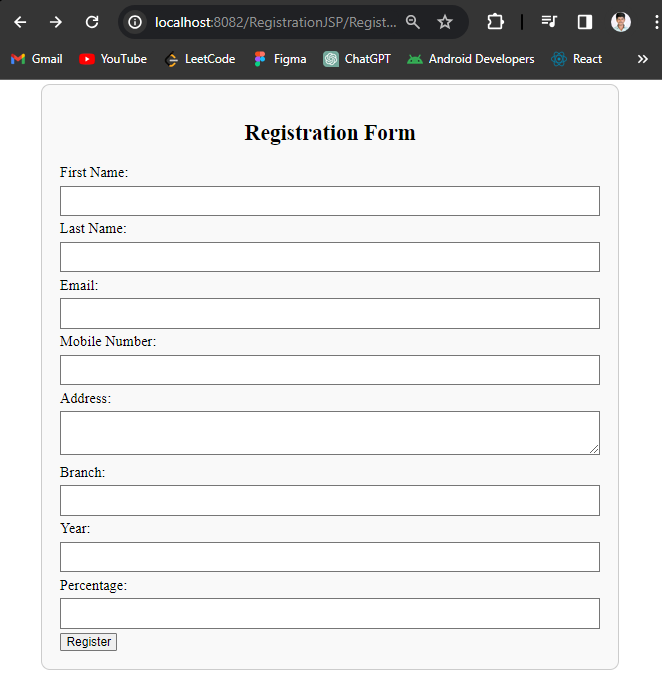
Step 4: Once the project completes and it runs as the tomcat sever then it will run on the port 8082. Refer the blow images for the better understanding.
Registration Form:
If we are following the above steps, then we can successfully develop the JSP Registration Form project.