|
VOOZH | about |
|
VOOZH | about |
In JUnit 5, testing with mock objects has been significantly enhanced through the use of Mockito. Two essential annotations for working with Mockito are @Mock and @Captor. The @Mock annotation helps create mock instances of dependencies, while @Captor allows capturing argument values that are passed to methods.
In this article, we will learn how to inject the @Mock and @Captor annotations into JUnit 5 method parameters to simplify test setups and improve readability.
To use Mockito with JUnit 5, add the following Maven dependencies to the pom.xml file:x
<dependency>
 <groupId>org.junit.jupiter</groupId>
 <artifactId>junit-jupiter</artifactId>
 <version>5.10.0</version>
 <scope>test</scope>
</dependency>
<dependency>
 <groupId>org.mockito</groupId>
 <artifactId>mockito-core</artifactId>
 <version>5.5.0</version>
 <scope>test</scope>
</dependency>
<dependency>
 <groupId>org.mockito</groupId>
 <artifactId>mockito-junit-jupiter</artifactId>
 <version>5.5.0</version>
 <scope>test</scope>
</dependency>
In JUnit 5, testing with mock objects is made easy with the help of Mockito. The use of @Mock and @Captor allows us to create mocks and capture arguments efficiently, helping us simulate and verify interactions between objects.
@Mock is an annotation provided by Mockito for creating mock instances of classes or interfaces. A mock is a simulated version that allows us to mimic the behavior of real objects without invoking their actual implementations. This is particularly useful in unit testing, where we want to isolate the class being tested from its dependencies.
@Captor simplifies the process of capturing arguments passed to methods. It wraps the ArgumentCaptor, a utility that helps verify that methods were called with specific arguments.
In this example project, we will create a setup that demonstrates how to use @Mock and @Captor in JUnit 5 to test interactions between a UserService and a UserRepository.
Create a new Maven project using IntelliJ IDEA with the following options:
mock-captor-exampleClick on the Create button.
After project creation done successfully, set up the file structure like shown in the below image:
Open the pom.xml file and add the necessary dependencies as described earlier.
Create the User class and this is a simple class that represents the User.
Create the UserRepository Interface and this interface simulates the database operations.
Create the UserService class and this class contains the bussiness logic for updating a user.
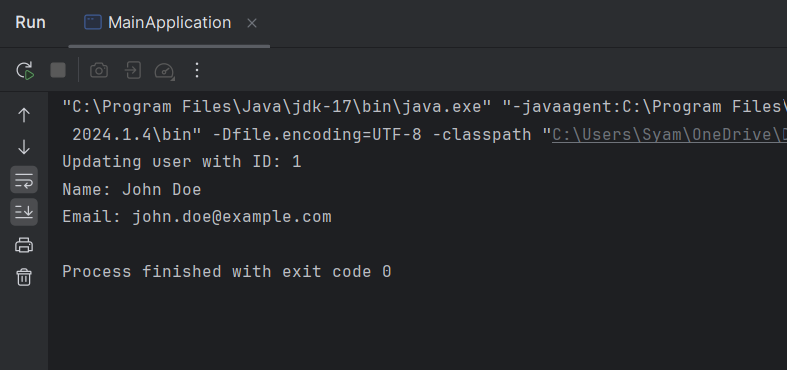
The MainApplication class serves as the entry point for demonstration.
Create the UserServiceTest class and this is the test class where we use @Mock and @Captor.
Explanation:
@ExtendWith(MockitoExtension.class): Enables Mockito’s JUnit 5 integration, allowing the use of annotations like @Mock, @Captor, and @InjectMocks.@InjectMocks: Creates an instance of UserService and injects the mock UserRepository into it.@Mock: Creates a mock object of UserRepository, which is used in the UserService class.@Captor: Initializes an ArgumentCaptor to capture arguments passed to the update method of the UserRepository.testUpdateUser() method:User object with test data.updateUser method to simulate updating a user.update method of the userRepository was called with the expected user.User object has the correct name and email.After completing the project, run the application, and it will start at port 8080.
We will now run the UserServiceTest using the below command:
mvn testThis example project demonstrates how to use the @Mock and @Captor effectively in the Maven project, ensuring that we can test the interaction between classes in the project.