|
VOOZH | about |
|
VOOZH | about |
Maven is a build automation tool used primarily for Java projects. It follows a lifecycle-based approach, where tasks are executed in predefined phases.
Maven has three built-in lifecycles. When you run a command, you are triggering one of these.
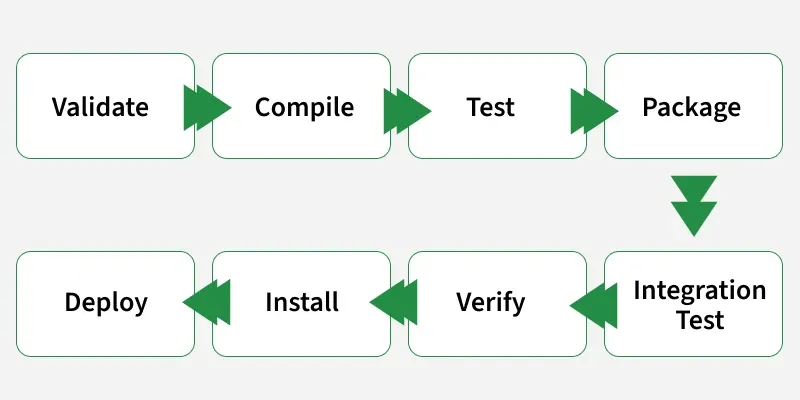
The default lifecycle is the core Maven lifecycle that handles everything from compiling the source code to deploying the application. It consists of multiple phases (around 23 in total), but the following are the 7 most important phases you should know:
Key Concept: The lifecycle is sequential. If you run
mvn install, Maven automatically runsvalidate,compile,test,package, andverifyfirst. You don't need to type them all.
This is where most beginners get confused.
A Phase is just a placeholder. Maven binds specific Plugin Goals to these phases to do the work.
compile Phase triggers the compiler:compile Goal.test Phase triggers the surefire:test Goal.| Command | What it Does | When to Use |
|---|---|---|
mvn clean | Deletes the target folder. | Before any new build to ensure no stale files remain. |
mvn compile | Compiles source code only. | When you just want to check for syntax errors. |
mvn package | Compiles + Tests + Builds JAR/WAR. | When you want to run the app locally or send the JAR to a colleague. |
mvn install | Packages + Copies to ~/.m2. | When another project on your machine depends on this one. |
mvn deploy | Packages + Uploads to Nexus/Artifactory. | When you are releasing code for the rest of the team (CI/CD server usually does this). |
mvn clean install | The "Gold Standard" command. | Cleans everything and rebuilds from scratch. Use this 90% of the time. |
mvn test | Compiles + Runs Unit Tests. | When you are doing TDD or verifying changes. |
Generally when we run any of the above commands, we add the mvn clean step so that the target folder generated from the previous build is removed before running a newer build. This is how the command would look on integrating the clean step with install phase:
mvn clean install
Similarly, if we want to run the step in debug mode for more detailed build information and logs, we will add -X to the actual command. Hence, the install step with debug mode on will have the following command:
mvn -X install
Consider a scenario where we do not want to run the tests while packaging or installing the Java project. In this case, we use -DskipTests along with the actual command. If we need to run the install step by skipping the tests associated with the project, the command would be:
mvn install -DskipTests