VOOZH about

URL: https://www.geeksforgeeks.org/advance-java/pagination-and-sorting-with-spring-data-jpa/

⇱ Pagination and Sorting with Spring Data JPA - GeeksforGeeks


  • Courses
  • Tutorials
  • Interview Prep

Pagination and Sorting with Spring Data JPA

Last Updated : 4 Apr, 2026

When working with large datasets, fetching all records at once can reduce performance and increase load on the application. Efficient data handling techniques are required to manage and process data smoothly.

  • Improves application performance and responsiveness
  • Helps in handling large volumes of data efficiently

Pagination

Pagination is used to handle large datasets efficiently by breaking them into smaller parts. It helps improve performance and makes data retrieval more manageable.

  • Reduces load on the application by fetching limited records
  • Improves response time and user experience
  • Helps in managing large amounts of data efficiently

Syntax:

Pageable pageable = PageRequest.of(pageNumber, pageSize);
Page<Entity> data = repository.findAll(pageable);

Sorting

Sorting is used to organize data in a specific order, making it easier to read and analyze. It improves how data is presented and accessed in applications.

  • Organizes data in ascending or descending order
  • Enhances readability and user experience
  • Helps in faster data analysis and retrieval

Syntax:

Sort sort = Sort.by("fieldName").ascending(); // or descending()
List<Entity> data = repository.findAll(sort);

Implementation: Pagination and Sorting in Spring Data JPA

Step 1: Create a Spring Boot Project

Create a new Spring Boot project with the following details:

  • Name: spring-sorting-pagination-demo
  • Language: Java
  • Type: Maven
  • Packaging: Jar

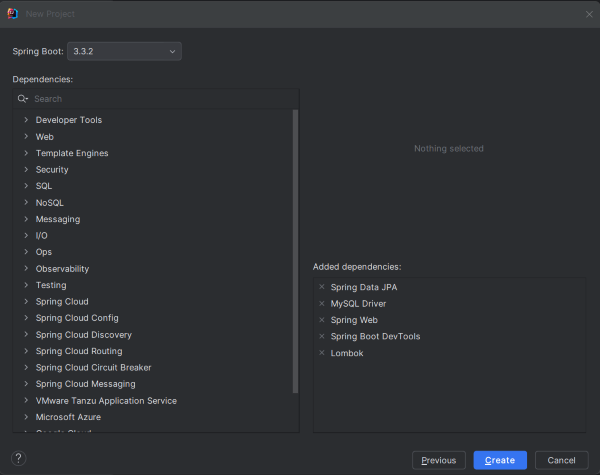
Step 2: Add the dependencies

Add the following dependencies into the project.

  • Spring Web
  • Spring Data JPA
  • MySQL Driver
  • These enable REST APIs and database interaction.
👁 Add the dependencies
Dependencies

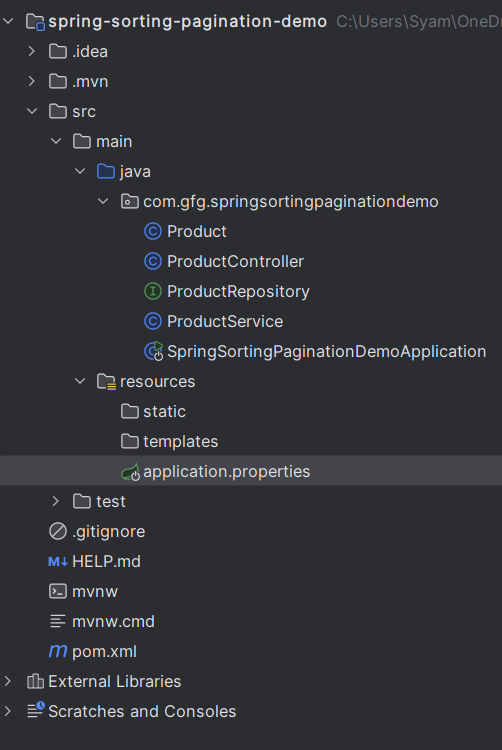
Step 3: Project Structure

Organize project into: Entity Repository Service Controller Helps maintain clean architecture.

👁 Project Structure
Structure

Step 4: Configure Application Properties

  • Set database details in application.properties.
  • Configure: URL , Username/password and Hibernate settings
  • Enables connection to MySQL database.

spring.application.name=spring-sorting-pagination-demo

spring.datasource.url=jdbc:mysql://localhost:3306/product_db

spring.datasource.username=root

spring.datasource.password=mypassword

spring.datasource.driver-class-name=com.mysql.cj.jdbc.Driver

spring.jpa.hibernate.ddl-auto=update

spring.jpa.show-sql=true

spring.jpa.properties.hibernate.dialect=org.hibernate.dialect.MySQL8Dialect

Step 5: Create the Entity Class

  • Define Product class with fields (id, name, price).
  • Use JPA annotations like @Entity, @Id.
  • Represents database table.

Product.java:

Step 6: Create the Repository Interface

  • Create interface extending JpaRepository.
  • Provides built-in methods for: CRUD , Pagination and Sorting
  • No need to write custom queries.

ProductRepository.java

Note: JpaRepository extends PagingAndSortingRepository, so you get pagination and sorting functionality without needing both.

Step 7: Create the Service Class

  • Add business logic layer.
  • Method: findAll(Pageable pageable)
  • Handles pagination request.

ProductService.java:

Step 8: Create the Controller Class

Create REST API endpoint /products. Accept parameters:

  • page -> page number
  • size -> number of records
  • sortBy -> field to sort
  • ascending -> sort order
  • Uses PageRequest and Sort

ProductController.java:

Step 9: Main Class

  • Runs the Spring Boot application.
  • @EnableSpringDataWebSupport helps in handling pagination response.

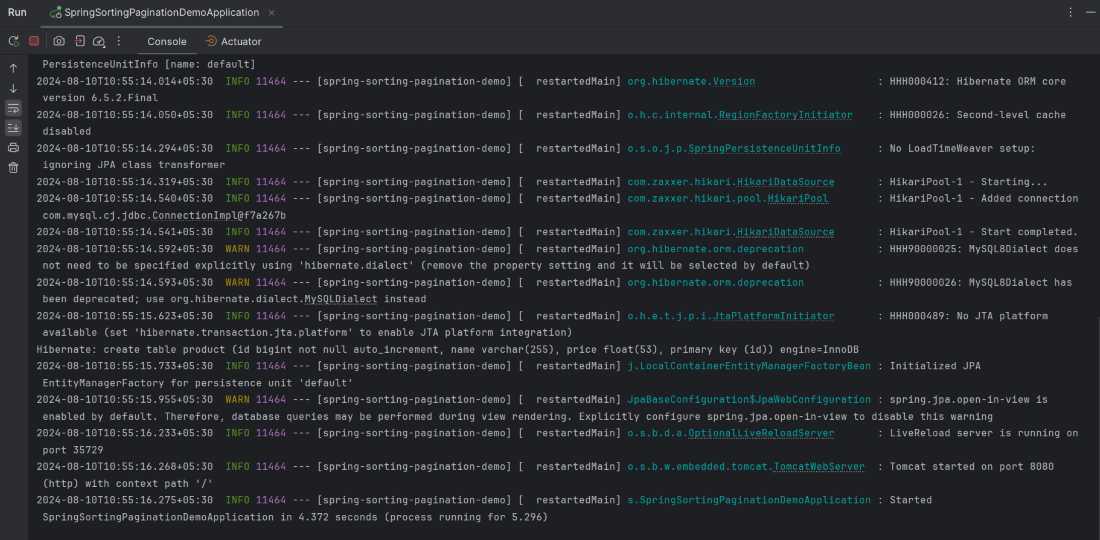
Step 10: Run the Application

Run the application. By default, it will start on port 8080.

👁 Run the Application
Output

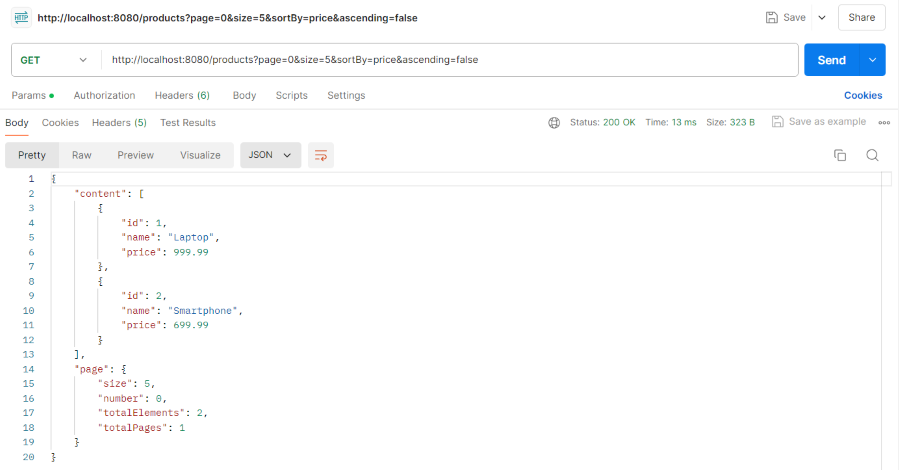
Step 11: Testing the Endpoint

To test the endpoint, use:

http://localhost:8080/products?page=0&size=5&sortBy=price&ascending=false

This fetches the first page of products, showing 5 records sorted by price in descending order.

👁 postman output ui
Output
Comment
Article Tags:

Explore