|
VOOZH | about |
|
VOOZH | about |
A REST Controller in Spring Boot is a class annotated with @RestController that processes incoming HTTP requests and returns data objects rather than views.
The @RestController annotation is used to define a class as a RESTful web controller in Spring.
Example:
| Feature | @Controller | @ResponseBody |
|---|---|---|
| Purpose | Handles web requests and returns views | Sends data directly in response |
| Return Type | View name (HTML/JSP) | Raw data (JSON/XML/String) |
| View Resolver | Used | Not used |
| Usage | Web MVC applications | REST APIs |
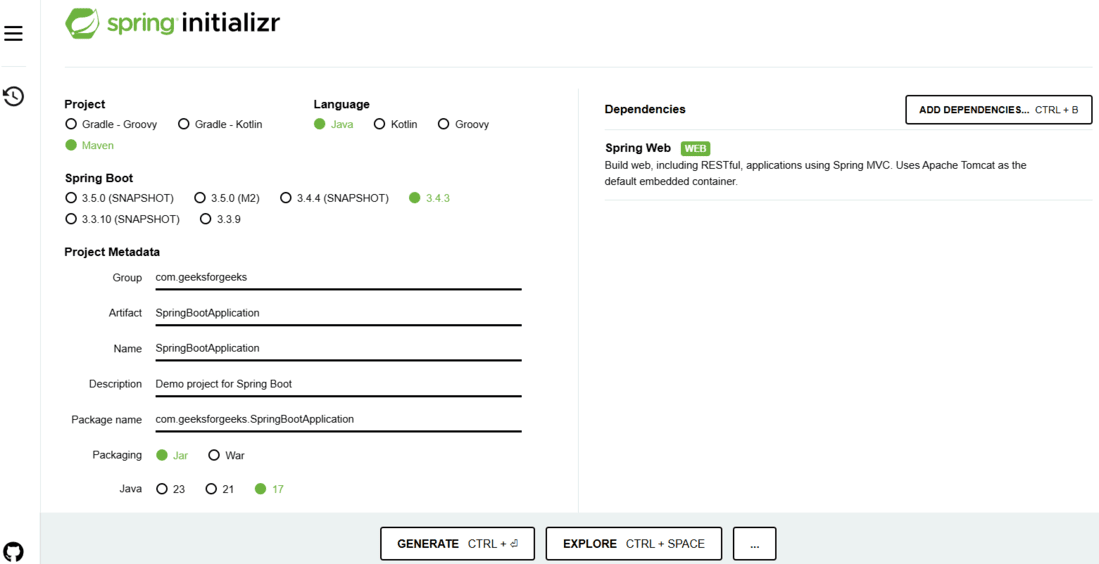
Use Spring Initializr to generate a new Spring Boot project.
Project Configuration:
Click on Generate, which will download the starter project.
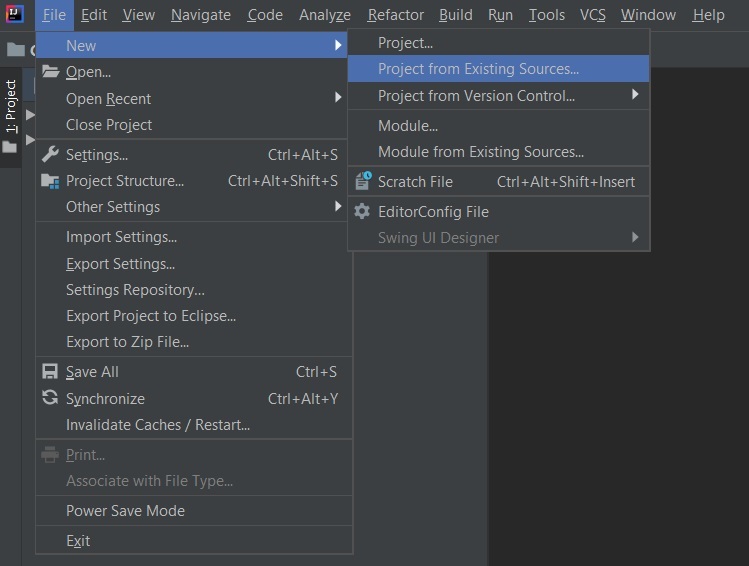
Note:
In the Import Project for Maven window, make sure you choose the same version of JDK which you selected while creating the project.
Go to src -> main -> java, create a java class with the name Details.
Details.java:
Now create another Java class with the name Controller and add the annotation @RestController.
Controller.java:
This application is now ready to run.
Run the SpringBootApplication class to start the embedded Tomcat server.
Note: The default port of the Tomcat server is 8080 and can be changed in the application.properties file.
Endpoint: POST http://localhost:8080/api/details
Request Body:
{
"id": 1,
"name": "John Doe"
}
Response:
"Data Inserted Successfully"
Endpoint: GET http://localhost:8080/api/details
Response:
[
{
"id": 1,
"name": "John Doe"
}
]
Endpoint: DELETE http://localhost:8080/api/details/1
Response:
"Data Deleted Successfully"
To know how to use Postman, refer: How to test Rest APIs in Postman