|
VOOZH | about |
|
VOOZH | about |
LDAP (Lightweight Directory Access Protocol) is widely used for identity and access management. It organizes data in a hierarchical structure, optimized for read-heavy operations. LDAP is advantageous due to its scalability and interoperability. In this article, we will create a simple authentication system using Spring Security with LDAP.
To follow along, you will need:
Go to Spring Initializr and select:
com.exampleldap-demoDownload the project and extract the zip file.
Open the pom.xml file and add the Spring Security LDAP dependency if not already present.
		<!-- https://mvnrepository.com/artifact/org.springframework.security/spring-security-ldap -->
		<dependency>
			<groupId>org.springframework.security</groupId>
			<artifactId>spring-security-ldap</artifactId>
			<version>6.3.3</version>
		</dependency>
Also install the dependencies by running the command in your terminal at your project location:
mvn installCreate the following files inside the src directory of the project:
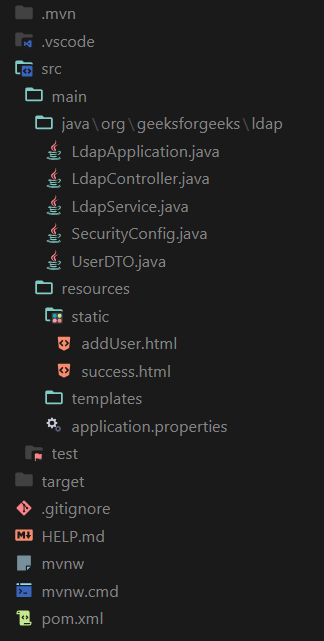
Create the HTML files named addUser.html and success.html inside the resources/static folder. After creating the above-mentioned files your project structure will look like this:
Now, let’s go through the code files with explanations and inline comments.
This controller handles the endpoints for displaying the home page and managing user creation.
Explanation:
LdapController manages the endpoints / (for home) and /add-user (for user creation).LdapService handles the actual user creation process in LDAP.This service class interacts with LDAP to create new users.
Explanation:
LdapService uses LdapTemplate to create and bind a new user to the LDAP directory using the given user details.createUser() method constructs the Distinguished Name (DN) and sets attributes like email, common name, surname, and password.This class represents a Data Transfer Object for user details.
Explanation:
This class configures Spring Security to use LDAP authentication.
Explanation:
SecurityConfig defines Spring Security settings, including access rules and LDAP authentication configurations.This HTML form allows for user creation in the LDAP directory.
Explanation:
/add-user endpoint for processing.A simple success page shown after a user is added.
Explanation:
Note: We have not set the password for the admin account, and the default password will be "secret" (without the double quotes).
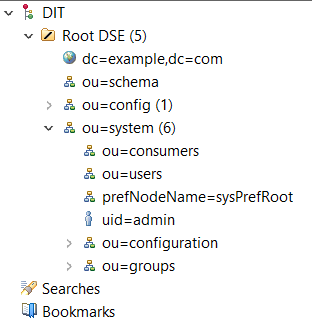
Create a user by right-clicking on ou=users -> New -> New Entry -> Create entry from scratch.
Now start the spring boot application and go to http://localhost:8080/. You will prompted to provided username and password. Provide the credentials of the previously created user to view the page.
Now we can add more users to the application which will be stored in the ou=users, ou=system directory of our LDAP server. Provide the necessary details and click on submit button and a user will be created with the appropriate information.